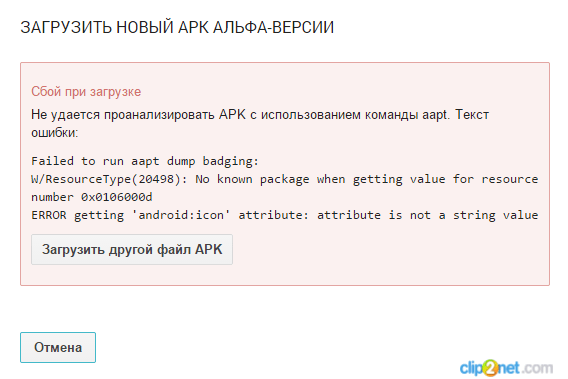
android:icon错误,关于上载:错误获取“ android:icon”属性:将apk上载到playstore时属性不是字符串值...
我已经收到该消息:我的AndroidManifest:package="..."android:versionCode="1"android:versionName="1.0">android:glEsVersion="0x00020000"android:required="true">android:minSdkVersion="10"android:targetSdkVersio
我已经收到该消息:
我的AndroidManifest:
package="..."
android:versionCode="1"
android:versionName="1.0">
android:glEsVersion="0x00020000"
android:required="true">
android:minSdkVersion="10"
android:targetSdkVersion="21" />
android:required="true" />
android:name="..."
android:allowBackup="true"
android:hardwareAccelerated="true"
android:label="@string/app_name"
android:icon="@drawable/launcher"
android:largeHeap="true"
android:theme="@style/AppTheme">
android:name="..."
android:label="@string/app_name"
android:screenOrientation="portrait"
android:theme="@android:style/Theme.NoTitleBar">
android:name="..."
android:label="@string/label_add_new_object"
android:screenOrientation="portrait"
android:icon="@drawable/ic_arrow"
android:theme="@style/MyFancyTheme"
android:configChanges="orientation|screenSize">
android:name="..."
android:label="@string/label_settings_activity"
android:screenOrientation="portrait"
android:icon="@drawable/ic_arrow"
android:theme="@style/Theme.AppCompat.Light"
>
android:name="..."
android:screenOrientation="portrait"
android:label="@string/app_name"
android:icon="@android:color/transparent"
android:theme="@style/CustomActionBarStyle">
android:resource="@xml/searchable" />
正如我在这里,这里和这里所读的,我已经完成了:
1)将所有可绘制对象从@ android / drawable复制到我相应的文件夹hdpi,mdpi等-
所以我在项目中的@ android / drawable文件夹中没有任何图标
2)把图标drawable到res的drawable文件夹
3)清理项目
有什么解决方案?
我找到了解决方案-它在
....
android:icon="@android:color/transparent" - the problem string
...
当我删除该字符串时,一切都工作正常
我认为这与将图标属性设置设置为颜色@android:color / transparent有关。 也许尝试使用透明的可绘制对象而不是颜色。

华为开发者空间,是为全球开发者打造的专属开发空间,汇聚了华为优质开发资源及工具,致力于让每一位开发者拥有一台云主机,基于华为根生态开发、创新。
更多推荐



 0
0 0
0- 0


 已为社区贡献1条内容

所有评论(0)