uniapp 录音和播放功能
·
实现录音功能需要用到 uni.getRecorderManager();
播放则需要用到 uni.createInnerAudioContext();
import * as m from '@dcloudio/uni-app'
 // 录音功能
const recorderManager = uni.getRecorderManager();
const innerAudioContext = uni.createInnerAudioContext();
按钮样式部分:
   <button @tap="startRecord">开始录音</button>
   <button @tap="playVoice">播放录音</button>
   <button @tap="Stop">停止播放</button>
点击开始录音时弹出层出现:
弹出层样式:
	<!-- <button>打开弹窗</button> -->
		<uni-popup ref="popup" type="bottom" background-color="#fff">
			<view class="pop">
				<view style="margin:10px 10px;text-align: end;" @click="endRecord">
					完成
				</view>
				<view class="luyin">
					<text>录音秒数</text>
					<text>{{num}}  秒</text>
				</view>

				<view class="img">
					<view>
						{{title}}
					</view>
					<image v-if="start" @click="open" src="https://pic.imgdb.cn/item/6483d51a1ddac507cc140c7c.png"
						mode=""></image>
					<image v-show="pause" @click="down" src="https://pic.imgdb.cn/item/6483d6811ddac507cc155ed6.png"
						mode=""></image>
					<image v-show="go_on" @click="go_ons" src="https://pic.imgdb.cn/item/6483d51a1ddac507cc140c7c.png"
						mode=""></image>
				</view>
			</view>
		</uni-popup>
css部分:
.pop {
		width: 100%;
		height: 30vh;
	}

	.luyin {
		width: 100%;
		height: 40px;
		font-size: 20px;
		text-align: center;
		margin-top: 20px;
		// >text:nth-child(1){

		// }
		>text:nth-child(2) {
			margin-left: 10px;
		}
	}

	.img {
		width: 100%;
		text-align: center;
		margin-top: 40px;

		image {
			border-radius: 50%;
			width: 50px;
			height: 50px;
			margin-top: 20px;
		}
	}
js部分:
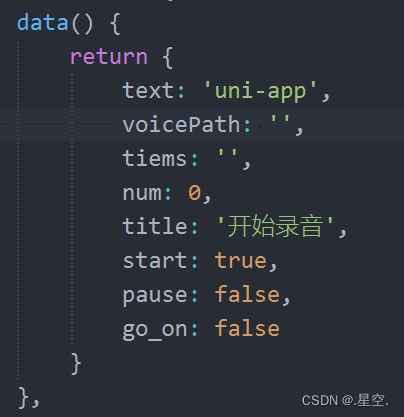
//底部弹出

startRecord() {
				this.$refs.popup.open('bottom')

			},
效果演示:
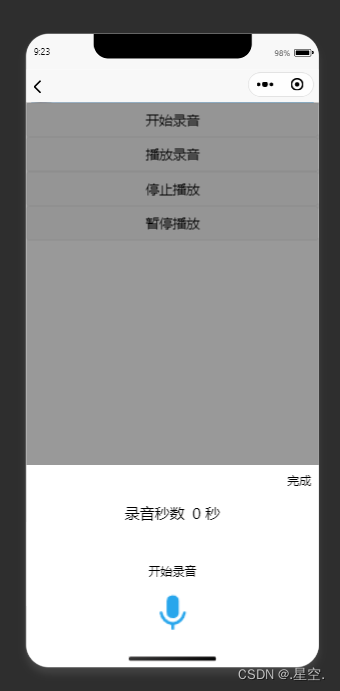
开始录音效果:
//开始录音
            open() {
				this.start = false;
				this.pause = true;
				this.title = '开始录音';
				console.log('开始录音');
				recorderManager.start();
				this.times = setInterval(() => {
					console.log(++this.num);
				}, 1000)
			},

//暂停录音

           down() {
				this.pause = false;
				this.go_on = true;
				this.title = '暂停录音';
				recorderManager.pause();
				clearInterval(this.times)
			},
//继续录音
			go_ons() {
				this.pause = true;
				this.go_on = false;
				this.title = '继续录音';
				recorderManager.resume();
				this.times = setInterval(() => {
					console.log(++this.num);
				}, 1000)
			},
//结束录音

            endRecord() {
				console.log('录音结束');
				recorderManager.stop();
				clearInterval(this.times)
				console.log(this.num);
			},
在onload中获取录音结束的返回值
onLoad() {
			let self = this;
			recorderManager.onStop(function(res) {
				console.log('recorder stop' + JSON.stringify(res));
				self.voicePath = res.tempFilePath;
			});
		},
开始播放事件:
//播放录音

            playVoice() {
				console.log('播放录音');
				if (this.voicePath) {
					innerAudioContext.src = this.voicePath;
					innerAudioContext.play();
				}
			},
//停止播放
			Stop() {
				innerAudioContext.stop();
			},
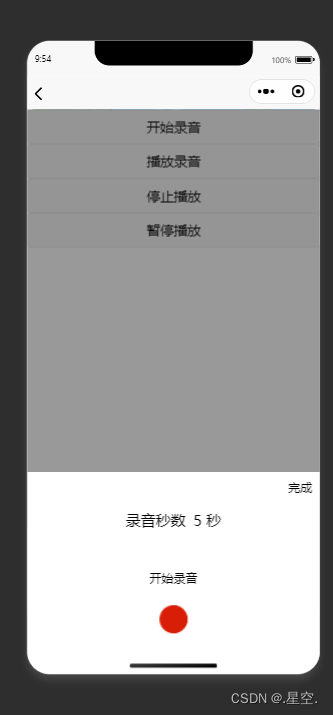
录音时效果演示:

华为开发者空间,是为全球开发者打造的专属开发空间,汇聚了华为优质开发资源及工具,致力于让每一位开发者拥有一台云主机,基于华为根生态开发、创新。
更多推荐


 3
3 0
0- 0


 已为社区贡献2条内容

所有评论(0)