Docker部署服务报错及解决方案
Docker部署xxx-xxxxx-xxx服务,报错信息如下:Use 'docker scan' to run Snyk tests against images to find vulnerabilities and learn how to fix themCreating xxx-xxxxx-xxx ...ERROR: for xxx-xxxxx-xxx"host" network_mode
报错1
报错信息如下图所示:docker-compose idea CreateProcess error=2, 系统找不到指定的文件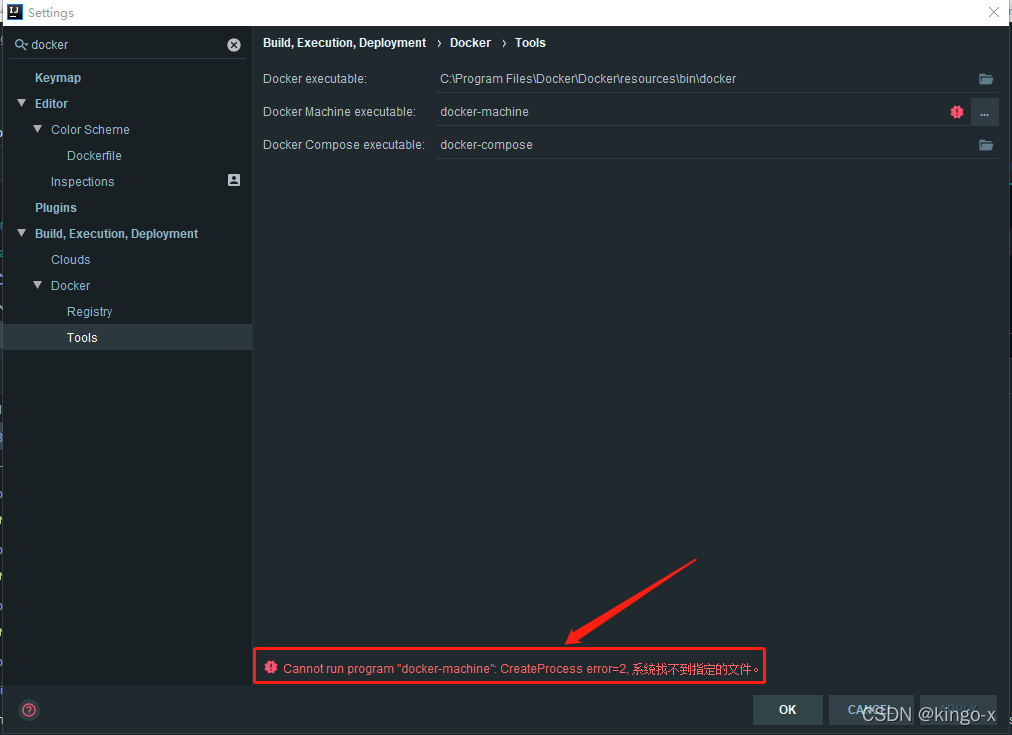
解决方案:IDEA执行docker-compose命令需要对应的可执行文件,而Windows上面没有这个命令。所以需要下载Docker,引用Docker安装目录下docker-compose命令。
如图,将红框的内容替换为C:\Program Files\Docker\Docker\resources\bin\docker-compose.exe: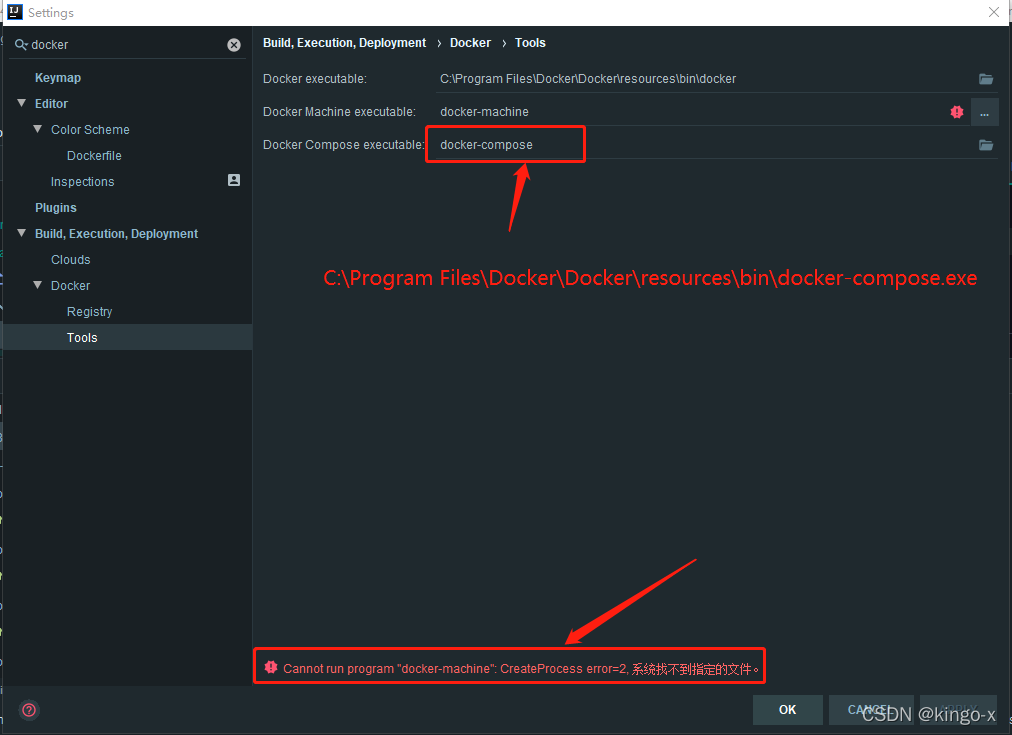
报错2
Docker部署xxx-xxxxx-xxx服务,报错信息如下:
Use 'docker scan' to run Snyk tests against images to find vulnerabilities and learn how to fix them
Creating xxx-xxxxx-xxx ...

ERROR: for xxx-xxxxx-xxx  "host" network_mode is incompatible with port_bindings

ERROR: for xxx-xxxxx-xxx  "host" network_mode is incompatible with port_bindings
Traceback (most recent call last):
  File "docker-compose", line 3, in <module>
  File "compose\cli\main.py", line 81, in main
  File "compose\cli\main.py", line 203, in perform_command
  File "compose\metrics\decorator.py", line 18, in wrapper
  File "compose\cli\main.py", line 1186, in up
  File "compose\cli\main.py", line 1166, in up
  File "compose\project.py", line 697, in up
  File "compose\parallel.py", line 108, in parallel_execute
  File "compose\parallel.py", line 206, in producer
  File "compose\project.py", line 679, in do
  File "compose\service.py", line 559, in execute_convergence_plan
  File "compose\service.py", line 473, in _execute_convergence_create
  File "compose\parallel.py", line 108, in parallel_execute
  File "compose\parallel.py", line 206, in producer
  File "compose\service.py", line 478, in <lambda>
  File "compose\service.py", line 457, in create_and_start
  File "compose\service.py", line 330, in create_container
  File "compose\service.py", line 939, in _get_container_create_options
  File "compose\service.py", line 1014, in _get_container_host_config
  File "docker\api\container.py", line 598, in create_host_config
  File "docker\types\containers.py", line 338, in __init__
docker.errors.InvalidArgument: "host" network_mode is incompatible with port_bindings
[24496] Failed to execute script docker-compose
Failed to deploy 'Compose: xxx-app': `docker-compose` process finished with exit code -1
报错原因: "host" network_mode is incompatible with port_bindings(host网络模式与端口映射不兼容)
错误定位:Docker compose file(docker-compose-dev.yml),内容如下所示
version: "2"
services:
  xxx-xxxxx-xxx:
    build: .
    	...
    network_mode: host
    image: xxx-xxxxx-xxx
    ports:
      - 9010:9010
    ...
network_mode: host网络模式设置为host,即host模式下容器不会获得一个独立的network namespace,而是与宿主机共用一个。这就意味着容器不会有自己的网卡信息,而是使用宿主机的。在这种情况下,所有端口是与宿主机同步,我们访问宿主机端口就能访问我们的容器,再作端口映射是本机映射到本机,多此一举。
解决方案:修改docker-compose-dev.yml文件,删除ports配置
version: "2"
services:
  xxx-xxxxx-xxx:
    build: .
    	...
    network_mode: host
    image: xxx-xxxxx-xxx
    ...
相关链接:https://blog.csdn.net/mahui_1980/article/details/114972555

华为开发者空间,是为全球开发者打造的专属开发空间,汇聚了华为优质开发资源及工具,致力于让每一位开发者拥有一台云主机,基于华为根生态开发、创新。
更多推荐



 5
5 0
0- 0


 已为社区贡献3条内容

所有评论(0)