Linux安装redis,redis无法连接问题总结
虚拟机(centos7)安装redis
请移步:https://blog.csdn.net/ITxiaofeixiang/article/details/111390055
问题描述
Resolved [redis.clients.jedis.exceptions.JedisConnectionException: Could not get a resource from the pool]
springboot项目集成redis测试,出现连接超时问题等。
前提
host和port设置都没问题。
虚拟机(centos7)配置了固定ip,可以ping通本地(win10)ip。
解决思路
1.看本地网络
win10 ping 虚拟机,发现ping不通了。

突然想到之前虚拟网卡被我禁用了,

启动,ping通!但是项目还是连接不上redis。
2.看虚拟机网络
查看防火墙状态(开的):
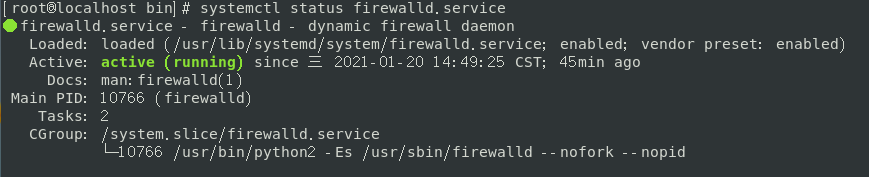
查看开放端口:

发现空的,说明6379端口并未开放。
A.开放6379端口:
firewall-cmd --zone=public --add-port=3338/tcp --permanent
B.重启防火墙
# 开机启动
systemctl enable firewalld
# 重启
systemctl restart firewalld
# 关闭
systemctl stop firewalld
# 开启
systemctl start firewalld
# 查看状态
systemctl statusfirewalld
测试,发现错误:
Resolved [redis.clients.jedis.exceptions.JedisDataException: DENIED
Redis is running in protected mode because protected mode is enabled,
no bind address was specified, no authentication password is requested
to clients.
解释:
protected-mode是redis本身的一个安全层,这个安全层的作用:就是只有【本机】可以访问redis,其他任何都不可以访问redis。这个安全层开启必须满足三个条件,不然安全层处于关闭状态:(1)protected-mode yes(处于开启)
(2)没有bind指令。原文:The server is not binding explicitly to a set of
addresses using the “bind” directive.(3)没有设置密码。原文:No password is configured。
这时redis的保护机制就会开启。开启之后,只有本机才可以访问redis。 如果上面三个条件任何一个不满足,就不会开启保护机制。
那么关闭保护模式就有三种办法了:
解决:
1.关闭保护模式
redis.config中的protected-mode yes 改为no

2.使用bind属性
重点,关于bind属性配置理解:
是绑定本机的IP地址,(准确的是:本机的网卡对应的IP地址,每一个网卡都有一个IP地址),而不是redis允许来自其他计算机的IP地址。并且设置bind是非本机网卡地址,是会启动失败的。
所以:
肯定是不能设置127.0.0.1得啦,那么就只允许使用本机访问了。
使用bind 0.0.0.0(接收所有) 这种也可以打破保护模式。
3.设置密码
你们自己设了哈,我就不测试了。请百度
参考链接;
https://blog.csdn.net/cw_hello1/article/details/83444013

华为AI开发者空间,是为全球开发者打造的专属开发空间,汇聚了华为优质开发资源及工具,致力于让每一位开发者拥有一台云主机,基于华为根生态开发、创新。
更多推荐


 1
 0
- 0


 已为社区贡献3条内容

所有评论(0)