docker安装oracle,并导入dump 文件,客户端Navicate连接
把本地数据库挪到自己的本本上先下载docker pull registry.cn-hangzhou.aliyuncs.com/helowin/oracle_11g时这个是企业版文件太大我的虚拟机安装失败,安装个j精简版的成功了,可以看到大小仍有2G 多[root@localhost ~]# docker pull registry.cn-hangzhou.aliyuncs.com/qid...
·
把本地数据库挪到自己的本本上
先下载docker pull registry.cn-hangzhou.aliyuncs.com/helowin/oracle_11g时这个是企业版文件太大我的虚拟机安装失败,安装个j精简版的成功了,可以看到大小仍有2G 多
[root@localhost ~]# docker pull registry.cn-hangzhou.aliyuncs.com/qida/oracle-xe-11g
Using default tag: latest
Trying to pull repository registry.cn-hangzhou.aliyuncs.com/qida/oracle-xe-11g ...
latest: Pulling from registry.cn-hangzhou.aliyuncs.com/qida/oracle-xe-11g
f069f1d21059: Pull complete
ecbeec5633cf: Pull complete
ea6f18256d63: Pull complete
54bde7b02897: Pull complete
729f7fe87c9a: Pull complete
f666cfd0593d: Pull complete
Digest: sha256:88e4ac323eda6936920a92bbdb08f40b288674b45b51796bfd998fd847dfef28
Status: Downloaded newer image for registry.cn-hangzhou.aliyuncs.com/qida/oracle-xe-11g:latest
[root@localhost ~]# docker images
REPOSITORY                                             TAG                 IMAGE ID            CREATED             SIZE
。。。
registry.cn-hangzhou.aliyuncs.com/qida/oracle-xe-11g   latest              4ea53ad65b45        2 years ago         2.24 GB
[root@localhost ~]# docker run -e ES_JAVA_OPTS="-Xms256m -Xmx256m" -d -p 1521:1521 --name oracle_11g 4ea53ad65b45
2f1f5b51d56b0162b617b81bb989ea14d72fbdfc0a280a1104c74c1cb0e8334f
[root@localhost ~]# docker ps -a
CONTAINER ID        IMAGE               COMMAND                  CREATED             STATUS                        PORTS                                                                                        NAMES
2f1f5b51d56b        4ea53ad65b45        "/bin/sh -c '/usr/..."   13 seconds ago      Up 11 seconds                 22/tcp, 8080/tcp, 0.0.0.0:1521->1521/tcp                                                     oracle_11g
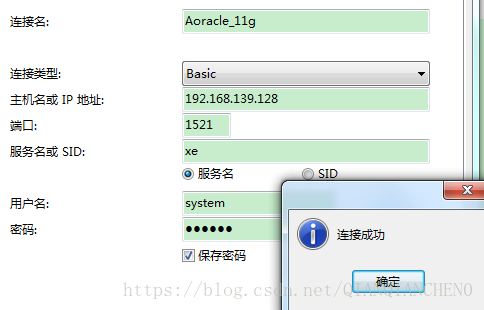
启动oracle_11g, 客户端Navicate连接,创建用户并connect
//创建用户
create user cqq identified by 123456;
//用户授权
grant connect, resource,dba to cqq;

[root@bogon ~]# docker exec -it oracle_11g bash
root@2f1f5b51d56b:/# sqlplus

SQL*Plus: Release 11.2.0.2.0 Production on Tue Aug 14 06:48:27 2018

Copyright (c) 1982, 2011, Oracle.  All rights reserved.

Enter user-name: cqq
Enter password:

Connected to:
Oracle Database 11g Express Edition Release 11.2.0.2.0 - 64bit Production

SQL>
从宿主机拷文件 uc.dmp到容器里面,并导入,然后通过Navicate客户端打开数据库就可以方便的操作数据了
这里有个小插曲:当rm 删除不了一个目录时,使用rm -rf强制删除
root@2f1f5b51d56b:/home# rm uc.dmp
rm: cannot remove 'uc.dmp': Is a directory
root@2f1f5b51d56b:/home# rm -rf uc.dmp

[root@bogon ~]# docker cp /home/uc.dmp oracle_11g:/home
must specify at least one container source
[root@bogon ~]# docker cp /home/uc.dmp 2f1f5b51d56b:/home
[root@bogon ~]# docker exec -it oracle_11g bash
root@2f1f5b51d56b:/# imp uc_dev/123456 file=/home/uc.dmp ignore=y full=y

Import: Release 11.2.0.2.0 - Production on Tue Aug 14 06:20:10 2018

Copyright (c) 1982, 2009, Oracle and/or its affiliates.  All rights reserved.


Connected to: Oracle Database 11g Express Edition Release 11.2.0.2.0 - 64bit Production

Export file created by EXPORT:V11.02.00 via conventional path

Warning: the objects were exported by UC, not by you

import done in US7ASCII character set and AL16UTF16 NCHAR character set
import server uses AL32UTF8 character set (possible charset conversion)
export client uses ZHS16GBK character set (possible charset conversion)
. importing UC's objects into UC_DEV
. . importing table                     "ANNOUNCE"          6 rows imported
...
Import terminated successfully without warnings.

华为开发者空间,是为全球开发者打造的专属开发空间,汇聚了华为优质开发资源及工具,致力于让每一位开发者拥有一台云主机,基于华为根生态开发、创新。
更多推荐



 0
0 0
0- 0


 已为社区贡献1条内容

所有评论(0)