虚拟机(Vmware)磁盘扩容(xfs格式)
虚拟机(Vmware)磁盘扩容(xfs格式)
·
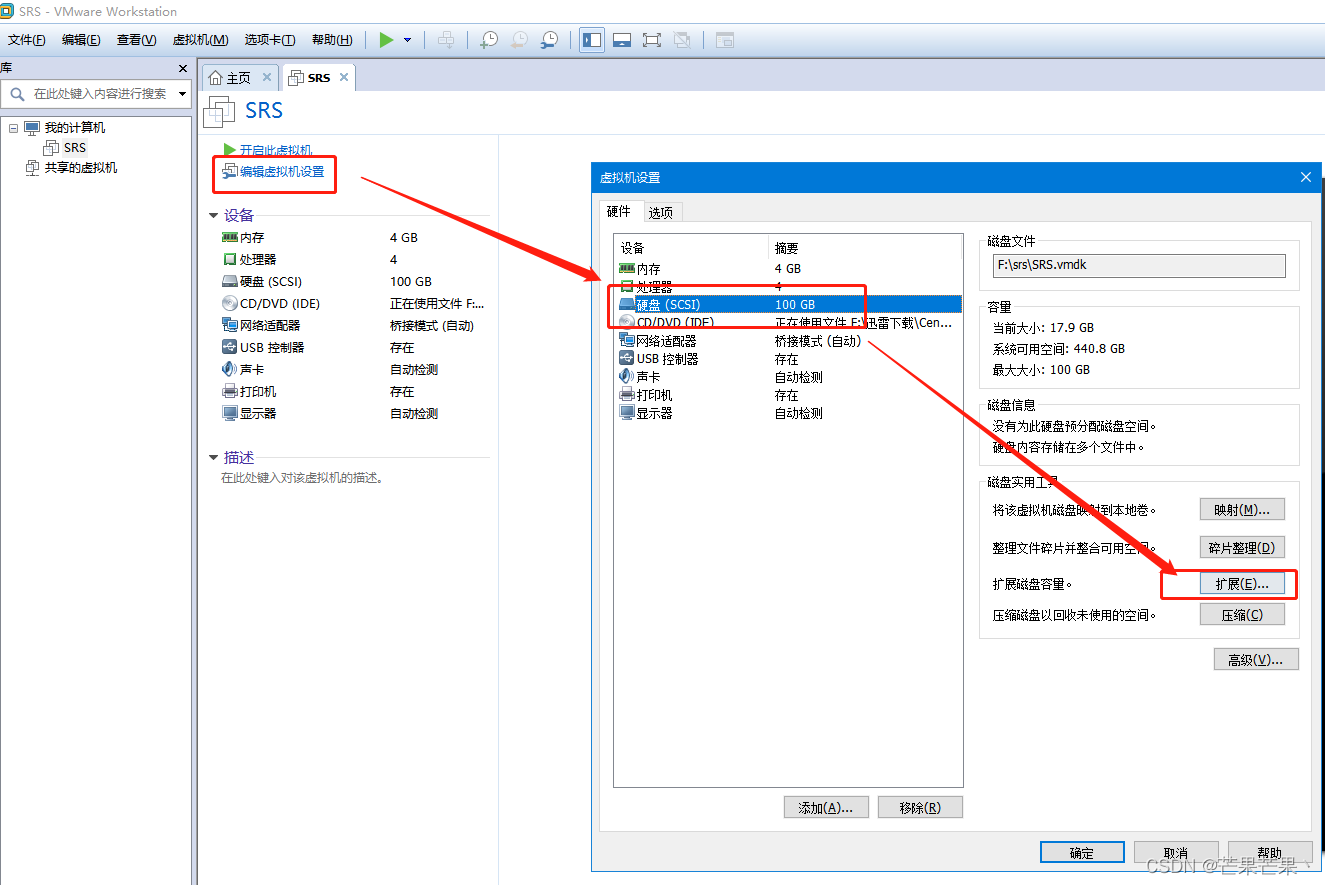
先将虚拟机关机,按上图调整虚拟磁盘大小。
1.开启并进入虚拟机,打开终端,输入命令 df -Th 查看格式,图示中 /dev/mapper/centos-root 类型为xfs。
[mango@localhost ~]$ df -Th
Filesystem              Type      Size  Used Avail Use% Mounted on
devtmpfs                devtmpfs  1.9G     0  1.9G   0% /dev
tmpfs                   tmpfs     1.9G   16K  1.9G   1% /dev/shm
tmpfs                   tmpfs     1.9G   13M  1.9G   1% /run
tmpfs                   tmpfs     1.9G     0  1.9G   0% /sys/fs/cgroup
/dev/mapper/centos-root xfs        97G   18G   80G  18% /
/dev/sda1               xfs      1014M  185M  830M  19% /boot
tmpfs                   tmpfs     378M     0  378M   0% /run/user/1004
tmpfs                   tmpfs     378M   24K  378M   1% /run/user/1000
[mango@localhost ~]$
2.执行 fdisk -l 命令查看磁盘容量,Disk /dev/sda: 107.4 GB
[root@localhost mango]# fdisk -l

Disk /dev/sda: 107.4 GB, 107374182400 bytes, 209715200 sectors
Units = sectors of 1 * 512 = 512 bytes
Sector size (logical/physical): 512 bytes / 512 bytes
I/O size (minimum/optimal): 512 bytes / 512 bytes
Disk label type: dos
Disk identifier: 0x000a56ed

   Device Boot      Start         End      Blocks   Id  System
/dev/sda1   *        2048     2099199     1048576   83  Linux
/dev/sda2         2099200    41943039    19921920   8e  Linux LVM

Disk /dev/mapper/centos-root: 104.1 GB, 104144568320 bytes, 203407360 sectors
Units = sectors of 1 * 512 = 512 bytes
Sector size (logical/physical): 512 bytes / 512 bytes
I/O size (minimum/optimal): 512 bytes / 512 bytes


Disk /dev/mapper/centos-swap: 2147 MB, 2147483648 bytes, 4194304 sectors
Units = sectors of 1 * 512 = 512 bytes
Sector size (logical/physical): 512 bytes / 512 bytes
I/O size (minimum/optimal): 512 bytes / 512 bytes
3. 新建分区
执行命令:fdisk /dev/sda
然后输入m->n->p->回车->回车->回车->w
WARNING: Re-reading the partition table failed with error 16
The kernel still uses the old table. The new table will be used at
the next reboot or after you run partprobe(8) or kpartx(8)
然后重起机器,执行命令:reboot ,重启之后执行命令:fdisk -l 查看分区,新的分区号是3
[root@localhost mango]# fdisk -l

Disk /dev/sda: 107.4 GB, 107374182400 bytes, 209715200 sectors
Units = sectors of 1 * 512 = 512 bytes
Sector size (logical/physical): 512 bytes / 512 bytes
I/O size (minimum/optimal): 512 bytes / 512 bytes
Disk label type: dos
Disk identifier: 0x000a56ed

   Device Boot      Start         End      Blocks   Id  System
/dev/sda1   *        2048     2099199     1048576   83  Linux
/dev/sda2         2099200    41943039    19921920   8e  Linux LVM
/dev/sda3        41943040   209715199    83886080   83  Linux

Disk /dev/mapper/centos-root: 104.1 GB, 104144568320 bytes, 203407360 sectors
Units = sectors of 1 * 512 = 512 bytes
Sector size (logical/physical): 512 bytes / 512 bytes
I/O size (minimum/optimal): 512 bytes / 512 bytes


Disk /dev/mapper/centos-swap: 2147 MB, 2147483648 bytes, 4194304 sectors
Units = sectors of 1 * 512 = 512 bytes
Sector size (logical/physical): 512 bytes / 512 bytes
I/O size (minimum/optimal): 512 bytes / 512 bytes
4.对/dev/sda3进行格式化
执行命令:mkfs.xfs /dev/sda3
meta-data=/dev/sda3              isize=512    agcount=4, agsize=67108864 blks
         =                       sectsz=512   attr=2, projid32bit=1
         =                       crc=1        finobt=0, sparse=0
data     =                       bsize=4096   blocks=268435455, imaxpct=25
         =                       sunit=0      swidth=0 blks
naming   =version 2              bsize=4096   ascii-ci=0 ftype=1
log      =internal log           bsize=4096   blocks=131071, version=2
         =                       sectsz=512   sunit=0 blks, lazy-count=1
realtime =none                   extsz=4096   blocks=0, rtextents=0
5.创建pv
执行命令:pvcreate /dev/sda3,然后输入y。
WARNING: xfs signature detected on /dev/sda3 at offset 0. Wipe it? [y/n]: y
Wiping xfs signature on /dev/sda3.
Physical volume "/dev/sda3" successfully created.
6.处理逻辑卷
执行命令: vgs
VG     #PV #LV #SN Attr   VSize     VFree
centos   1   3   0 wz--n- <40.00g 4.00m
执行命令:vgextend centos /dev/sda3
Volume group "centos" successfully extended执行命令: vgs
VG     #PV #LV #SN Attr   VSize  VFree
centos   2   3   0 wz--n- <100.00g 60.00g
可以看到由原来的40G变成100G。其中60G是空闲的.
7.扩容
执行命令 df -h 查看要扩容的文件系统的位置 ,这是是/dev/mapper/centos-root
devtmpfs                 7.8G     0  7.8G    0% /dev
tmpfs                    7.8G     0  7.8G    0% /dev/shm
tmpfs                    7.8G  8.9M  7.8G    1% /run
tmpfs                    7.8G     0  7.8G    0% /sys/fs/cgroup
/dev/mapper/centos-root  100G   40G  60G    60% /
/dev/sda1               1014M  188M  827M   19% /boot
tmpfs                    1.6G     0  1.6G    0% /run/user/0
执行命令 lvextend -l +100%free /dev/mapper/centos-root
Size of logical volume centos/root changed from <40.00 GiB (244470 extents) to 99 G iB(504414 extents).
Logical volume centos/root successfully resized.
执行命令 xfs_growfs /dev/mapper/centos-root ,扩容,调整分区。
meta-data=/dev/mapper/centos-root isize=512    agcount=4, agsize=63249920 blks
         =                       sectsz=512   attr=2, projid32bit=1
         =                       crc=1        finobt=0 spinodes=0
data     =                       bsize=4096   blocks=252999680, imaxpct=25
         =                       sunit=0      swidth=0 blks
naming   =version 2              bsize=4096   ascii-ci=0 ftype=1
log      =internal               bsize=4096   blocks=123535, version=2
         =                       sectsz=512   sunit=0 blks, lazy-count=1
realtime =none                   extsz=4096   blocks=0, rtextents=0
data blocks changed from 252888680 to 521435136
最后执行命令 df -h 查看结果,/dev/mapper/centos-root 97G 18G 80G 18% / 扩容成功。
[root@localhost mango]# df -h
Filesystem               Size  Used Avail Use% Mounted on
devtmpfs                 1.9G     0  1.9G   0% /dev
tmpfs                    1.9G   16K  1.9G   1% /dev/shm
tmpfs                    1.9G   14M  1.9G   1% /run
tmpfs                    1.9G     0  1.9G   0% /sys/fs/cgroup
/dev/mapper/centos-root   97G   18G   80G  18% /
/dev/sda1               1014M  185M  830M  19% /boot
tmpfs                    378M     0  378M   0% /run/user/1004
tmpfs                    378M   24K  378M   1% /run/user/1000
tmpfs                    378M     0  378M   0% /run/user/0

华为开发者空间,是为全球开发者打造的专属开发空间,汇聚了华为优质开发资源及工具,致力于让每一位开发者拥有一台云主机,基于华为根生态开发、创新。
更多推荐



 0
0 0
0- 0


 已为社区贡献3条内容

所有评论(0)