Oracle Form Builder 安装时遇到的问题记录
Oracle Form Builder 安装时遇到的问题记录
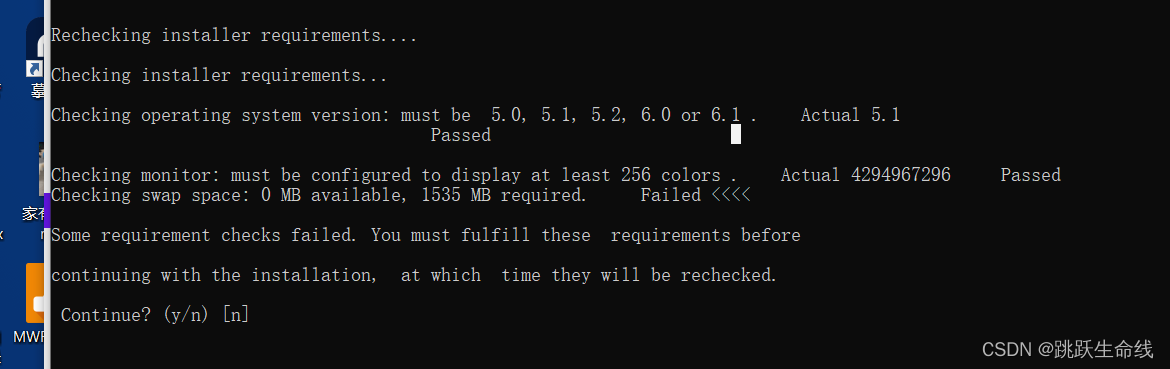
问题1:Checking operating system version: must be 5.0, 5.1 or 5.2. Actual 6.1
Checking operating system version: must be 5.0, 5.1 or 5.2. Actual 6.1
Failed <<<<
解决方法:
修改x:\ds_windows_x86_101202_disk1\install\oraparam.ini
增加6.1到Certified Versions的Windows项中
[Certified Versions]
Windows=5.0,5.1,5.2,6.1
Solaris=5.8,5.9
Linux=redhat-2.1AS
HPUX=B.11.11
问题2: Checking swap space: 0 MB available, 500 MB required. Failed <<<<
解决方法:
需要手工设置虚拟内存,如果VM为系统自动管理,Oracle Installer无法识别
1. Open Control Panel -> System ->Advanced System Settings ->Advanced.
2. In Performance section click Settings -> Advanced.
3. In Virtual Memory section, click Change.
4. Uncheck the check box "Automatically manage paging file size for all drivers".

5. Choose "Custom Size".
6. Specify the value for : Initial Size and Maximum Size .
7. Press "Set".

以下是我本地的 虚拟内存设置截图

-- 刘轶鹤

华为开发者空间,是为全球开发者打造的专属开发空间,汇聚了华为优质开发资源及工具,致力于让每一位开发者拥有一台云主机,基于华为根生态开发、创新。
更多推荐



 0
0 0
0- 0


 已为社区贡献1条内容

所有评论(0)