#vue# js正则表达式——实现手机号校验效果
需求:输入错误的手机号,会有提示语,正确的手机号码会有正确的图标效果:思路:(1)排版(不细讲),使用input 、button、span等标签,排版里面一个主要的小点是,需要写出两个span ,通过v-show先进行隐藏,等后面判断手机号码的正确错误再进行显示与隐藏(2)接着,就需要在input 里设置@blur事件(当元素失去焦点时,触发的事件,就是鼠标离开方框的时候)(3)然后,再使用js正
·
需求:输入错误的手机号,会有提示语,正确的手机号码会有正确的图标
效果:
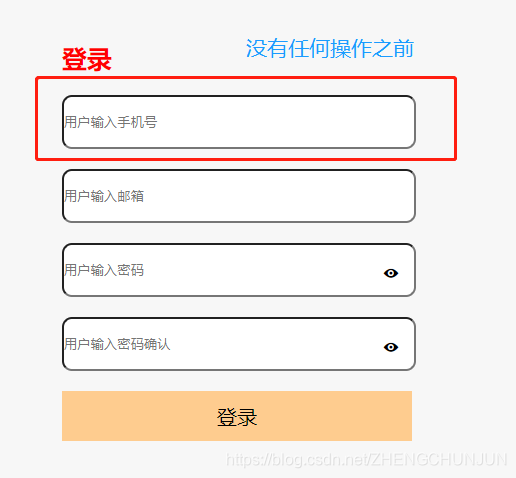
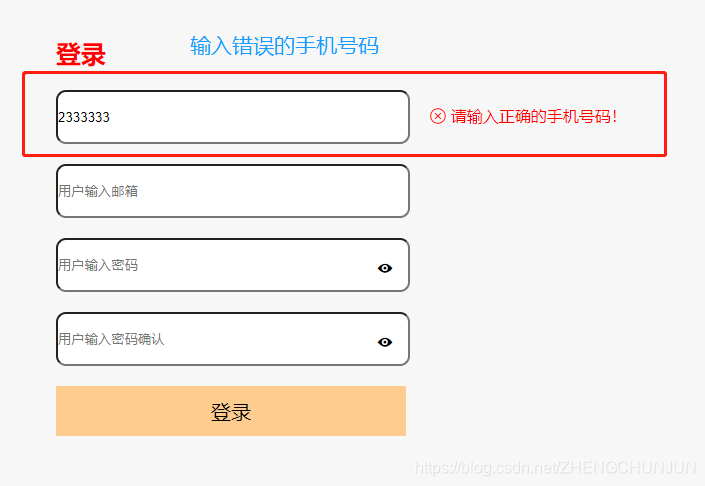

思路:
(1)排版(不细讲),使用input 、button、span等标签,排版里面一个主要的小点是,需要写出两个span ,通过v-show先进行隐藏,等后面判断手机号码的正确错误再进行显示与隐藏
(2)接着,就需要在input 里设置@blur事件(当元素失去焦点时,触发的事件,就是鼠标离开方框的时候)
(3)然后,再使用js正则表达式,进行手机号码的校验,使用这串代码
let reg = /^1[0-9]{10}$/;(4)最后,在写@blur事件的判断方法的时候,当不符合手机校验规则时,就显示“请输入正确的手机号码”的提示语,即系错误图标及提示语= true,然后else的时候(就是手机号码为正确),要先把错误图标及提示语设置为false,然后正确图标设置为true
 let reg = /^1[0-9]{10}$/;
 if (!reg.test(this.变量)) {
            }
demo示例
<template>
     <div class="signin">
            <h2>登录</h2>
            <div class="signin-item">
                <input placeholder="用户输入手机号" v-model="phone" @blur="getphone"/>
                <span class="iconfont iconselect_fill"
                      style="color:green; font-size: 18px"
                      v-show="rightshow"></span>
                <span class="iconfont iconicon-close"
                      style="font-size: 16px; color:red; "
                      v-show="errshow"> 请输入正确的手机号码!</span>
            </div>
</template>
<script>
    data() {
        return {
            phone:'',
            rightshow:false, // 正确图标
            errshow:false, //错误图标
        }
    },
    methods: {
        getphone() {
            let reg = /^1[0-9]{10}$/;
            //正则表达式 ,1代表手机号的第一位1 ,[0-9]{10}代表后面10个数字,在0-9里面随机
            if (!reg.test(this.phone)) { //!就代表当 不符合这个规则,
                                        !reg.test(this.phone)这个也是语法来的
                this.errshow = true;
                this.rightshow = false;
            }
            else {
                this.errshow = false;
                this.rightshow = true;
            }
        }
</script>
<style>
    h2 {
    font-size: 25px;
    color: red;
    margin-bottom: 20px;
}

.signin {
    width: 600px;
    margin: 50px auto;
}

.signin input {
    display: inline-block;
    width: 350px;
    margin-bottom: 20px;
    border-radius: .1rem;
}

.signin button {
    width: 350px;
    height:  50px;
    background-color: #FECC8F;
}
.signin-item {
    position: relative;

}
.signin-item .iconkekan {
    position: absolute;
    right: 42%;
    padding-top: 20px;
    padding-right: 10px;
    font-size: 18px;
}

.signin-item .iconkekan-hover {
  color: #DA1A14;
}

</style>
华为开发者空间,是为全球开发者打造的专属开发空间,汇聚了华为优质开发资源及工具,致力于让每一位开发者拥有一台云主机,基于华为根生态开发、创新。
更多推荐



 3
3 0
0- 0


 已为社区贡献26条内容

所有评论(0)