vs code c/c++语法高亮设置
vs code c、c++语法高亮设置找到 C/C++ Themes插件并安装,会生成 Dark(Visual Studio C/C++)配色主题,选择这个配色主题。找到 cpptools_dark_vs.json文件,一般在目录“C:\Users\Administrator.vscode\extensions\ms-vscode.cpptools-themes-1.0.0\themes”下。..
·
找到 C/C++ Themes插件并安装,会生成 Dark(Visual Studio C/C++)配色主题,选择这个配色主题。
找到 cpptools_dark_vs.json文件,一般路径为
C:\Users\Administrator.vscode\extensions\ms-vscode.cpptools-themes-1.0.0\themes
打开ccptools_dark_vs.json,是乱码的,需要用json editor变换一下,然后就可以看到 c/c++语法高亮的颜色设置,
根据自己的需要更改即可。
附上修改后的文件:https://download.csdn.net/download/nos001/11731250
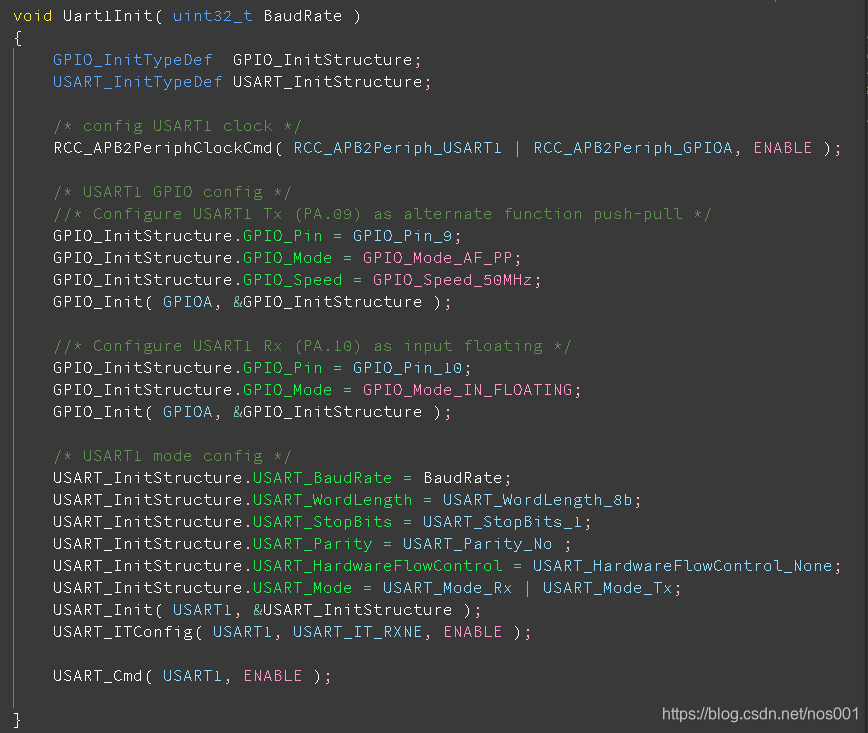
高亮效果如下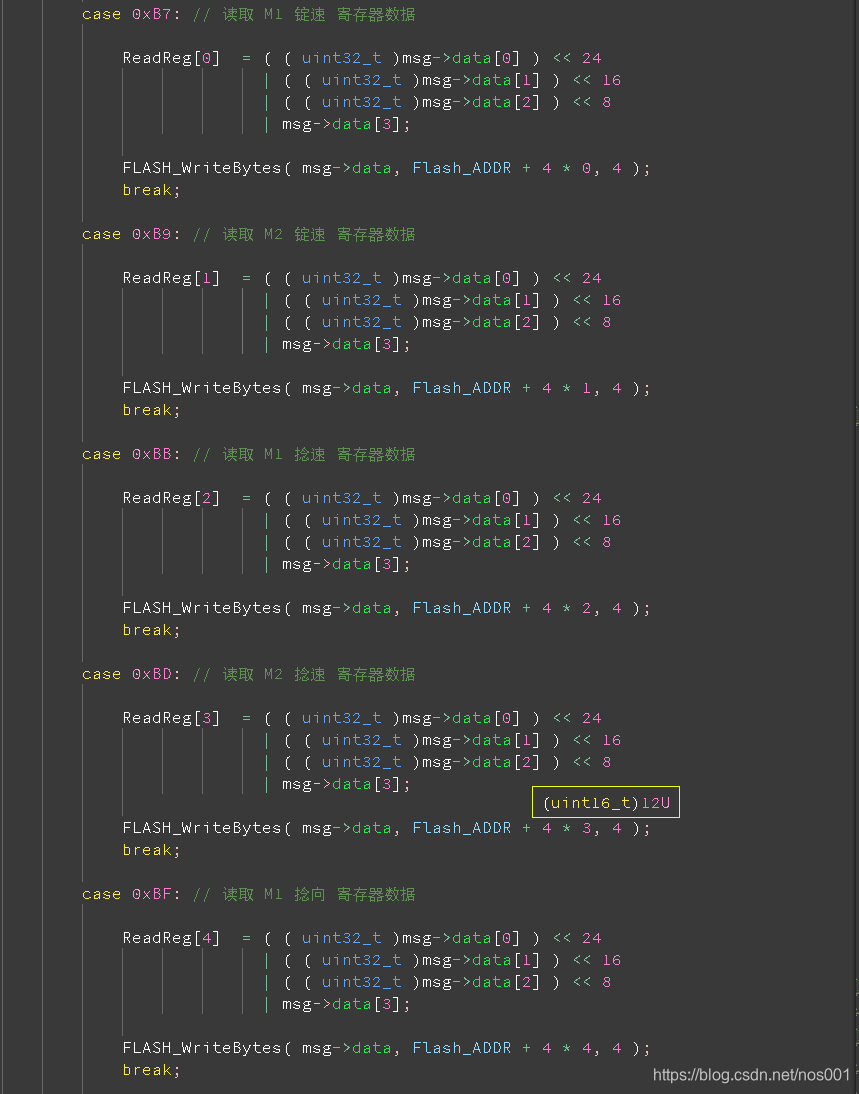
这是vscode的设置文件 settings.json,很多c语法高亮设置不了,语法高亮主要在插件的cpptools_dark_vs.json里设置。
{
    "workbench.colorTheme": "Visual Studio Dark - C++",
    "files.defaultLanguage": "c",
    "files.autoGuessEncoding": true,   /* 尝试猜测字符集编码,不用为中文注释乱码操心了 */
    // "files.encoding": "gb2312",
    "editor.fontSize": 16,
    "editor.suggestFontSize": 0,
    "editor.fontFamily": "Source Code Pro ExtraLight,华文细黑",
    "workbench.editor.labelFormat": "default",
    "window.title": "${dirty}${activeEditorLong}${separator}${separator}${appName}",
    "workbench.editor.tabSizing": "shrink",
    "search.collapseResults": "alwaysExpand",
    //Icons
    "workbench.editor.showIcons": true,
    "outline.icons": true,

    //编辑操作
    "editor.multiCursorModifier": "alt", // 多行编辑
    "editor.cursorStyle": "line",        // 光标样式
    "editor.stablePeek": true,
    "emmet.triggerExpansionOnTab": true,
    "workbench.sideBar.location": "left",
    //格式化样式
    "C_Cpp.formatting": "Disabled",      // 默认的Clang格式化禁用
    "[c]": {
        "editor.defaultFormatter": "chiehyu.vscode-astyle"
    },
    "[cpp]": {
        "editor.defaultFormatter": "chiehyu.vscode-astyle"
    },
    "astyle.astylerc": null,
    "astyle.c.enable": true,
    "astyle.cpp.enable": true,
    "astyle.executable": "G:/AStyle/vscode/astyle/bin/AStyle.exe",
    "astyle.cmd_options": [
        "--style=allman",
        "--attach-extern-c",
        "--convert-tabs",
        "--pad-oper",              /* 操作符两边加空格 */
        "--unpad-paren",           /* 删除括号两边多余的空格,如果可能,注释会保持不动 */
        "--pad-paren-in",          /* 括号内部加空格,如果可能,注释会保持不动 */
        "--break-blocks",          /*  */
        "--align-reference=name",
        "--align-pointer=name",
        "--indent-preproc-define", /* 宏定义对齐 */
        "--indent-preproc-cond",   /* 函数内的预处理条件语句和代码缩进相同 */
        "--indent-col1-comments",  /* 非代码行结尾的注释和代码缩进对齐 */
        "--indent-preproc-block",  /* 预处理块缩进 */
        "--mode=c",
    ],
    //自动补全
    "javascript.suggest.enabled": true,
    "typescript.suggest.enabled": true,
    //预处理,不活动的代码调光,即灰暗与否
    "C_Cpp.dimInactiveRegions": true,
    "C_Cpp.inactiveRegionBackgroundColor": null,
    "C_Cpp.inactiveRegionForegroundColor": "#ffffff",
    "C_Cpp.inactiveRegionOpacity": 0.5,
    //Bracket
    "editor.matchBrackets": true,
    //自定义颜色
    "workbench.colorCustomizations": {
        // 编辑器
        "editor.background": "#393939",
        "editor.foreground": "#ffffff",
        "editorIndentGuide.background": "#686666",            // 缩进参考线
        "editorIndentGuide.activeBackground": "#7c7b7b",      // 缩进参考线
        "editorCursor.foreground": "#ffffff",                 // 光标颜色
        "list.highlightForeground": "#003cff",                // 鼠标所在行的颜色
        //字符选择时的高亮
        "editor.lineHighlightBackground": "#393939",          // 光标所在行背景颜色
        "editor.lineHighlightBorder": "#393939",              // 光标所在行边框颜色
        "editor.selectionForeground": "#393939",              // 单击所选内容的颜色
        "editor.selectionBackground": "#032ff1",              // 双击所选内容的颜色
        "editor.selectionHighlightBackground": "#393939",     // 与所选择的字符匹配的字符
        "editor.selectionHighlightBorder": "#a0ffe2",         // 与所选择的字符匹配的字符的边框
        "editor.hoverHighlightBackground": "#063ef7",
        //弹出小窗口:选项设置提示窗口,源代码补全窗口
        "editorSuggestWidget.background": "#262626",          // 弹出小窗口的背景
        "editorSuggestWidget.foreground": "#ffffff",
        "editorSuggestWidget.border": "#fbff14",              // 弹出小窗口的边框
        "editorSuggestWidget.selectedBackground": "#a78e04",  // 当前所选行高亮
        "editorSuggestWidget.highlightForeground": "#00ff37", // 与输入内容匹配的字符的颜色
        //弹出窗口:选项设置提示窗口,源代码补全窗口,同上面的效果一样
        // "editorWidget.background": "#393939",                // 弹出小窗口的背景
        // "editorWidget.border": "#fbff14",                    // 弹出小窗口的边框
        // "list.focusBackground": "#837a00",                   // 当前所选行高亮
        // "list.highlightForeground": "#00ff37",               // 与输入内容匹配的字符的颜色
        //--------------------------------------
        //光标悬停在字符上时弹出的提示框
        "editorHoverWidget.border": "#f0ff18",        // 光标悬停在字符上时弹出的提示框
        "editorHoverWidget.background": "#393939",
        //标题栏
        "tab.activeBackground": "#2579dae1",          // 活动标签背景
        "tab.activeForeground": "#ffffff",
        "tab.inactiveForeground": "#ffffff",
        "tab.inactiveBackground": "#333333",
        "tab.border": "#555555",                      // 标签间隔
        "tab.activeBorderTop": "#393939",             // 活动的签顶边框
        "tab.activeBorder": "#393939",                // 活动标签底边框
        "tab.hoverBorder": "#393939",                 // 鼠标悬停在标题上的底框
        "tab.hoverBackground": "#00b95dc9",             // 鼠标悬停在标题上的背景

        "titleBar.border": "#5e5b5b",                 // 菜单栏与标签栏分割线
        //分割线
        "contrastBorder": "#555555",                  // 板块分割线
        //资源管理器
        "sideBar.background": "#393939",              // 资源管理器栏背景色
        "sideBar.foreground": "#ffffff",              // 资源管理器栏前景色
        "sideBar.border": "#cacaca",                  // 资源管理器栏边框色
        "sideBarTitle.foreground": "#03f0e4",         // 资源管理器标题色
        "sideBarSectionHeader.foreground": "#7edbff", // 工作区标题色
        "list.activeSelectionBackground": "#18aa3d",  // 资源管理器所选文件背景色
        "list.inactiveSelectionBackground": "#0c6396",
        "list.hoverBackground": "#119739",
        //侧边栏
        "activityBar.background": "#393939",
        "activityBar.foreground": "#00ffff",
        "activityBar.inactiveForeground": "#ffffff",
        //终端
        "terminal.foreground": "#ffffff",
        //状态栏、输出栏
        "statusBarItem.hoverBackground": "#001aff",
        "statusBar.background": "#393939",
        "panelTitle.inactiveForeground": "#ffffff",
        "panelTitle.activeForeground": "#a6ff00",
        "panel.background": "#393939",
        "panel.border": "#a1a1a1",                     // 输出栏分割线
        //滚动条
        "scrollbarSlider.background": "#666666",
        "scrollbarSlider.hoverBackground": "#73ff01",
        "scrollbarSlider.activeBackground": "#73ff01",
        //速览窗口
        "peekViewEditor.background": "#353333",
        "peekViewResult.background": "#161616",
        "peekView.border": "#ffffff",
        //搜索输入框
        "input.background": "#000000",
        "input.border": "#ffffff",
        "input.foreground": "#ffffff",
        "focusBorder": "#00ccff",
        //括号匹配
        "editorBracketMatch.background": "#f755fd",
        "editorBracketMatch.border": "#ff0000",
    },
    /* 主要在插件本身的配置文件cpptools_dark_vs,json里设置,
     * 这里重复一些设置,是为了设置效果立即可见。另外,eum、
     * 宏定义标签(js定义为函数或变量)、结构体解引用等这些在这里无法设置。
     */
    "editor.tokenColorCustomizations": {
        "[Visual Studio Dark - C++]": {
            "textMateRules": [
                {
                    "scope": [
                        "comment.line",
                        "comment.block",
                        "comment.block.documentation",
                        "comment",
                    ],
                    "settings": {
                        "fontStyle": "",
                        "foreground": "#629752f1"
                    }
                },
                {
                    "scope": [
                        "constant.character.escape", /* 换行符 */
                        "constant.numeric",          /* 数字 */
                        "emphasis"
                    ],
                    "settings": {
                        "foreground": "#ff7ed4"
                    }
                },
                { /* 预处理“#if”等的括号;宏定义的参数括号及代码段 */
                    "scope": "meta.preprocessor",
                    "settings": {
                        "foreground": "#ffffff"
                    }
                },
                { /* 函数定义与声明的参数以及括号;宏定义代码段的参数及括号 */
                    "scope": "meta.function",
                    "settings": {
                        "foreground": "#ffffff",
                    }
                },
                { /* 函数实体的所有大括号和变量,包括宏定义的代码段 */
                    "scope": "meta.block",
                    "settings": {
                        "foreground": "#ffffff"
                    }
                },
                {
                    "scope": "support.function",       /* 库函数 */
                    "settings": {
                        "foreground": "#39ffef"
                    }
                },
                {
                    "scope": [
                        "entity.name.type",             /* 结构、联合名 */
                    ],
                    "settings": {
                        "fontStyle": "",
                        "foreground": "#5ca7fd"
                    }
                },
                {
                    "scope": [
                        "meta.function",
                        "meta.function-call",           /* 函数调用的括号*/
                    ],
                    "settings": {
                        "foreground": "#ffffff"
                    }
                },
                {
                    "name": "KEYWORD",
                    "scope": "keyword.operator",        /* 运算符 */
                    "settings": {
                        "foreground": "#7cbd99"
                    }
                },
                {
                    "name": "KEYWORD",
                    "scope": "keyword.operator.logical", /* 逻辑运算符 */
                    "settings": {
                        "foreground": "#ffffff"
                    }
                },
                {
                    "name": "KEYWORD",
                    "scope": [
                        "keyword.control",    /* 预编译条件判断,关键字 */
                        "storage.modifier",   /* static、const等 */
                        "storage.type"        /* void,变量类型限定符 */
                    ],
                    "settings": {
                        "foreground": "#ffec41"
                    }
                },
                {
                    "scope": [
                        "punctuation.terminator", /* 分号(代码终止符) */
                        "punctuation.separator"   /* 逗号 */
                    ],
                    "settings": {
                        "foreground": "#ffb9b9"
                    }
                },
            ],
        },
    },
    "clang.completion.enable": false,
    "clang.completion.completeMacros": false,
    "clang.executable": "C://Program Files/LLVM/bin/clang",
    "files.autoSave": "off",
    // "update.channel": "none",
    "window.zoomLevel": 0,
    "workbench.tree.indent": 16,
    "terminal.integrated.cursorStyle": "line",
    "workbench.iconTheme": "vsclassic-icon-theme",
    /*  koroFileHeader 插件
     *  注释插件,函数头注释,文件头注释生成
     *  文件头注释快捷键 “ ctrl + alt + i ” ,函数头注释快捷键“ ctrl + alt + t ”
     */
    "fileheader.configObj": {
        "createFileTime": true,
        "language": {
            "languagetest": {
                "head": "/$$",
                "middle": " $ @",
                "end": " $/"
            }
        },
        "autoAdd": true,
        "autoAlready": true,
        "annotationStr": {
            "head": "/*",
            "middle": " * @",
            "end": " */",
            "use": false
        },
        "headInsertLine": {
            "php": 2
        },
        "beforeAnnotation": {},
        "afterAnnotation": {},
        "specialOptions": {},
        "switch": {
            "newlineAddAnnotation": true
        },
        "prohibitAutoAdd": [
            "json"
        ],
        "moveCursor": true,
        "dateFormat": "YYYY-MM-DD HH:mm:ss",
        "atSymbol": " ",     /* 注释语法符号,如 '@' */
        "atSymbolObj": {},
        "colon": " ",        /* 分割符,如 ':' */
        "colonObj": {},
        "commitHooks": {
            "allowHooks": false,
            "noHooks": [
                "项目名"
            ],
            "showLog": true
        }
    },
    /* 函数头注释格式定义,快捷键 ctrl + alt + t */
    "fileheader.cursorMode": {
        "功 能": ":",
        "参 数": ":",
        "返 回": ":",
        "说 明": ":"
    }
}

华为开发者空间,是为全球开发者打造的专属开发空间,汇聚了华为优质开发资源及工具,致力于让每一位开发者拥有一台云主机,基于华为根生态开发、创新。
更多推荐



 3
3 0
0- 0


 已为社区贡献1条内容

所有评论(0)