vue修改编辑弹窗下拉数据回显
·
1、效果如图: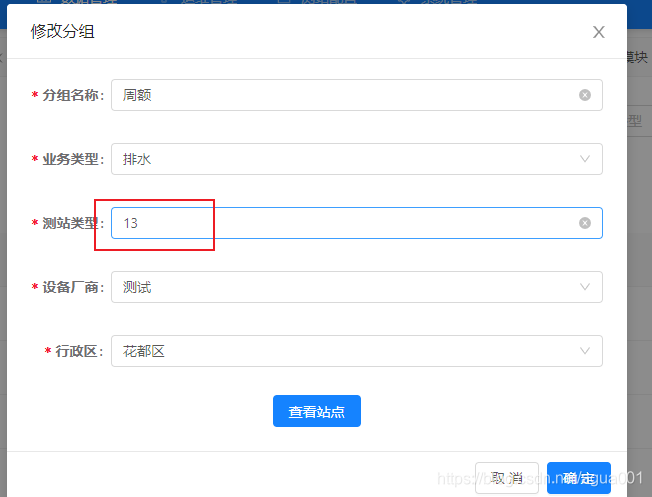
<a-form-item label="测站类型">
  <a-select
    allowClear
    v-decorator="[
      'typeId',
      { rules: [{ required: true, message: '请选择测站类型' }] },
    ]"
    placeholder="请选择测站类型"
  >
    <a-select-option
      v-for="(item, index) in $attrs.testList"
      :value="item.id"
      :key="index"
    >
      {{ item.name }}
    </a-select-option>
  </a-select>
</a-form-item>
2、绑定的是下拉数据的id,而且也拿到了,赋值
this.form.setFieldsValue({
 name: this.detailData.name,
  businessType: this.detailData.businessType,
  typeId: this.detailData.typeId,
  region: this.detailData.region,
  manufacturesId: this.detailData.manufacturesName,
});
3、按道理说,应该显示name才对的,打印后台数据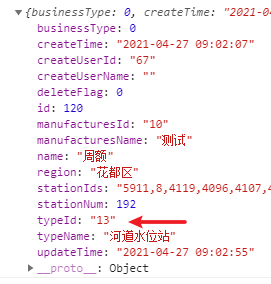
4、细心的盆友会发现,id是字符串,所以加工一下(把绑定的id转成字符串)
<a-form-item label="测站类型">
  <a-select
    allowClear
    v-decorator="[
      'typeId',
      { rules: [{ required: true, message: '请选择测站类型' }] },
    ]"
    placeholder="请选择测站类型"
  >
    <a-select-option
      v-for="(item, index) in $attrs.testList"
      :value="String(item.id)"
      :key="index"
    >
      {{ item.name }}
    </a-select-option>
  </a-select>
</a-form-item>
5、最终效果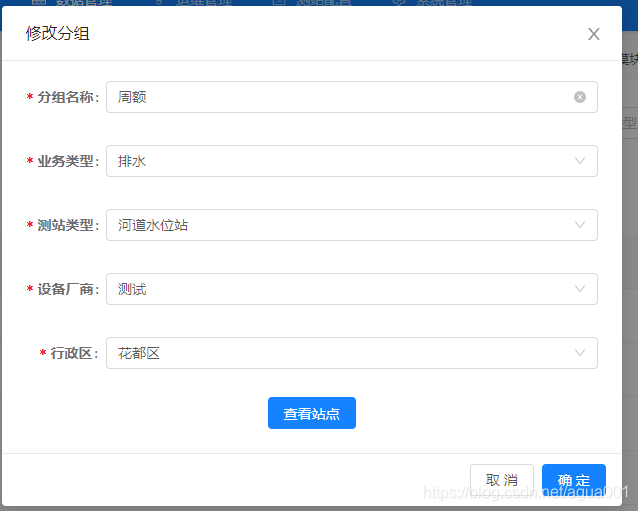
6、还有一种情况,就是后台直接返回了name值,直接使用就行,以上是只返回id或者 code的情况可以使用
this.form.setFieldsValue({
 name: this.detailData.name,
  businessType: this.detailData.businessType,
  typeId: this.detailData.typeName, // 后台直接返回name值
  region: this.detailData.region,
  manufacturesId: this.detailData.manufacturesName,
});
7、但是使用name去做回显,如果用户不修改的部分,绑定的值还是name值。最后如果后台需要的不是name,而是id或者code值,那就会出现异常了噢,所以最好和后台约定好,返回id或者code,而且数据类型也定义好
若无心宽似海,哪来风平浪静!

华为开发者空间,是为全球开发者打造的专属开发空间,汇聚了华为优质开发资源及工具,致力于让每一位开发者拥有一台云主机,基于华为根生态开发、创新。
更多推荐
 2
2 0
0- 0


 已为社区贡献11条内容

所有评论(0)