android初始化流程图,MSM8909+Android5.1.1启动流程---LCM初始化
MSM8909+Android5.1.1启动流程---LCM初始化\bootable\bootloader\lk\app\aboot\aboot.caboot_init()--->target_display_init()--->gcdb_display_init()gcdb_display_init()函数的调用流程图1Mipi接口的显示屏初始化设置流程: 图2下面介绍这些函数1..
MSM8909+Android5.1.1启动流程---LCM初始化
\bootable\bootloader\lk\app\aboot\aboot.c
aboot_init()--->target_display_init()--->gcdb_display_init()
gcdb_display_init()函数的调用流程
图1
Mipi接口的显示屏初始化设置流程:
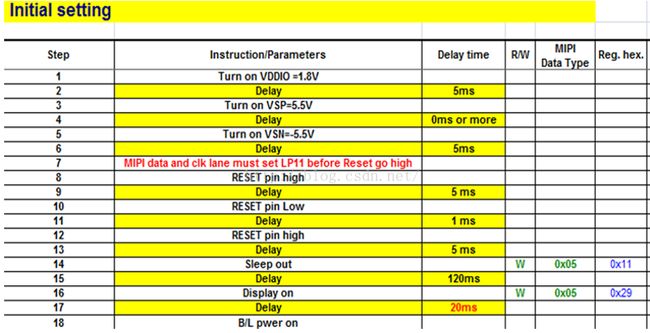
图2
下面介绍这些函数
1. oem_panel_selec()
根据传递进来的panel_name和supp_panels[]匹配到panel id
/*
*The list of panels that are supported on this target.
*Any panel in this list can be selected using fastboot oem command.
*/
static struct panel_list supp_panels[] = {
{"hx8394d_720p_video",HX8394D_720P_VIDEO_PANEL},
{"sharp_qhd_video",SHARP_QHD_VIDEO_PANEL},
{"truly_wvga_cmd",TRULY_WVGA_CMD_PANEL},
{"hx8379a_fwvga_skua_video",HX8379A_FWVGA_SKUA_VIDEO_PANEL},
{"ili9806e_wvga_video",ILI9806E_WVGA_VIDEO_PANEL},
…
{"jd9161ba_fwvga_video_panel",JD9161BA_FWVGA_VIDEO_PANEL},
};
先调用board_hardware_id()和board_hardware_subtype()获取board.platform_hw与board.platform_subtype,我们分别是11(HW_PLATFORM_QRD)和12(QRD_SKUE_projectname)
msm8909-1gb-qrd-skue.dts文件相关内容
qcom,board-id= <0x1000b 0x8>;
b对应于
uint32_t board_hardware_id()
{
returnboard.platform_hw;
}
8对应于
uint32_t board_hardware_subtype(void)
{
returnboard.platform_subtype;
}
然后调用init_panel_data()初始化panel数据,主要初始化panel_struct结构体数据,然后返回panel类型PANEL_TYPE_DSI。
typedef struct panel_struct{
int (*read_id)(void); //add by zougang
structpanel_config *paneldata;
structpanel_resolution *panelres;
structcolor_info *color;
structvideopanel_info *videopanel;
structcommandpanel_info *commandpanel;
structcommand_state *state;
structlane_configuration *laneconfig;
structpanel_timing *paneltiminginfo;
structpanel_reset_sequence *panelresetseq;
structbacklight *backlightinfo;
structfb_compression fbcinfo;
};
此结构体对应/dsi-panel-ili9806e-wvga-video.dtsi文件,此结构体主要成员如下
(1) panel_config
/*Panel Configuration */
typedef struct panel_config{
char *panel_node_id;// qcom,mdss_dsi_ili9806e_wvga_video
char *panel_controller;// "dsi:0:"
char *panel_compatible;// "qcom,mdss-dsi-panel"
uint16_tpanel_interface;//10
uint16_tpanel_type;//0
char *panel_destination;// "DISPLAY_1"
uint32_tpanel_orientation;//0
uint32_tpanel_clockrate;//0
uint16_tpanel_framerate;//60
uint16_tpanel_channelid;//0
uint16_tdsi_virtualchannel_id;//0
uint16_tpanel_broadcast_mode;//0
uint16_tpanel_lp11_init;//0
uint16_tpanel_init_delay;//0
uint16_tdsi_stream;//0
uint8_t interleave_mode;//0
uint32_tpanel_bitclock_freq;
uint32_tpanel_operating_mode;//0
uint32_tpanel_with_enable_gpio;//0
uint8_t mode_gpio_state;//0
char *slave_panel_node_id;//0
};
(2) panel_resolution
typedef struct panel_resolution{
uint16_tpanel_width;
uint16_tpanel_height;
uint16_thfront_porch;
uint16_thback_porch;
uint16_thpulse_width;
uint16_thsync_skew;
uint16_tvfront_porch;
uint16_tvback_porch;
uint16_tvpulse_width;
uint16_thleft_border;
uint16_thright_border;
uint16_tvtop_border;
uint16_tvbottom_border;
uint16_thactive_res;
uint16_tvactive_res;
uint16_tinvert_data_polarity;
uint16_tinvert_vsync_polarity;
uint16_tinvert_hsync_polarity;
};
Panel的分辨率、时序参数、极性等数据。
(3) color_info
typedef struct color_info{
uint8_t color_format;//24位色
uint8_t color_order;
uint8_t underflow_color;
uint8_t border_color;
uint8_t pixel_packing;
uint8_t pixel_alignment;
};
Panel color信息。
(4) lane_configuration
typedef struct lane_configuration {
uint8_tdsi_lanes;//比如2个lane,但大分辨率如720*1280,需要4lane
uint8_tdsi_lanemap;
uint8_tlane0_state;
uint8_tlane1_state;
uint8_tlane2_state;
uint8_tlane3_state;
};
这里可看出只支持到4lane,支持的lane对应的state为1,否则为0。
(5) panel_timing
typedef struct panel_timing {
uint8_tdsi_mdp_trigger;// "none"
uint8_tdsi_dma_trigger;// "trigger_sw"
uint8_ttclk_post;
uint8_ttclk_pre;
};
(6) panel_reset_sequence
typedef struct panel_reset_sequence {
uint8_tpin_state[TOTAL_RESET_GPIO_CTRL];
uint32_tsleep[TOTAL_RESET_GPIO_CTRL];
uint8_tpin_direction;
};
对应设备树文件的qcom,mdss-dsi-reset-sequence =<1 20>, <0 20>, <1 20>;
这里可让pin状态及演示多久后再修改pin状态。
(7) backlight
typedef struct backlight {
uint16_tbl_interface_type;//1,对应"bl_ctrl_pwm"
uint16_tbl_min_level;//背光最小值
uint16_tbl_max_level;//背光最大值
uint16_tbl_step;//间隔值
uint16_tbl_pmic_controltype;//1,表示"bl_ctrl_pwm"
char *bl_pmic_model;// "PMIC_8941"
};
2. init_platform_data()
static void init_platform_data()
{
memcpy(dsi_video_mode_phy_db.regulator,panel_regulator_settings,
REGULATOR_SIZE);
memcpy(dsi_video_mode_phy_db.ctrl,panel_physical_ctrl,
PHYSICAL_SIZE);
memcpy(dsi_video_mode_phy_db.strength,panel_strength_ctrl,
STRENGTH_SIZE);
memcpy(dsi_video_mode_phy_db.bistCtrl,panel_bist_ctrl, BIST_SIZE);
memcpy(dsi_video_mode_phy_db.laneCfg,panel_lane_config, LANE_SIZE);
}
初始化mdss_dsi_phy_ctrl结构体成员
struct mdss_dsi_phy_ctrl {
uint32_tregulator[MAX_REGULATOR_CONFIG];
uint32_ttiming[MAX_TIMING_CONFIG];
uint32_tctrl[MAX_CTRL_CONFIG];
uint32_tstrength[MAX_STRENGTH_CONFIG];
charbistCtrl[MAX_BIST_CONFIG];
charlaneCfg[MAX_LANE_CONFIG];
enumdsi_reg_mode regulator_mode;
intis_pll_20nm;
};
3. dsi_panel_init()
用在init_panel_data()初始化的全局变量panelstruct来初始化panel.panel_info,其中包含对msm_panel_info结构体中函数指针的赋值,如下:
pinfo->pre_on = dsi_panel_pre_on;
pinfo->pre_off= dsi_panel_pre_off;
pinfo->on= dsi_panel_post_on;
pinfo->off= dsi_panel_post_off;
pinfo->rotate= dsi_panel_rotation;
pinfo->config= dsi_panel_config;
4. 初始化panel全局变量的其他结构体成员
panel.panel_info.mipi.mdss_dsi_phy_db =&dsi_video_mode_phy_db;
panel.pll_clk_func= mdss_dsi_panel_clock;
panel.power_func= mdss_dsi_panel_power;
panel.pre_init_func= mdss_dsi_panel_pre_init;
panel.bl_func= mdss_dsi_bl_enable;
panel.fb.base= base;
panel.fb.width= panel.panel_info.xres;
panel.fb.height= panel.panel_info.yres;
panel.fb.stride= panel.panel_info.xres;
panel.fb.bpp= panel.panel_info.bpp;
panel.fb.format= panel.panel_info.mipi.dst_format;
5. msm_display_init(&panel)
5.1 调用mdss_dsi_panel_power()给DSI panel供电
(1) target_ldo_ctrl()--->regulator_enable()给L2、L6和L17供电
(2) 是否调用mdss_dsi_panel_reset()
/* Panel Reset */
if(!panelstruct.paneldata->panel_lp11_init) {
ret= mdss_dsi_panel_reset(enable);
if(ret) {
dprintf(CRITICAL,"panel reset failed\n");
returnret;
}
}
由于我们这里的panelstruct.paneldata->panel_lp11_init在init_panel_data()函数赋值为1,所以这里暂时不调用mdss_dsi_panel_reset(enable)。
5.2 调用mdss_dsi_panel_clock()
调用calculate_clock_config(pinfo)计算时钟配置和调用target_panel_clock(enable, pinfo)配置目标panel的时钟。
5.3 msm_fb_alloc(&(panel->fb))和fbcon_setup(&(panel->fb))
为帧缓冲器(frame buffer)分配内存。
5.4 display_image_on_screen()
调用fetch_image_from_partition()从splash分区获取lk logo图片,如果splash分区没有满足要求的数据,就显示默认的logo。
5.5 msm_display_config()
根据pinfo->type,比如我们这里是MIPI_VIDEO_PANEL来配置msm平台display,配置时还需要根据MDP(MobileDisplay processor)的版本来调用对应的config函数,如下:
mdp_rev = mdp_get_revision();
if(mdp_rev == MDP_REV_50 || mdp_rev == MDP_REV_304 ||
mdp_rev== MDP_REV_305)
ret= mdss_dsi_config(panel);
else
ret= mipi_config(panel);
msm8909是MDP_REV_305版本(MDP 3.05),所以调用mdss_dsi_config(panel)
5.5.1 mdss_dsi_config(panel)
(1) mdss_dsi_phy_init()
mdss_dsi_phy_init(&mipi_pinfo,MIPI_DSI0_BASE, DSI0_PHY_BASE);
if(pinfo->mipi.dual_dsi)
mdss_dsi_phy_init(&mipi_pinfo,MIPI_DSI1_BASE, DSI1_PHY_BASE);
如果有两个MIPI DSI接口MIPI_DSI0和MIPI_DSI1就调用两次mdss_dsi_phy_init(),msm8909只有MIPI_DSI0,MSM8994等有两个DSI接口。
(2) mdss_dsi_host_init()
初始化DSI接口的host控制器。
(3) mdss_dsi_panel_pre_init()
static int mdss_dsi_panel_pre_init(void)
{
intret = NO_ERROR;
if(panelstruct.paneldata->panel_lp11_init) {
ret= mdss_dsi_panel_reset(1);
if(ret) {
dprintf(CRITICAL,"panel reset failed\n");
returnret;
}
}
if(panelstruct.paneldata->panel_init_delay)
udelay(panelstruct.paneldata->panel_init_delay);
dprintf(SPEW,"Panel pre init done\n");
returnret;
}因为panelstruct.paneldata->panel_lp11_init在init_panel_data()函数赋值为1,所以调用mdss_dsi_panel_reset()根据reset时序来复位panel。
(4) read_id()读显示屏id
此函数指针read_id在init_panel_data()中赋值,这是自己增加的一部分,主要是为了兼容不同显示屏。
(5) 旋转显示屏
if (pinfo->rotate &&panel->rotate)
pinfo->rotate();
dsi_panel_init()中用pinfo->rotate = dsi_panel_rotation初始化,dsi_panel_rotation()直接调用oem_panel_rotation()返回NO_ERROR,没有实际旋转的动作。
5.5.2 mdp_dsi_video_config(pinfo,&(panel->fb))
配置DSI VIDEO模式
5.6 msm_display_on()
主要部分:
case MIPI_VIDEO_PANEL:
dprintf(INFO,"Turn on MIPI_VIDEO_PANEL.\n");
ret= mdp_dsi_video_on(pinfo);
if(ret)
gotomsm_display_on_out;
ret= mdss_dsi_post_on(panel);
if(ret)
gotomsm_display_on_out;
ret= mipi_dsi_on();
if(ret)
gotomsm_display_on_out;
break;
(1) 调用mdp_dsi_video_on()使能DSI VIDEO
(2) mdss_dsi_post_on()使用初始化命令来初始化panel
mipi_pinfo.panel_cmds = pinfo->mipi.panel_cmds;
mipi_pinfo.num_of_panel_cmds= pinfo->mipi.num_of_panel_cmds;
mipi_pinfo.signature= pinfo->mipi.signature;
ret= mdss_dsi_panel_initialize(&mipi_pinfo, pinfo->mipi.broadcast);
对应qcom,mdss-dsi-on-command部分。
(3) mipi_dsi_on()
5.7 打开背光
/* Turn on backlight */
if(pdata->bl_func)
ret= pdata->bl_func(1);
对应调用mdss_dsi_bl_enable()--->panel_backlight_ctrl(enable)--->
target_backlight_ctrl(panelstruct.backlightinfo,enable)
可知根据panelstruct.backlightinfo来进行背光控制,而panelstruct.backlightinfo在oem_panel_select()--->init_panel_data()被赋值
panelstruct->backlightinfo =&ili9806e_fwvga_video_backlight;
参考:
高通平台MSM8916LCM模块移植(一)-bootloader部分
http://blog.csdn.net/penghcai/article/details/43227005

华为开发者空间,是为全球开发者打造的专属开发空间,汇聚了华为优质开发资源及工具,致力于让每一位开发者拥有一台云主机,基于华为根生态开发、创新。
更多推荐



 1
1 0
0- 0


 已为社区贡献2条内容

所有评论(0)