Android 入门宝典 - 事件分发机制
文章目录
基础
名词解析
touch event(触控事件):使用 MotionEvent 类包装,描述用户当前触控的行为,常见的事件有 ACTION_DOWN、ACTION_UP、ACTION_MOVE
gesture(手势):具有某些特征的事件序列:点击、滚动、滑动、双击、长按……
另一种定义:以 ACTION_DOWN 开始,以 ACTION_UP 结尾为一个 gesture。
事件序列:从 DOWN 事件开始,到 UP 事件结束,中间穿插多个 MOVE 事件的列表
https://developer.android.com/reference/android/view/MotionEvent#ACTION_POINTER_DOWN
事件分发流程
每个事件序列执行一次:
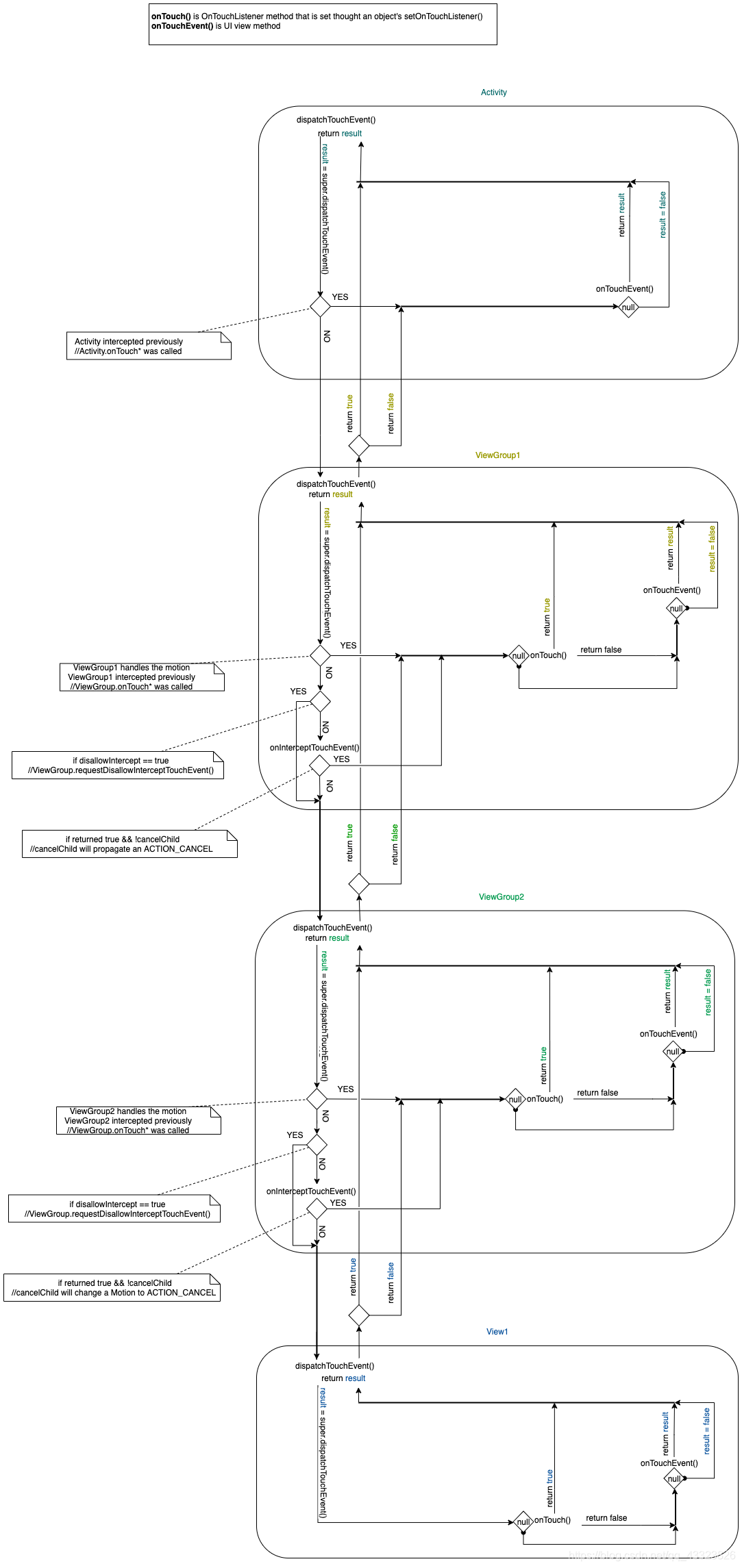
- 事件序列的分发开始于 Activity.dispatchTouchEvent()
- 发送事件到 Window 的根 View 上,其本质是一个 ViewGroup
- 事件序列在视图层中自上而下进行传递
- ViewGroups 向它的子 View 分发事件序列
- 按子 View 添加顺序进行反向查询
- 当事件落在相关 View 区间中,一一调用每个 child.dispatchTouchEvent() 直至事件序列被消耗,返回 true
- 没有子 View 目标,尝试在自身注册监听器 onTouch() 或自身 onTouchEvent() 方法处理
- ViewGroups 可以在 onInterceptTouchEvent() 随时拦截每个事件
- 拦截 DOWN 事件,即拦截整个事件序列,则后续的事件不再调用此方法,且跳过子 View 的分发到达自己的处理方法 1 ^1 1
- 从中途拦截,会向命中的子 View 发送 ACTION_CANCEL,子 View 也可以通过 parent.requestDisllowInterceptTouchEvent(true) 提前阻止此次拦截,但在下一个事件序列将恢复
- ViewGroups 向它的子 View 分发事件序列
- 事件序列的消耗,如未消耗的自下而上进行询问回收
- 分发最终都会到达某个 View/ViewGroup 的事件处理方法
- 添加 OnTouchListener 可以在此 View/ViewGroup 中消耗事件序列,停止传递
- 其次,子类重写 View.onTouchEvent 返回 true,也能对事件序列进行处理消耗
- 具有 clickable 属性的控件添加 OnClickListener 后,默认的 onTouchEvent 会对其进行处理,并返回 true
- View/ViewGroup 消耗事件需要在处理 ACTION_DOWN 时返回 true,ACTION_DOWN 没有被消耗则向上进行回收
- ViewGroup 中事件的回收通过 super.dispatchTouchEvent() 处理
- 事件序列的分发结束于 Activity.dispatchTouchEvent()
- 最终未被消耗的通过返回 onTouchEvent() 结束,且后续的事件分发均到达该 onTouchEvent()
onInterceptTouchEvent 和 dispatchTouchEvent 的区别
dispatchTouchEvent 按一定的逻辑执行复杂的事件分配的工作,也能支配事件所有权,但不应重写该方法来自定义事件分配逻辑。
而 onInterceptTouchEvent 正是重写用来在 dispatchTouchEvent 之前自定义事件分配的方法。
Android: Difference between onInterceptTouchEvent and dispatchTouchEvent?
requestDisallowInterceptTouchEvent (boolean disallowIntercept):当子视图不希望让所有父视图组通过 ViewGroup#onInterceptTouchEvent(MotionEvent) 拦截触摸事件时调用。子视图的父试图组应将此请求传递给所有父试图组们。该父级必须在触摸期间遵守该请求(即仅在该父级收到 UP 或 CANCEL 事件后才清除该标志)。
检测常用手势
https://developer.android.com/training/gestures/detector?hl=zh-cn
利用 GestureDetector 类,您可以轻松地检测常用手势,而无需亲自处理单个轻触事件。该类支持的一些手势包括 onDown()、onLongPress()、onFling() 等。
实现 GestureDetector.OnGestureListener 接口:
implements GestureDetector.OnGestureListener
当您实例化 GestureDetectorCompat 对象时需要实现 GestureDetector.OnGestureListener 接口的类(第 2 个参数)。 设置监听器,当特定轻触事件发生时,GestureDetector.OnGestureListener 会通知用户:
GestureDetectorCompat mDetector = new GestureDetectorCompat(this,this);
mDetector.setOnDoubleTapListener(this);
要让您的 GestureDetector 对象能够接收事件,您可以替换 onTouchEvent() 方法,并将所有观察到的事件传递给检测器实例:
@Override
public boolean onTouchEvent(MotionEvent event){
    if (this.mDetector.onTouchEvent(event)) {
        return true;
    }
    return super.onTouchEvent(event);
}
如果您只想处理几个手势,则可以扩展 GestureDetector.SimpleOnGestureListener。
在使用 GestureDetector.OnGestureListener 时,最佳做法是实现一个返回 true 的 onDown() 方法。这是因为所有手势都以 onDown() 消息开头。如果您从 onDown() 返回 false(与 GestureDetector.SimpleOnGestureListener 的默认做法一样),则系统会认为您想要忽略其余手势,并且永远不会调用 GestureDetector.OnGestureListener 的其他方法。
GestureDetector.SimpleOnGestureListener 通过针对所有 onTouchEvent 方法返回 false 提供对所有这些方法的实现。因此,您可以仅替换您关注的方法。例如,以下代码段会创建一个扩展 GestureDetector.SimpleOnGestureListener 的类,并替换 onFling() 和 onDown():
public class MainActivity extends Activity {

    private GestureDetectorCompat mDetector;

    @Override
    public void onCreate(Bundle savedInstanceState) {
        super.onCreate(savedInstanceState);
        setContentView(R.layout.activity_main);
        mDetector = new GestureDetectorCompat(this, new MyGestureListener());
    }

    @Override
    public boolean onTouchEvent(MotionEvent event){
        this.mDetector.onTouchEvent(event);
        return super.onTouchEvent(event);
    }

    class MyGestureListener extends GestureDetector.SimpleOnGestureListener {
        private static final String DEBUG_TAG = "Gestures";

        @Override
        public boolean onDown(MotionEvent event) {
            Log.d(DEBUG_TAG,"onDown: " + event.toString());
            return true;
        }

        @Override
        public boolean onFling(MotionEvent event1, MotionEvent event2,
                float velocityX, float velocityY) {
            Log.d(DEBUG_TAG, "onFling: " + event1.toString() + event2.toString());
            return true;
        }
    }
}
源码分析
https://www.androidos.net.cn/android/9.0.0_r8/xref/frameworks/base/core/java/android/view/ViewGroup.java
Activity 检测到事件,触发 dispatchTouchEvent 进行事件派发,首先判断 Window 调用 superDispatchTouchEvent(ev) 进行分发的情况,为 true 则返回 true,并让 Window 处理事件,否则返回 onTouchEvent(ev) 表示自己处理
Window 的 superDispatchTouchEvent(ev) 直接返回 DecorView 的 superDispatchTouchEvent(ev) 进行分发
DecorView 是顶级 ViewGroup,事件传递到 ViewGroup 的 dispatchTouchEvent 进行分发
// ViewGroup
@Override
public boolean dispatchTouchEvent(MotionEvent ev) {
    if (mInputEventConsistencyVerifier != null) {
        mInputEventConsistencyVerifier.onTouchEvent(ev, 1);
    }

    // If the event targets the accessibility focused view and this is it, start
    // normal event dispatch. Maybe a descendant is what will handle the click.
    if (ev.isTargetAccessibilityFocus() && isAccessibilityFocusedViewOrHost()) {
        ev.setTargetAccessibilityFocus(false);
    }

    boolean handled = false;
    if (onFilterTouchEventForSecurity(ev)) {
        final int action = ev.getAction();
        final int actionMasked = action & MotionEvent.ACTION_MASK;

        // Handle an initial down.
        if (actionMasked == MotionEvent.ACTION_DOWN) {
            // Throw away all previous state when starting a new touch gesture.
            // The framework may have dropped the up or cancel event for the previous gesture
            // due to an app switch, ANR, or some other state change.
            cancelAndClearTouchTargets(ev);
            resetTouchState();
        }

        // Check for interception.
        final boolean intercepted;
        if (actionMasked == MotionEvent.ACTION_DOWN
                || mFirstTouchTarget != null) {
            final boolean disallowIntercept = (mGroupFlags & FLAG_DISALLOW_INTERCEPT) != 0;
            if (!disallowIntercept) {
                intercepted = onInterceptTouchEvent(ev);
                ev.setAction(action); // restore action in case it was changed
            } else {
                intercepted = false;
            }
        } else {
            // There are no touch targets and this action is not an initial down
            // so this view group continues to intercept touches.
            intercepted = true;
        }

        // If intercepted, start normal event dispatch. Also if there is already
        // a view that is handling the gesture, do normal event dispatch.
        if (intercepted || mFirstTouchTarget != null) {
            ev.setTargetAccessibilityFocus(false);
        }

        // Check for cancelation.
        final boolean canceled = resetCancelNextUpFlag(this)
                || actionMasked == MotionEvent.ACTION_CANCEL;

        // Update list of touch targets for pointer down, if needed.
        final boolean isMouseEvent = ev.getSource() == InputDevice.SOURCE_MOUSE;
        final boolean split = (mGroupFlags & FLAG_SPLIT_MOTION_EVENTS) != 0
                && !isMouseEvent;
        TouchTarget newTouchTarget = null;
        boolean alreadyDispatchedToNewTouchTarget = false;
        if (!canceled && !intercepted) {
            // If the event is targeting accessibility focus we give it to the
            // view that has accessibility focus and if it does not handle it
            // we clear the flag and dispatch the event to all children as usual.
            // We are looking up the accessibility focused host to avoid keeping
            // state since these events are very rare.
            View childWithAccessibilityFocus = ev.isTargetAccessibilityFocus()
                    ? findChildWithAccessibilityFocus() : null;

            if (actionMasked == MotionEvent.ACTION_DOWN
                    || (split && actionMasked == MotionEvent.ACTION_POINTER_DOWN)
                    || actionMasked == MotionEvent.ACTION_HOVER_MOVE) {
                final int actionIndex = ev.getActionIndex(); // always 0 for down
                final int idBitsToAssign = split ? 1 << ev.getPointerId(actionIndex)
                        : TouchTarget.ALL_POINTER_IDS;

                // Clean up earlier touch targets for this pointer id in case they
                // have become out of sync.
                removePointersFromTouchTargets(idBitsToAssign);

                final int childrenCount = mChildrenCount;
                if (newTouchTarget == null && childrenCount != 0) {
                    final float x =
                            isMouseEvent ? ev.getXCursorPosition() : ev.getX(actionIndex);
                    final float y =
                            isMouseEvent ? ev.getYCursorPosition() : ev.getY(actionIndex);
                    // Find a child that can receive the event.
                    // Scan children from front to back.
                    final ArrayList<View> preorderedList = buildTouchDispatchChildList();
                    final boolean customOrder = preorderedList == null
                            && isChildrenDrawingOrderEnabled();
                    final View[] children = mChildren;
                    for (int i = childrenCount - 1; i >= 0; i--) {
                        final int childIndex = getAndVerifyPreorderedIndex(
                                childrenCount, i, customOrder);
                        final View child = getAndVerifyPreorderedView(
                                preorderedList, children, childIndex);
                        if (!child.canReceivePointerEvents()
                                || !isTransformedTouchPointInView(x, y, child, null)) {
                            continue;
                        }

                        newTouchTarget = getTouchTarget(child);
                        if (newTouchTarget != null) {
                            // Child is already receiving touch within its bounds.
                            // Give it the new pointer in addition to the ones it is handling.
                            newTouchTarget.pointerIdBits |= idBitsToAssign;
                            break;
                        }

                        resetCancelNextUpFlag(child);
                        if (dispatchTransformedTouchEvent(ev, false, child, idBitsToAssign)) {
                            // Child wants to receive touch within its bounds.
                            mLastTouchDownTime = ev.getDownTime();
                            if (preorderedList != null) {
                                // childIndex points into presorted list, find original index
                                for (int j = 0; j < childrenCount; j++) {
                                    if (children[childIndex] == mChildren[j]) {
                                        mLastTouchDownIndex = j;
                                        break;
                                    }
                                }
                            } else {
                                mLastTouchDownIndex = childIndex;
                            }
                            mLastTouchDownX = ev.getX();
                            mLastTouchDownY = ev.getY();
                            newTouchTarget = addTouchTarget(child, idBitsToAssign);
                            alreadyDispatchedToNewTouchTarget = true;
                            break;
                        }

                        // The accessibility focus didn't handle the event, so clear
                        // the flag and do a normal dispatch to all children.
                        ev.setTargetAccessibilityFocus(false);
                    }
                    if (preorderedList != null) preorderedList.clear();
                }

                if (newTouchTarget == null && mFirstTouchTarget != null) {
                    // Did not find a child to receive the event.
                    // Assign the pointer to the least recently added target.
                    newTouchTarget = mFirstTouchTarget;
                    while (newTouchTarget.next != null) {
                        newTouchTarget = newTouchTarget.next;
                    }
                    newTouchTarget.pointerIdBits |= idBitsToAssign;
                }
            }
        }

        // Dispatch to touch targets.
        if (mFirstTouchTarget == null) {
            // No touch targets so treat this as an ordinary view.
            handled = dispatchTransformedTouchEvent(ev, canceled, null,
                    TouchTarget.ALL_POINTER_IDS);
        } else {
            // Dispatch to touch targets, excluding the new touch target if we already
            // dispatched to it.  Cancel touch targets if necessary.
            TouchTarget predecessor = null;
            TouchTarget target = mFirstTouchTarget;
            while (target != null) {
                final TouchTarget next = target.next;
                if (alreadyDispatchedToNewTouchTarget && target == newTouchTarget) {
                    handled = true;
                } else {
                    final boolean cancelChild = resetCancelNextUpFlag(target.child)
                            || intercepted;
                    if (dispatchTransformedTouchEvent(ev, cancelChild,
                            target.child, target.pointerIdBits)) {
                        handled = true;
                    }
                    if (cancelChild) {
                        if (predecessor == null) {
                            mFirstTouchTarget = next;
                        } else {
                            predecessor.next = next;
                        }
                        target.recycle();
                        target = next;
                        continue;
                    }
                }
                predecessor = target;
                target = next;
            }
        }

        // Update list of touch targets for pointer up or cancel, if needed.
        if (canceled
                || actionMasked == MotionEvent.ACTION_UP
                || actionMasked == MotionEvent.ACTION_HOVER_MOVE) {
            resetTouchState();
        } else if (split && actionMasked == MotionEvent.ACTION_POINTER_UP) {
            final int actionIndex = ev.getActionIndex();
            final int idBitsToRemove = 1 << ev.getPointerId(actionIndex);
            removePointersFromTouchTargets(idBitsToRemove);
        }
    }

    if (!handled && mInputEventConsistencyVerifier != null) {
        mInputEventConsistencyVerifier.onUnhandledEvent(ev, 1);
    }
    return handled;
}
当初次事件分发时为 ACTION_DOWN 事件,则通过 onInterceptTouchEvent 判断是否拦截;如果未拦截且没有找到命中的子 View,则 mFirstTouchTarget == null 为 true,随后的事件可以直接拦截;找到命中的子 View 则依旧通过 onInterceptTouchEvent 判断是否拦截。
// Check for interception.
final boolean intercepted;
if (actionMasked == MotionEvent.ACTION_DOWN
        || mFirstTouchTarget != null) {
    ...
    intercepted = onInterceptTouchEvent(ev);
    ...
} else {
	// There are no touch targets and this action is not an initial down
	// so this view group continues to intercept touches
    intercepted = true;
}
不拦截则分发给子视图处理。分发规则是遍历子 View,检测是否在播放动画或是否落在它的区域,满足这两个条件则使用 dispatchTransformedTouchEvent 方法调用子分支(即子 View 的 dispatchTouchEvent)处理,若找不到触发目标则调用父分支(即 ViewGroup 的 dispatchTouchEvent)返回处理。
/**
 * Transforms a motion event into the coordinate space of a particular child view,
 * filters out irrelevant pointer ids, and overrides its action if necessary.
 * If child is null, assumes the MotionEvent will be sent to this ViewGroup instead.
 */
private boolean dispatchTransformedTouchEvent(MotionEvent event, boolean cancel,
        View child, int desiredPointerIdBits) {
    final boolean handled;

    // Canceling motions is a special case.  We don't need to perform any transformations
    // or filtering.  The important part is the action, not the contents.
    final int oldAction = event.getAction();
    if (cancel || oldAction == MotionEvent.ACTION_CANCEL) {
        event.setAction(MotionEvent.ACTION_CANCEL);
        if (child == null) {
            handled = super.dispatchTouchEvent(event);
        } else {
            handled = child.dispatchTouchEvent(event);
        }
        event.setAction(oldAction);
        return handled;
    }

    // Calculate the number of pointers to deliver.
    final int oldPointerIdBits = event.getPointerIdBits();
    final int newPointerIdBits = oldPointerIdBits & desiredPointerIdBits;

    // If for some reason we ended up in an inconsistent state where it looks like we
    // might produce a motion event with no pointers in it, then drop the event.
    if (newPointerIdBits == 0) {
        return false;
    }

    // If the number of pointers is the same and we don't need to perform any fancy
    // irreversible transformations, then we can reuse the motion event for this
    // dispatch as long as we are careful to revert any changes we make.
    // Otherwise we need to make a copy.
    final MotionEvent transformedEvent;
    if (newPointerIdBits == oldPointerIdBits) {
        if (child == null || child.hasIdentityMatrix()) {
            if (child == null) {
                handled = super.dispatchTouchEvent(event);
            } else {
                final float offsetX = mScrollX - child.mLeft;
                final float offsetY = mScrollY - child.mTop;
                event.offsetLocation(offsetX, offsetY);

                handled = child.dispatchTouchEvent(event);

                event.offsetLocation(-offsetX, -offsetY);
            }
            return handled;
        }
        transformedEvent = MotionEvent.obtain(event);
    } else {
        transformedEvent = event.split(newPointerIdBits);
    }

    // Perform any necessary transformations and dispatch.
    if (child == null) {
        handled = super.dispatchTouchEvent(transformedEvent);
    } else {
        final float offsetX = mScrollX - child.mLeft;
        final float offsetY = mScrollY - child.mTop;
        transformedEvent.offsetLocation(offsetX, offsetY);
        if (! child.hasIdentityMatrix()) {
            transformedEvent.transform(child.getInverseMatrix());
        }

        handled = child.dispatchTouchEvent(transformedEvent);
    }

    // Done.
    transformedEvent.recycle();
    return handled;
}
最终都会调用子 View 的 dispatchTouchEvent
/**
 * Pass the touch screen motion event down to the target view, or this
 * view if it is the target.
 *
 * @param event The motion event to be dispatched.
 * @return True if the event was handled by the view, false otherwise.
 */
public boolean dispatchTouchEvent(MotionEvent event) {
    // If the event should be handled by accessibility focus first.
    if (event.isTargetAccessibilityFocus()) {
        // We don't have focus or no virtual descendant has it, do not handle the event.
        if (!isAccessibilityFocusedViewOrHost()) {
            return false;
        }
        // We have focus and got the event, then use normal event dispatch.
        event.setTargetAccessibilityFocus(false);
    }
    boolean result = false;

    if (mInputEventConsistencyVerifier != null) {
        mInputEventConsistencyVerifier.onTouchEvent(event, 0);
    }

    final int actionMasked = event.getActionMasked();
    if (actionMasked == MotionEvent.ACTION_DOWN) {
        // Defensive cleanup for new gesture
        stopNestedScroll();
    }

    if (onFilterTouchEventForSecurity(event)) {
        if ((mViewFlags & ENABLED_MASK) == ENABLED && handleScrollBarDragging(event)) {
            result = true;
        }
        //noinspection SimplifiableIfStatement
        ListenerInfo li = mListenerInfo;
        if (li != null && li.mOnTouchListener != null
                && (mViewFlags & ENABLED_MASK) == ENABLED
                && li.mOnTouchListener.onTouch(this, event)) {
            result = true;
        }

        if (!result && onTouchEvent(event)) {
            result = true;
        }
    }

    if (!result && mInputEventConsistencyVerifier != null) {
        mInputEventConsistencyVerifier.onUnhandledEvent(event, 0);
    }

    // Clean up after nested scrolls if this is the end of a gesture;
    // also cancel it if we tried an ACTION_DOWN but we didn't want the rest
    // of the gesture.
    if (actionMasked == MotionEvent.ACTION_UP ||
            actionMasked == MotionEvent.ACTION_CANCEL ||
            (actionMasked == MotionEvent.ACTION_DOWN && !result)) {
        stopNestedScroll();
    }

    return result;
}
if (onFilterTouchEventForSecurity(event)) 语句判断当前 View 是否没被遮住等;这里面第二个 if 语句有 li.mOnTouchListener != null 即当注册了 OnTouchListener 时优先分发给 onTouch 执行,在此 View 中拦截该事件;如果没有注册则执行优先级低的 onTouchEvent,也就是第三个 if 语句。
/**
 * Register a callback to be invoked when a touch event is sent to this view.
 * @param l the touch listener to attach to this view
 */
public void setOnTouchListener(OnTouchListener l) {
    getListenerInfo().mOnTouchListener = l;
}
拦截或子 View 处理不了(onTouchEvent 返回 false)时,ViewGroup 设置了 onTouchListener 则 onTouch 会调用,否则 onTouchEvent 会被调用,也就是 onTouch 会屏蔽 onTouchEvent 设置了 onClickListener 的 onClick 方法;
所以事件处理有两种方式:设置 Listener;重写 View 的 onTouchEvent 方法。处理不了则返回上级使用其方法进行处理,以此类推。
View 的分发事件,先判断 onTouchListener 以及 onTouch 的返回值,再判断 onTouchEvent 的返回值。View 在 DISABLED 状态也会消耗事件。只要 CLICKABLE 和 LONG_CLICKABLE 有一个为 true,onTouchEvent 就会启用线程performClick(该方法保证点击事件遵循系统要求)调用 OnClickListener 的 onClick 方法。
/**
 * Implement this method to handle touch screen motion events.
 * <p>
 * If this method is used to detect click actions, it is recommended that
 * the actions be performed by implementing and calling
 * {@link #performClick()}. This will ensure consistent system behavior,
 * including:
 * <ul>
 * <li>obeying click sound preferences
 * <li>dispatching OnClickListener calls
 * <li>handling {@link AccessibilityNodeInfo#ACTION_CLICK ACTION_CLICK} when
 * accessibility features are enabled
 * </ul>
 *
 * @param event The motion event.
 * @return True if the event was handled, false otherwise.
 */
public boolean onTouchEvent(MotionEvent event) {
    final float x = event.getX();
    final float y = event.getY();
    final int viewFlags = mViewFlags;
    final int action = event.getAction();

    final boolean clickable = ((viewFlags & CLICKABLE) == CLICKABLE
            || (viewFlags & LONG_CLICKABLE) == LONG_CLICKABLE)
            || (viewFlags & CONTEXT_CLICKABLE) == CONTEXT_CLICKABLE;

    if ((viewFlags & ENABLED_MASK) == DISABLED) {
        if (action == MotionEvent.ACTION_UP && (mPrivateFlags & PFLAG_PRESSED) != 0) {
            setPressed(false);
        }
        mPrivateFlags3 &= ~PFLAG3_FINGER_DOWN;
        // A disabled view that is clickable still consumes the touch
        // events, it just doesn't respond to them.
        return clickable;
    }
    if (mTouchDelegate != null) {
        if (mTouchDelegate.onTouchEvent(event)) {
            return true;
        }
    }

    if (clickable || (viewFlags & TOOLTIP) == TOOLTIP) {
        switch (action) {
            case MotionEvent.ACTION_UP:
                mPrivateFlags3 &= ~PFLAG3_FINGER_DOWN;
                if ((viewFlags & TOOLTIP) == TOOLTIP) {
                    handleTooltipUp();
                }
                if (!clickable) {
                    removeTapCallback();
                    removeLongPressCallback();
                    mInContextButtonPress = false;
                    mHasPerformedLongPress = false;
                    mIgnoreNextUpEvent = false;
                    break;
                }
                boolean prepressed = (mPrivateFlags & PFLAG_PREPRESSED) != 0;
                if ((mPrivateFlags & PFLAG_PRESSED) != 0 || prepressed) {
                    // take focus if we don't have it already and we should in
                    // touch mode.
                    boolean focusTaken = false;
                    if (isFocusable() && isFocusableInTouchMode() && !isFocused()) {
                        focusTaken = requestFocus();
                    }

                    if (prepressed) {
                        // The button is being released before we actually
                        // showed it as pressed.  Make it show the pressed
                        // state now (before scheduling the click) to ensure
                        // the user sees it.
                        setPressed(true, x, y);
                    }

                    if (!mHasPerformedLongPress && !mIgnoreNextUpEvent) {
                        // This is a tap, so remove the longpress check
                        removeLongPressCallback();

                        // Only perform take click actions if we were in the pressed state
                        if (!focusTaken) {
                            // Use a Runnable and post this rather than calling
                            // performClick directly. This lets other visual state
                            // of the view update before click actions start.
                            if (mPerformClick == null) {
                                mPerformClick = new PerformClick();
                            }
                            if (!post(mPerformClick)) {
                                performClickInternal();
                            }
                        }
                    }

                    if (mUnsetPressedState == null) {
                        mUnsetPressedState = new UnsetPressedState();
                    }

                    if (prepressed) {
                        postDelayed(mUnsetPressedState,
                                ViewConfiguration.getPressedStateDuration());
                    } else if (!post(mUnsetPressedState)) {
                        // If the post failed, unpress right now
                        mUnsetPressedState.run();
                    }

                    removeTapCallback();
                }
                mIgnoreNextUpEvent = false;
                break;

            case MotionEvent.ACTION_DOWN:
                if (event.getSource() == InputDevice.SOURCE_TOUCHSCREEN) {
                    mPrivateFlags3 |= PFLAG3_FINGER_DOWN;
                }
                mHasPerformedLongPress = false;

                if (!clickable) {
                    checkForLongClick(
                            ViewConfiguration.getLongPressTimeout(),
                            x,
                            y,
                            TOUCH_GESTURE_CLASSIFIED__CLASSIFICATION__LONG_PRESS);
                    break;
                }

                if (performButtonActionOnTouchDown(event)) {
                    break;
                }

                // Walk up the hierarchy to determine if we're inside a scrolling container.
                boolean isInScrollingContainer = isInScrollingContainer();

                // For views inside a scrolling container, delay the pressed feedback for
                // a short period in case this is a scroll.
                if (isInScrollingContainer) {
                    mPrivateFlags |= PFLAG_PREPRESSED;
                    if (mPendingCheckForTap == null) {
                        mPendingCheckForTap = new CheckForTap();
                    }
                    mPendingCheckForTap.x = event.getX();
                    mPendingCheckForTap.y = event.getY();
                    postDelayed(mPendingCheckForTap, ViewConfiguration.getTapTimeout());
                } else {
                    // Not inside a scrolling container, so show the feedback right away
                    setPressed(true, x, y);
                    checkForLongClick(
                            ViewConfiguration.getLongPressTimeout(),
                            x,
                            y,
                            TOUCH_GESTURE_CLASSIFIED__CLASSIFICATION__LONG_PRESS);
                }
                break;

            case MotionEvent.ACTION_CANCEL:
                if (clickable) {
                    setPressed(false);
                }
                removeTapCallback();
                removeLongPressCallback();
                mInContextButtonPress = false;
                mHasPerformedLongPress = false;
                mIgnoreNextUpEvent = false;
                mPrivateFlags3 &= ~PFLAG3_FINGER_DOWN;
                break;

            case MotionEvent.ACTION_MOVE:
                if (clickable) {
                    drawableHotspotChanged(x, y);
                }

                final int motionClassification = event.getClassification();
                final boolean ambiguousGesture =
                        motionClassification == MotionEvent.CLASSIFICATION_AMBIGUOUS_GESTURE;
                int touchSlop = mTouchSlop;
                if (ambiguousGesture && hasPendingLongPressCallback()) {
                    if (!pointInView(x, y, touchSlop)) {
                        // The default action here is to cancel long press. But instead, we
                        // just extend the timeout here, in case the classification
                        // stays ambiguous.
                        removeLongPressCallback();
                        long delay = (long) (ViewConfiguration.getLongPressTimeout()
                                * mAmbiguousGestureMultiplier);
                        // Subtract the time already spent
                        delay -= event.getEventTime() - event.getDownTime();
                        checkForLongClick(
                                delay,
                                x,
                                y,
                                TOUCH_GESTURE_CLASSIFIED__CLASSIFICATION__LONG_PRESS);
                    }
                    touchSlop *= mAmbiguousGestureMultiplier;
                }

                // Be lenient about moving outside of buttons
                if (!pointInView(x, y, touchSlop)) {
                    // Outside button
                    // Remove any future long press/tap checks
                    removeTapCallback();
                    removeLongPressCallback();
                    if ((mPrivateFlags & PFLAG_PRESSED) != 0) {
                        setPressed(false);
                    }
                    mPrivateFlags3 &= ~PFLAG3_FINGER_DOWN;
                }

                final boolean deepPress =
                        motionClassification == MotionEvent.CLASSIFICATION_DEEP_PRESS;
                if (deepPress && hasPendingLongPressCallback()) {
                    // process the long click action immediately
                    removeLongPressCallback();
                    checkForLongClick(
                            0 /* send immediately */,
                            x,
                            y,
                            TOUCH_GESTURE_CLASSIFIED__CLASSIFICATION__DEEP_PRESS);
                }

                break;
        }

        return true;
    }

    return false;
}
/**
 * Entry point for {@link #performClick()} - other methods on View should call it instead of
 * {@code performClick()} directly to make sure the autofill manager is notified when
 * necessary (as subclasses could extend {@code performClick()} without calling the parent's
 * method).
 */
private boolean performClickInternal() {
    // Must notify autofill manager before performing the click actions to avoid scenarios where
    // the app has a click listener that changes the state of views the autofill service might
    // be interested on.
    notifyAutofillManagerOnClick();

    return performClick();
}

/**
 * Call this view's OnClickListener, if it is defined.  Performs all normal
 * actions associated with clicking: reporting accessibility event, playing
 * a sound, etc.
 *
 * @return True there was an assigned OnClickListener that was called, false
 *         otherwise is returned.
 */
// NOTE: other methods on View should not call this method directly, but performClickInternal()
// instead, to guarantee that the autofill manager is notified when necessary (as subclasses
// could extend this method without calling super.performClick()).
public boolean performClick() {
    // We still need to call this method to handle the cases where performClick() was called
    // externally, instead of through performClickInternal()
    notifyAutofillManagerOnClick();

    final boolean result;
    final ListenerInfo li = mListenerInfo;
    if (li != null && li.mOnClickListener != null) {
        playSoundEffect(SoundEffectConstants.CLICK);
        li.mOnClickListener.onClick(this);
        result = true;
    } else {
        result = false;
    }

    sendAccessibilityEvent(AccessibilityEvent.TYPE_VIEW_CLICKED);

    notifyEnterOrExitForAutoFillIfNeeded(true);

    return result;
}
标志位的清除
ViewGroup.dispatchTouchEvent 方法开始位置,初次 ACTION_DOWN 时,会清除先前所有标志
// Handle an initial down.
if (actionMasked == MotionEvent.ACTION_DOWN) {
    // Throw away all previous state when starting a new touch gesture.
    // The framework may have dropped the up or cancel event for the previous gesture
    // due to an app switch, ANR, or some other state change.
    cancelAndClearTouchTargets(ev);
    resetTouchState();
}
resetTouchState 这里对一些对象状态和 flags (例如 FLAG_DISALLOW_INTERCEPT)进行重置和预置
/**
 * Resets all touch state in preparation for a new cycle.
 */
private void resetTouchState() {
    clearTouchTargets();
    resetCancelNextUpFlag(this);
    mGroupFlags &= ~FLAG_DISALLOW_INTERCEPT;	// 与非运算,重置 FLAG——DISALLOW——INTERCEPT 标志位
    mNestedScrollAxes = SCROLL_AXIS_NONE;
}
clearTouchTargets 这里对 TouchTarget 链表进行清除
/**
 * Clears all touch targets.
 */
private void clearTouchTargets() {
    TouchTarget target = mFirstTouchTarget;
    if (target != null) {
        do {
            TouchTarget next = target.next;
            target.recycle();
            target = next;
        } while (target != null);
        mFirstTouchTarget = null;
    }
}
事件拦截
ViewGroup.dispatchTouchEvent 的事件拦截代码:
// Check for interception.
final boolean intercepted;
if (actionMasked == MotionEvent.ACTION_DOWN
        || mFirstTouchTarget != null) {
    final boolean disallowIntercept = (mGroupFlags & FLAG_DISALLOW_INTERCEPT) != 0;
    if (!disallowIntercept) {
        intercepted = onInterceptTouchEvent(ev);
        ev.setAction(action); // restore action in case it was changed
	} else {
		intercepted = false;
    }
} else {
    // There are no touch targets and this action is not an initial down
    // so this view group continues to intercept touches.
    intercepted = true;
}
ViewGroup 拦截判断分为内外两层,外层直接拦截判断上面已经分析了,内层有如下逻辑:
final boolean disallowIntercept = (mGroupFlags & FLAG_DISALLOW_INTERCEPT) != 0;	//不允许拦截时与为1,返回 true
if (!disallowIntercept) {	//允许拦截
    intercepted = onInterceptTouchEvent(ev);
    ev.setAction(action); // restore action in case it was changed
} else {	//不允许拦截
    intercepted = false;
}
当点击事件为 ACTION_DOWN 的时候,myGroupFlags 的 FLAG_DISALLOW_INTERCEPT 标志位会重置,也就是 mGroupFlags & FLAG_DISALLOW_INTERCEPT 结果为 0,disallowIntercept 为 false。所以 FLAG_DISALLOW_INTERCEPT 在 ACTION_DOWN 事件中不起作用,每次遇见 ACTION_DOWN 事件时,ViewGroup 都会调用 onInterceptTouchEvent 来询问自己是否拦截事件。
那么 FLAG_DISALLOW_INTERCEPT 起什么作用呢???
- FLAG_DISALLOW_INTERCEPT 影响的是 move/up 的事件拦截,可以使用来直接分发给子 view 而不对 move/up 事件进行 onInterceptTouchEvent 操作,即一个事件序列只进行一次 onInterceptTouchEvent 操作,效率更高
- 能解决像 ScrollView 和 ViewPager 存在滑动冲突的问题。见 https://editor.csdn.net/md/?articleId=100876652
FLAG_DISALLOW_INTERCEPT 通过 requestDisallowInterceptTouchEvent 设置
OnClickListener 设置 CLICKABLE
当我们设置OnClickListener或者OnLongClickListener时,View会自动将其CLICKABLE设置为true。
public void setOnClickListener(@Nullable OnClickListener l) {
    if (!isClickable()) {
        setClickable(true);
    }
    getListenerInfo().mOnClickListener = l;
}
public void setOnLongClickListener(@Nullable OnLongClickListener l) {
    if (!isLongClickable()) {
        setLongClickable(true);
    }
    getListenerInfo().mOnLongClickListener = l;
}
补充
((ViewGroup) getWindow().getDecorView().findViewById(android.R.id.content)).getChildAt(0) 可获取 Activity 设置的 View(即 setContent(View) 的 View)
super.onCreate(savedInstanceState);
setContentView(R.layout.activity_main);
所以 DecorView 是 setContent(View) 的父容器

华为开发者空间,是为全球开发者打造的专属开发空间,汇聚了华为优质开发资源及工具,致力于让每一位开发者拥有一台云主机,基于华为根生态开发、创新。
更多推荐


 0
0 0
0- 0


 已为社区贡献1条内容

所有评论(0)