android 自定义圆角button,android 自定义圆角button效果的实例代码(自定义view Demo)...
概述在平时开发过程中经常会碰到需要使用圆角button的情况,一般也会包括很多其他小功能,比如要在里面添加img,设置不同的圆角大小等。针对这样的场景,直接使用创建多个shape,定义多个xml文件也是可以实现的。但是如果使用非常频繁,那么直接自定义一个就会来的非常方便。甚至在一些情况下,不是可以用shape定义的规则图形,比如需要用到贝塞尔曲线等。如果全局需要这样风格的view,那么自定义一个V
概述
在平时开发过程中经常会碰到需要使用圆角button的情况,一般也会包括很多其他小功能,比如要在里面添加img,设置不同的圆角大小等。
针对这样的场景,直接使用创建多个shape,定义多个xml文件也是可以实现的。但是如果使用非常频繁,那么直接自定义一个就会来的非常方便。
甚至在一些情况下,不是可以用shape定义的规则图形,比如需要用到贝塞尔曲线等。
如果全局需要这样风格的view,那么自定义一个View是非常必要的。
本文主要是个demo记录,如有需要的读者可以借鉴学习。
Demo
主要实现功能:
自定义圆角大小
支持设置leftDrawable,和自定义文字内容(文字和img默认居中)
支持点击效果
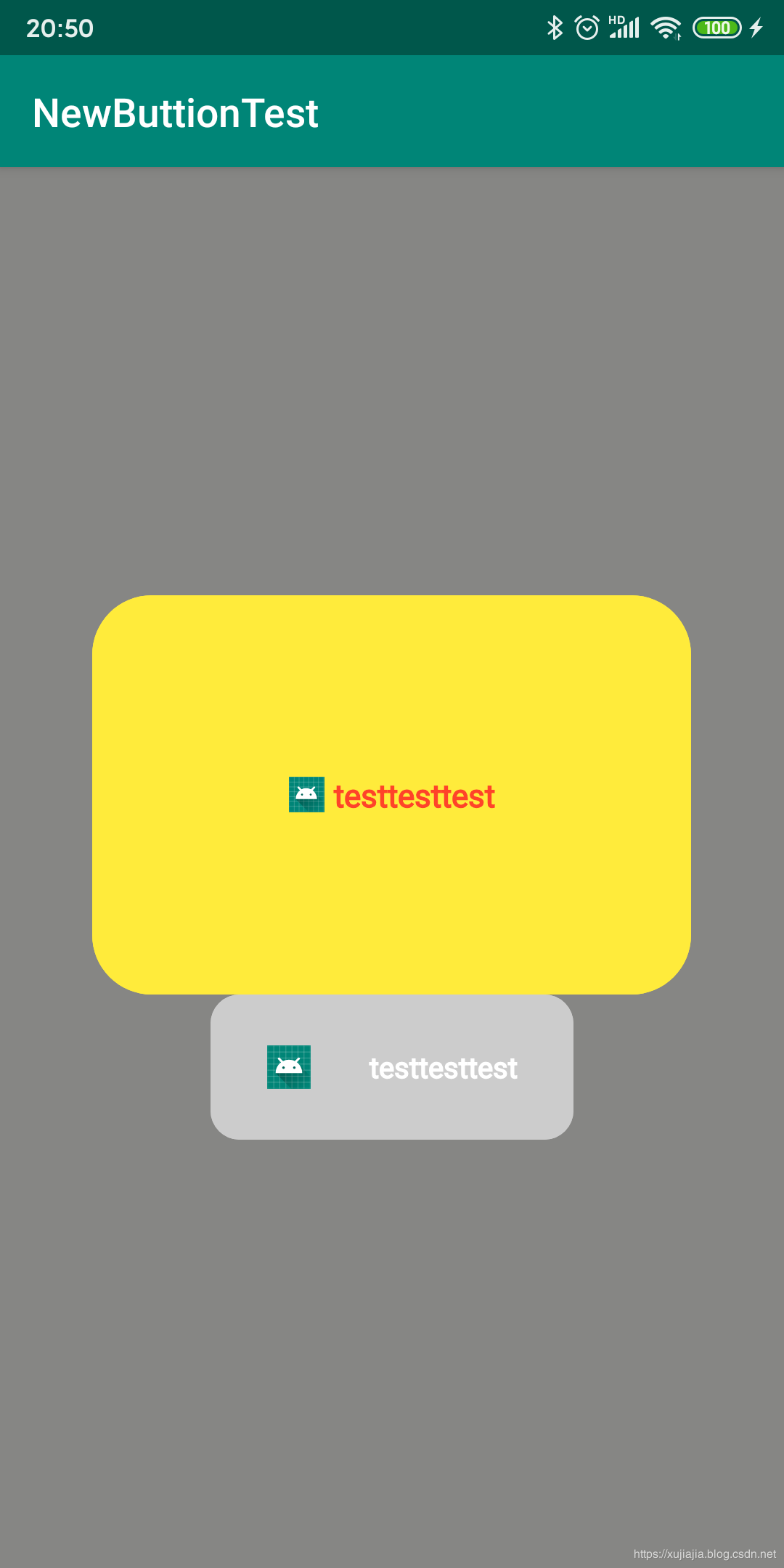
源码
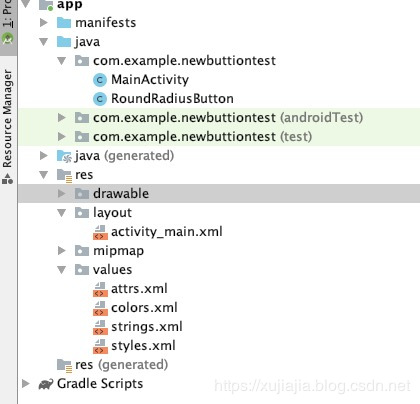
RoundRadiusButton.java
/**
* author: xujiajia
* description:
* 1、drawable只有在设置textString的时候才会生效(居中效果两个一起测量)
*/
public class RoundRadiusButton extends View {
//data
private int width = 0;
private int height = 0;
private int roundRadius = 16;
private int bgColor = Color.LTGRAY;
private boolean isTouching = false;
//img and text
private Drawable leftDrawable = null;
private int drawableWidth = 20;
private int drawableHeight = 20;
private int leftDrawablePaddingRight = 0;
private String textString;
private int textSize = 30;
private int textColor = Color.BLACK;
//onDraw
Paint paint;
Path path;
RectF rectF;
Rect rect;
public RoundRadiusButton(Context context, int width, int height) {
super(context);
this.width = width;
this.height = height;
this.setLayoutParams(new ViewGroup.LayoutParams(width, height));
this.setClickable(true);
}
public RoundRadiusButton(Context context, AttributeSet attrs) {
super(context, attrs);
getDataFromAttrs(context, attrs);
this.setClickable(true);
}
public RoundRadiusButton(Context context, AttributeSet attrs, int defStyleAttr) {
super(context, attrs, defStyleAttr);
getDataFromAttrs(context, attrs);
this.setClickable(true);
}
private void getDataFromAttrs(Context context, AttributeSet attrs) {
if (attrs == null) {
return;
}
TypedArray ta = context.obtainStyledAttributes(attrs, R.styleable.RoundRadiusButton);
roundRadius = ta.getDimensionPixelOffset(R.styleable.RoundRadiusButton_roundRadius, 16);
bgColor = ta.getColor(R.styleable.RoundRadiusButton_bgColor, Color.LTGRAY);
leftDrawable = ta.getDrawable(R.styleable.RoundRadiusButton_leftDrawable);
drawableWidth = ta.getDimensionPixelOffset(R.styleable.RoundRadiusButton_drawableWidth, 0);
drawableHeight = ta.getDimensionPixelOffset(R.styleable.RoundRadiusButton_drawableHeight, 0);
leftDrawablePaddingRight =
ta.getDimensionPixelOffset(R.styleable.RoundRadiusButton_leftDrawablePaddingRight, 0);
textString = ta.getString(R.styleable.RoundRadiusButton_textString);
textSize = ta.getDimensionPixelOffset(R.styleable.RoundRadiusButton_textSize, 0);
textColor = ta.getColor(R.styleable.RoundRadiusButton_textColor, Color.BLACK);
ta.recycle();
}
public void setRoundRadius(int roundRadius) {
this.roundRadius = roundRadius;
invalidate();
}
public void setBgColor(int bgColor) {
this.bgColor = bgColor;
invalidate();
}
public void setLeftDrawable(Drawable leftDrawable, int drawableWidth, int drawableHeight,
int paddingRight) {
this.leftDrawable = leftDrawable;
this.drawableWidth = drawableWidth;
this.drawableHeight = drawableHeight;
this.leftDrawablePaddingRight = paddingRight;
invalidate();
}
public void setTextString(String textString) {
this.textString = textString;
invalidate();
}
public void setTextColor(int textColor) {
this.textColor = textColor;
invalidate();
}
public void setTextSize(int textSize) {
this.textSize = textSize;
invalidate();
}
@Override public boolean onTouchEvent(MotionEvent event) {
if (isClickable()) {
switch (event.getAction()) {
case MotionEvent.ACTION_DOWN:
isTouching = true;
invalidate();
break;
case MotionEvent.ACTION_UP:
isTouching = false;
invalidate();
break;
}
}
return super.onTouchEvent(event);
}
@Override protected void onDraw(Canvas canvas) {
super.onDraw(canvas);
if (width == 0 || height == 0) {
width = getWidth();
height = getHeight();
}
if (paint == null) {
paint = new Paint();
}
if (path == null) {
path = new Path();
}
if (rectF == null) {
rectF = new RectF();
}
if (rect == null) {
rect = new Rect();
}
paint.setColor(bgColor);
paint.setAntiAlias(true);//抗锯齿
paint.setStrokeWidth(0);//线的宽度设为0,避免画圆弧的时候部分圆弧与边界相切
paint.setStyle(Paint.Style.FILL_AND_STROKE);
path.setFillType(Path.FillType.WINDING);
//左上圆角
path.moveTo(0, roundRadius);
rectF.set(0, 0, 2 * roundRadius,
2 * roundRadius);
path.addArc(rectF, 180, 90);
//上边
path.lineTo(width - roundRadius, 0);
//右上圆角
rectF.set(width - roundRadius * 2, 0, width, roundRadius * 2);
path.addArc(rectF, -90, 90);
//右边
path.lineTo(width, height - roundRadius);
//右下圆角
rectF.set(width - roundRadius * 2, height - roundRadius * 2, width,
height);
path.addArc(rectF, 0, 90);
//下边
path.lineTo(roundRadius, height);
//左下圆角
rectF.set(0, height - roundRadius * 2, 2 * roundRadius,
height);
path.addArc(rectF, 90, 90);
//左边
path.lineTo(0, roundRadius);
path.close();
canvas.drawPath(path, paint);
if (isTouching) {
paint.setColor(getContext().getResources().getColor(R.color.black_tran_30));
canvas.drawPath(path, paint);
}
//填充背景中间空白的部分
path.moveTo(0, roundRadius);
path.lineTo(width - roundRadius, 0);
path.lineTo(width, height - roundRadius);
path.lineTo(roundRadius, height);
path.close();
canvas.drawPath(path, paint);
if (isTouching) {
paint.setColor(getContext().getResources().getColor(R.color.black_tran_30));
canvas.drawPath(path, paint);
}
//text, drawable两个一起计算位置
if (!TextUtils.isEmpty(textString)) {
paint.setStrokeWidth(1.5f);
paint.setColor(textColor);
paint.setTextSize(textSize);
rect.setEmpty();
paint.getTextBounds(textString, 0, textString.length(), rect);
float leftBitmap = 0;
float topBitmap = 0;
if (leftDrawable != null) {
if (leftDrawable != null) {
leftBitmap = (1.0f * width - drawableWidth - rect.width() - leftDrawablePaddingRight) / 2;
topBitmap = (1.0f * height - drawableHeight) / 2;
leftDrawable.setBounds((int) leftBitmap, (int) topBitmap,
(int) (leftBitmap + drawableWidth),
(int) (topBitmap + drawableHeight));
leftDrawable.draw(canvas);
}
}
float textX = 0;
float textY =
1.0f * height / 2 + paint.getTextSize() / 2 - paint.getFontMetrics().descent / 2;
if (leftBitmap == 0 && topBitmap == 0) {
textX = width / 2 - rect.width() / 2;
} else {
textX = leftBitmap + drawableWidth + leftDrawablePaddingRight;
}
canvas.drawText(textString, textX, textY, paint);
}
}
}
MainActivity.java
public class MainActivity extends AppCompatActivity {
private LinearLayout llContainer;
@Override
protected void onCreate(Bundle savedInstanceState) {
super.onCreate(savedInstanceState);
setContentView(R.layout.activity_main);
initView();
}
private void initView() {
llContainer = findViewById(R.id.ll_container);
RoundRadiusButton roundRadiusButton = new RoundRadiusButton(this, 500, 200);
roundRadiusButton.setBgColor(Color.LTGRAY);
roundRadiusButton.setRoundRadius(40);
//text
roundRadiusButton.setTextString("testtesttest");
roundRadiusButton.setTextColor(Color.WHITE);
roundRadiusButton.setTextSize(40);
//drawable
roundRadiusButton.setLeftDrawable(getResources().getDrawable(R.mipmap.ic_launcher), 60, 60, 80);
roundRadiusButton.setOnClickListener(new View.OnClickListener() {
@Override public void onClick(View v) {
Toast.makeText(MainActivity.this, "testest", Toast.LENGTH_LONG).show();
}
});
roundRadiusButton.setClickable(false);
llContainer.addView(roundRadiusButton);
}
}
activity_main.xml
xmlns:app="http://schemas.android.com/apk/res-auto"
xmlns:tools="http://schemas.android.com/tools"
android:id="@+id/ll_container"
android:layout_width="match_parent"
android:layout_height="match_parent"
android:background="#868684"
android:gravity="center"
android:orientation="vertical"
tools:context=".MainActivity"
>
android:layout_width="300dp"
android:layout_height="200dp"
app:bgColor="#FFEB3B"
app:drawableHeight="18dp"
app:drawableWidth="18dp"
app:leftDrawable="@mipmap/ic_launcher"
app:leftDrawablePaddingRight="5dp"
app:roundRadius="30dp"
app:textColor="#FF4329"
app:textSize="16dip"
app:textString="testtesttest"
/>
attrs.xml
colors.xml
#30000000
总结
以上所述是小编给大家介绍的android 自定义圆角button效果的实例代码,希望对大家有所帮助,如果大家有任何疑问请给我留言,小编会及时回复大家的。在此也非常感谢大家对脚本之家网站的支持!
如果你觉得本文对你有帮助,欢迎转载,烦请注明出处,谢谢!

华为开发者空间,是为全球开发者打造的专属开发空间,汇聚了华为优质开发资源及工具,致力于让每一位开发者拥有一台云主机,基于华为根生态开发、创新。
更多推荐



 0
0 0
0- 0


 已为社区贡献4条内容

所有评论(0)