android怎么实现广告页,Android 实现广告欢迎界面(倒计时)
前些时候就是别人问我他的android APP怎么做一个广告的欢迎界面,就是过几秒后自动跳转到主界面的实现。也就是下面这种类似的效果。要插什么广告的话你就换张图吧。那么我就思考了下,就用了android 的一个动画类Animation...其实在Android 的API开发文档上就有的一个东西。自己可以去查下看。就像下面的这个图上面的一样的。也是属于界面View 下的一个类方法...其实这个东西,
前些时候就是别人问我他的android APP怎么做一个广告的欢迎界面,就是过几秒后自动跳转到主界面的实现。
也就是下面这种类似的效果。要插什么广告的话你就换张图吧。

那么我就思考了下,就用了android 的一个动画类Animation...其实在Android 的API开发文档上就有的一个东西。自己可以去查下看。就像下面的这个图上面的一样的。也是属于界面View 下的一个类方法...
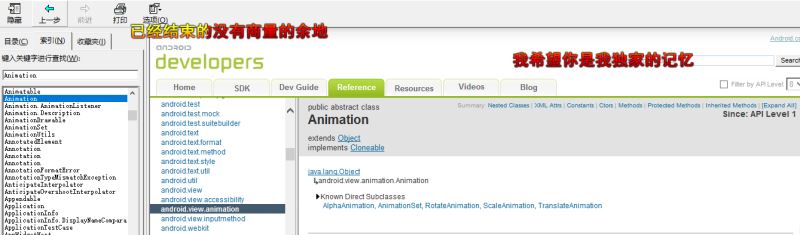
其实这个东西,怎么讲呢。
咱主要的话还是来一个小白都看的懂的一个教程类的文章吧。
第一步的话
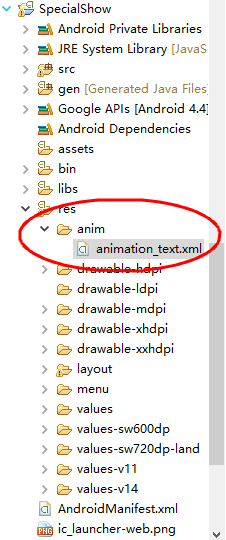
咱先开始在咱的项目中新建一个anim的文件夹用来存等会要用到的一些 倒计时 的文字的动态效果的吧。(想想还是截个屏吧,怕有些同志还是看不懂...没别的意思)
 看到了么
看到了么
看到了么,就是这样的,在你的Android项目下的存放资源的那个文件夹中新建一个anim文件夹,再新建一个animation_text.xml
的xml文件,待会就知道有啥用了。
咱下面
第二步的话,咱就开始添加内容了。
android:duration="1000"
android:fromAlpha="0.0"
android:toAlpha="1.0" />
android:duration="800"
android:fromXScale="1.5"
android:fromYScale="1.5"
android:pivotX="50%"
android:pivotY="50%"
android:toXScale="1.0"
android:toYScale="1.0" />
上面的效果的话,如果是不知道这些属性是什么意思的话那你可以百度的,我这一一讲的话就感觉有点啰嗦的了。
咱还是讲正题吧,那上面这些写的有什么用呢。就看下面了,那么我们下面就得开始把那个界面布局出来了吧,然后我们下面就开始吧,
做一个类似我上面的界面吧。咱就用FrameLayout布局了,如果知道是什么布局方式的话,我觉得应该看的懂吧。
xmlns:tools="http://schemas.android.com/tools"
android:layout_width="match_parent"
android:layout_height="match_parent"
android:background="@drawable/page24"
tools:context="${relativePackage}.${activityClass}" >
android:layout_width="wrap_content"
android:layout_height="wrap_content"
android:layout_gravity="right"
android:orientation="horizontal" >
android:layout_width="wrap_content"
android:layout_height="wrap_content"
android:layout_gravity="right"
android:text="广告倒计时:"
android:textColor="#ffffff"
android:textSize="20sp" />
android:id="@+id/textView"
android:layout_width="wrap_content"
android:layout_height="wrap_content"
android:layout_gravity="right"
android:text="5"
android:textColor="#ffffff"
android:textSize="20sp" />
android:layout_width="wrap_content"
android:layout_height="wrap_content"
android:layout_gravity="right"
android:text="s"
android:textColor="#ffffff"
android:textSize="20sp" />
下面的话咱就开始要写怎么在app内部实现的方法了吧,这就到了我们的Java的程序天地来了。
这时候我们就在项目下的src文件下的包里面写上你的Java文件吧。咱慢慢来,别急。
/**
*
* 1.声明界面
* 2.定义变量
* 3.调用类Animation
* 4.写方法让它动起来
* @author Rain
*
*/
public class WelcomeActivity extends Activity{
// 声明控件对象
private TextView textView;
//声明时间有多少;
private int count = 5;
private Animation animation;
@Override
protected void onCreate(Bundle savedInstanceState) {
super.onCreate(savedInstanceState);
// 下面的话就是去除标题的方法
requestWindowFeature(Window.FEATURE_NO_TITLE);
setContentView(R.layout.activity_welcome);
// 初始化控件对象textView
textView = (TextView) findViewById(R.id.textView);
animation = AnimationUtils.loadAnimation(this, R.anim.animation_text);
handler.sendEmptyMessageDelayed(0, 1000);
}
//咱在写一个计算Welcome界面的广告时间结束后进入主界面的方法
private int getCount() {
count--;
if (count == 0) {
Intent intent = new Intent(this, MainActivity.class);
startActivity(intent);
finish();
}
return count;
}
//进行一个消息的处理
@SuppressLint("HandlerLeak")
private Handler handler = new Handler() {
public void handleMessage(android.os.Message msg) {
if (msg.what == 0) {
textView.setText(getCount()+"");
handler.sendEmptyMessageDelayed(0, 1000);
animation.reset();
textView.startAnimation(animation);
}
};
};
}
用的时候可得注意导入下包哈。
这样一个会自动跳转到主界面的广告界面就完成了。
总结
以上所述是小编给大家介绍的Android 实现广告欢迎界面(倒计时),希望对大家有所帮助,如果大家有任何疑问请给我留言,小编会及时回复大家的。在此也非常感谢大家对脚本之家网站的支持!

华为开发者空间,是为全球开发者打造的专属开发空间,汇聚了华为优质开发资源及工具,致力于让每一位开发者拥有一台云主机,基于华为根生态开发、创新。
更多推荐



 1
1 0
0- 0


 已为社区贡献3条内容

所有评论(0)