android tabhost 底部有一条白条,Android TabHost解决下面白线
我之前做分页都是用GridView和ActivityGroup实现的.因为觉得TabHost不好用,还有就是自己水平差的原因吧.如果帮的话,重写view任何问题都可以解决,呵呵,下面请看实现过程,其实很简单.
针对TabHost的运用,我就不多讲解了,网上例子好多,或者你也可以下载我的Demo查看,不过先声明,写的不好.
代码片段:publicclassMyActivityextendsTabActivity {
privateTabWidget tabWidget;
/** Called when the activity is first created. */
publicvoidonCreate(Bundle savedInstanceState) {
super.onCreate(savedInstanceState);
setContentView(R.layout.main);
Resources res = getResources();// Resource object to get Drawables
finalTabHost tabHost = getTabHost();// The activity TabHost
TabHost.TabSpec spec;// Resusable TabSpec for each tab
Intent intent;// Reusable Intent for each tab
// Create an Intent to launch an Activity for the tab (to be reused)
intent =newIntent().setClass(this, ArtistsActivity.class);
// Initialize a TabSpec for each tab and add it to the TabHost
spec = tabHost
.newTabSpec("artists")
.setIndicator("Artists",
res.getDrawable(R.drawable.ic_tab_artists))
.setContent(intent);
tabHost.addTab(spec);
// Do the same for the other tabs
intent =newIntent().setClass(this, AlbumsActivity.class);
spec = tabHost
.newTabSpec("albums")
.setIndicator("Albums",
res.getDrawable(R.drawable.ic_tab_artists))
.setContent(intent);
tabHost.addTab(spec);
intent =newIntent().setClass(this, SongsActivity.class);
spec = tabHost
.newTabSpec("songs")
.setIndicator("Songs",
res.getDrawable(R.drawable.ic_tab_artists))
.setContent(intent);
tabHost.addTab(spec);
tabHost.setCurrentTab(2);
View v;
tabWidget = tabHost.getTabWidget();
for(inti =0; i
// 获取tabview项
v = tabWidget.getChildAt(i);
// 设置tab背景颜色
v.setBackgroundResource(Android.R.color.white);
// 获取textview控件,(默认为白色)
TextView textView = (TextView) v.findViewById(android.R.id.title);
textView.setTextColor(Color.BLACK);
// 默认选项要处理
if(tabHost.getCurrentTab() == i)
v.setBackgroundResource(R.drawable.renren_sdk_pay_repair_btn);
}
// tabchanged的监听
tabHost.setOnTabChangedListener(newOnTabChangeListener() {
// tabId显示的是:newTabSpec里面的值
@Override
publicvoidonTabChanged(String tabId) {
// 首先把所有的view背景初始化了.
for(inti =0; i
View v = tabHost.getTabWidget().getChildAt(i);
// 设置tab背景颜色
v.setBackgroundResource(android.R.color.white);
// 选中的进行处理
if(tabHost.getCurrentTab() == i) {
v.setBackgroundResource(R.drawable.renren_sdk_pay_repair_btn);
}
}
}
});
}
}
其实就是那几行加注释部分,相信你看一下就明白.
解决Tab下面白线方法:
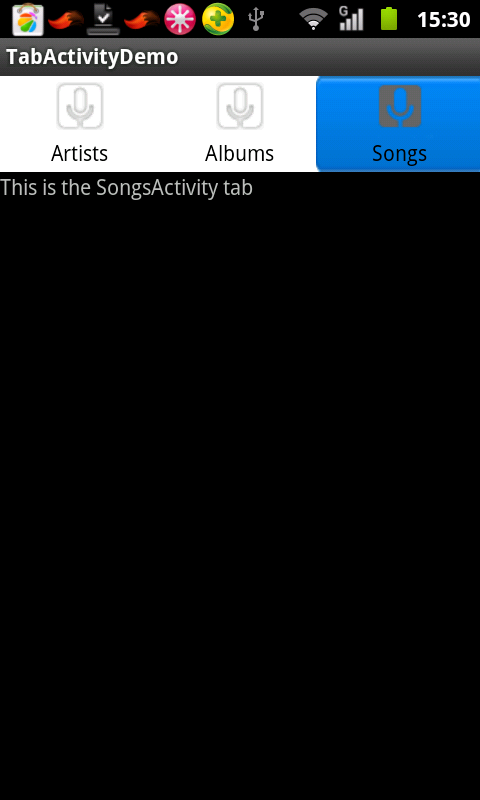
首先我们要获取Tab的分页view和textview控件,因为textview默认字体是白色.我们要进行处理.获取后进行相应处理(也就是该加背景的加背景,该改变字体颜色的改变字体颜色).最后我们要对TabHost进行监听(OnTabChangedListener);也不是什么监听,。就是用他的点击执行事件.
下面是视图:


源码下载
具体下载目录在 /2012年资料/8月/30日/Android TabHost解决下面白线

华为开发者空间,是为全球开发者打造的专属开发空间,汇聚了华为优质开发资源及工具,致力于让每一位开发者拥有一台云主机,基于华为根生态开发、创新。
更多推荐


 0
0 0
0- 0


 已为社区贡献2条内容

所有评论(0)