android edittext 表情,Android EditText实现输入表情
一、简介edittext是textview的子类,textview能用的工具edittext都能用,这里就是edittext利用spannablestring的imagespan实现输入表情的功能类结构图:二、方法1)edittext利用spannablestring的imagespan实现添加表情的方法第一步:创建spannablestring对象spannablestringspannable
一、简介
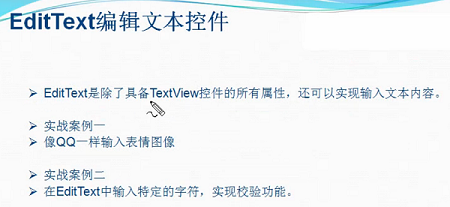
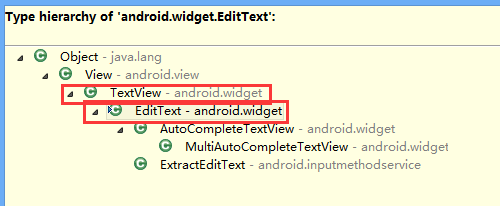
edittext是textview的子类,textview能用的工具edittext都能用,这里就是edittext利用spannablestring的imagespan实现输入表情的功能
类结构图:
二、方法
1)edittext利用spannablestring的imagespan实现添加表情的方法
第一步:创建spannablestring对象spannablestring
spannablestring spannablestring=new spannablestring("d");
第二步:利用spannablestring的setspan方法添加imagespan
imagespan imagespan=new imagespan(this, bitmapfactory.decoderesource(getresources(),r.drawable.image1));
spannablestring.setspan(imagespan, 0, 1, spannable.span_exclusive_exclusive);
第三步:在edittext对象中添加spannablestring
et_emotion.append(spannablestring);
三、代码实例
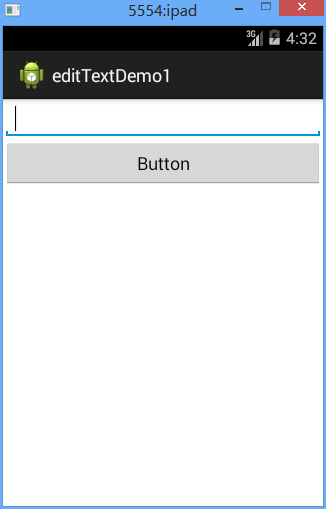
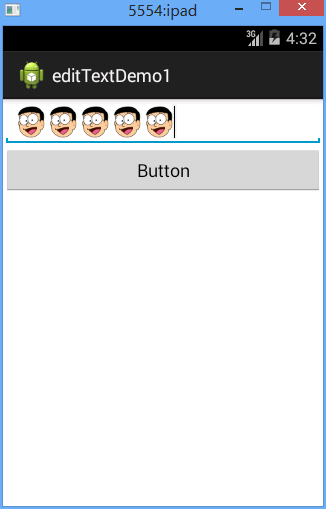
效果图:
代码:
fry.activity01
package fry;
import com.example.edittextdemo1.r;
import android.app.activity;
import android.graphics.bitmapfactory;
import android.os.bundle;
import android.text.spannable;
import android.text.spannablestring;
import android.text.style.imagespan;
import android.view.view;
import android.view.view.onclicklistener;
import android.widget.button;
import android.widget.edittext;
public class activity01 extends activity implements onclicklistener{
private edittext et_emotion;
private button bt_addemotion;
@override
protected void oncreate(bundle savedinstancestate) {
// todo auto-generated method stub
super.oncreate(savedinstancestate);
setcontentview(r.layout.activity01);
et_emotion=(edittext) findviewbyid(r.id.et_emotion);
bt_addemotion=(button) findviewbyid(r.id.bt_addemotion);
bt_addemotion.setonclicklistener(this);
}
@override
public void onclick(view arg0) {
// todo auto-generated method stub
/*
* edittext利用spannablestring的imagespan实现添加表情的方法
* 第一步:创建spannablestring对象spannablestring
* 第二步:利用spannablestring的setspan方法添加imagespan
* 第三步:在edittext对象中添加spannablestring
*
*/
spannablestring spannablestring=new spannablestring("d");
imagespan imagespan=new imagespan(this, bitmapfactory.decoderesource(getresources(),r.drawable.image1));
spannablestring.setspan(imagespan, 0, 1, spannable.span_exclusive_exclusive);
et_emotion.append(spannablestring);
}
}
/edittextdemo1/res/layout/activity01.xml
android:layout_width="match_parent"
android:layout_height="match_parent"
android:orientation="vertical" >
android:id="@+id/et_emotion"
android:layout_width="match_parent"
android:layout_height="wrap_content"
android:ems="10" >
android:id="@+id/bt_addemotion"
android:layout_width="match_parent"
android:layout_height="wrap_content"
android:text="button" />
总结
以上所述是小编给大家介绍的android edittext实现输入表情,希望对大家有所帮助

华为开发者空间,是为全球开发者打造的专属开发空间,汇聚了华为优质开发资源及工具,致力于让每一位开发者拥有一台云主机,基于华为根生态开发、创新。
更多推荐



 0
0 0
0- 0


 已为社区贡献1条内容

所有评论(0)