android中libgif.so例子程序,android使用giflib加载gif
背景不多说,反正ndk加载gif比java上加载gif好很多很多,主要体现在内存占用与cpu消耗上。使用ndk加载占用内存更小,消耗的cpu更少。要使用ndk加载,需要用到giflib库,Android源代码里面其实也用到了这个库。一、下载giflib二、构建so库1、把需要用到的代码拷贝进来2、实现我们的CMakeLists.txtcmake_minimum_required(VERSION 3
背景不多说,反正ndk加载gif比java上加载gif好很多很多,主要体现在内存占用与cpu消耗上。使用ndk加载占用内存更小,消耗的cpu更少。
要使用ndk加载,需要用到giflib库,Android源代码里面其实也用到了这个库。
一、下载giflib
二、构建so库
1、把需要用到的代码拷贝进来
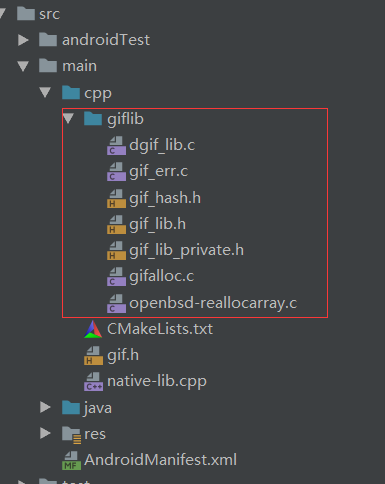
2、实现我们的CMakeLists.txt
cmake_minimum_required(VERSION 3.4.1)
set(SOURCES)
file(GLOB_RECURSE SOURCES ${CMAKE_SOURCE_DIR}/*.cpp ${CMAKE_SOURCE_DIR}/*.c)
add_library(
native-lib
SHARED
${SOURCES})
set(LIBS)
list(APPEND LIBS log jnigraphics)
target_link_libraries(
native-lib
${LIBS})
语法上就不多说了。
注意还需要用到log库和 jnigraphics库,一个是用来打印log,一个是用来图片解析的时候用到。
3、新建java类GifHandler,在里面新建本地方法,方便等会直接用快捷方式在native-lib里面生成
package com.example.gifndk;
import android.graphics.Bitmap;
public class GifHandler {
static {
System.loadLibrary("native-lib");
}
private volatile long gifInfo;
public GifHandler(String path) {
gifInfo = openFile(path);
}
public synchronized int getWidth() {
return getWidthN(gifInfo);
}
public synchronized int getHeight() {
return getHeightN(gifInfo);
}
public synchronized int getLength() {
return getLengthN(gifInfo);
}
/**
* @param bitmap
* @param index 第几帧
* @return
*/
public long renderFrame(Bitmap bitmap, int index) {
return renderFrameN(gifInfo, bitmap, index);
}
private native int getWidthN(long gifInfo);
private native int getHeightN(long gifInfo);
private native int getLengthN(long gifInfo);
private native long renderFrameN(long gifInfo, Bitmap bitmap, int index);
private native long openFile(String path);
}
通过这些方法获取宽度,高度,帧数,渲染,打开文件。
4、native-lib代码,这里编写我们的本地代码
首先需要引进的头文件有:
#include
#include
#include "giflib/gif_lib.h"
#include
#include "gif.h"
//双引号是从本地项目找,找不到再从系统找,<>是直接从系统找
NDK中带的头文件,解析图片要用到。
gif.h我们自己新建的头文件,等会讲
首先看openFile方法
extern "C"
JNIEXPORT jlong JNICALL
Java_com_example_gifndk_GifHandler_openFile(
JNIEnv *env,
jobject /* this */, jstring path) {
const char *path1 = env->GetStringUTFChars(path, 0);
int err;
GifFileType *gif = DGifOpenFileName(path1, &err);
err = DGifSlurp(gif);
env->ReleaseStringUTFChars(path, path1);
return reinterpret_cast(gif);
}
这个方法主要是获取到GifFileType的指针地址。
GifFileType里面有gif文件的各种信息。
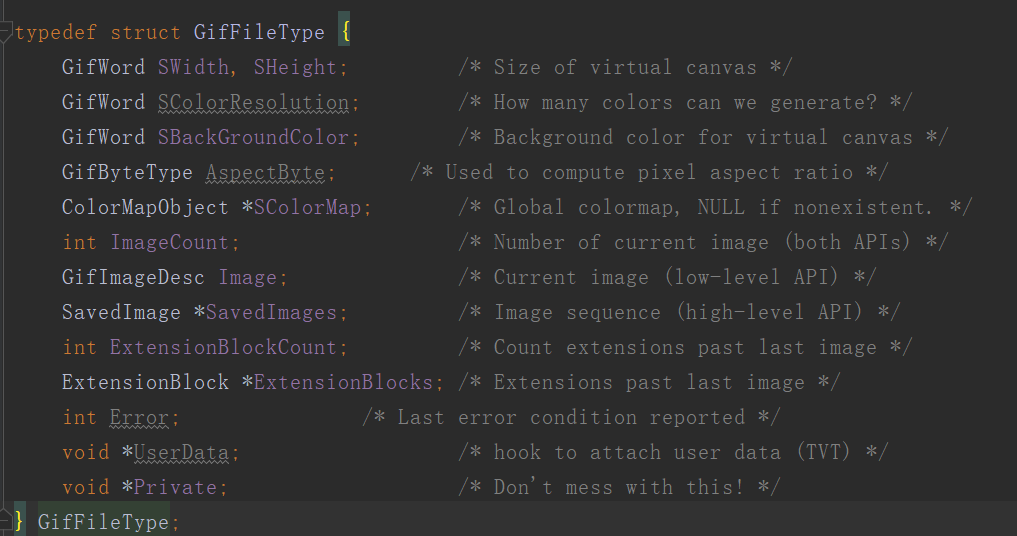
从注释也可以看出具体的含义。
顺便说一下UserData,这个其实相当于tag,类似于可以给一个view tag标识。
获取到到GifFileType之后便可以通过它获取宽度,高度,帧数,方法如下:
extern "C"
JNIEXPORT jint JNICALL
Java_com_example_gifndk_GifHandler_getWidthN(JNIEnv *env, jobject thiz, jlong gif_info) {
return ((GifFileType *) gif_info)->SWidth;
}
extern "C"
JNIEXPORT jint JNICALL
Java_com_example_g

关于找一找教程网
本站文章仅代表作者观点,不代表本站立场,所有文章非营利性免费分享。
本站提供了软件编程、网站开发技术、服务器运维、人工智能等等IT技术文章,希望广大程序员努力学习,让我们用科技改变世界。
[android使用giflib加载gif]http://www.zyiz.net/tech/detail-111563.html
赞(0)
共有
条评论
网友评论

华为开发者空间,是为全球开发者打造的专属开发空间,汇聚了华为优质开发资源及工具,致力于让每一位开发者拥有一台云主机,基于华为根生态开发、创新。
更多推荐



 0
0 0
0- 0


 已为社区贡献1条内容

所有评论(0)