android notification设计规范,Android开发学习笔记:Notification和NotificationManager浅析...
Notification和NotificationManager操作相对比较简单,一般获取系统级的服务NotificationManager,然后实例化Notification,设置它的属性,通过NotificationManager发出通知就可以了。基本步骤如下:1.获取NotificationManagerString service = Context.NOTIFICATION_SERVIC
Notification和NotificationManager操作相对比较简单,一般获取系统级的服务NotificationManager,然后实例化Notification,设置它的属性,通过NotificationManager发出通知就可以了。基本步骤如下:
1.获取NotificationManager
String service = Context.NOTIFICATION_SERVICE;
NotificationManager mNotificationManager =(NotificationManager)getSystemService(service);
2.实例化Notification对象
//实例化Notification
Notification notification =newNotification();
3.设置Notification的属性
// 设置显示图标,该图标会在状态栏显示
inticon = notification.icon = R.drawable.happy;
// 设置显示提示信息,该信息也在状态栏显示
String tickerText ="测试Notification";
// 显示时间
longwhen = System.currentTimeMillis(); notification.icon = icon;
notification.tickerText = tickerText;
notification.when = when;
//也可以这样设置
Notification notification_2=newNotification(icon,tickerText,when)
调用setLatestEventInfo()方法在视图中设置图标和时间。
// 实例化Intent
Intent intent =newIntent(MainActivity.this, MainActivity.class);
// 获得PendingIntent
PendingIntent pIntent = PendingIntent.getActivity(MainActivity.this,0, intent,0);
// 设置事件信息
notification.setLatestEventInfo(MainActivity.this," Title","Content", pIntent);
4.发出通知
//Notification标示ID
privatestaticfinalintID =1;
//发出通知
mNotificationManager.notify(ID, n);
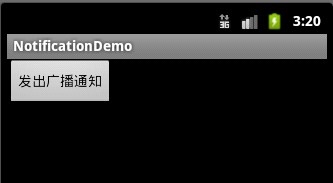
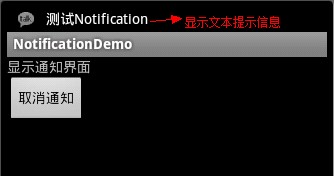
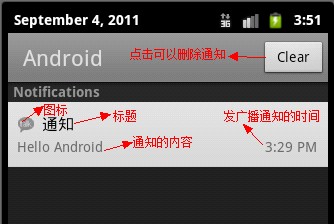
下面是具体的例子,在这个例子里定义了一个MainActivity发出广播通知,定义一个MyReceiver类继承Broadcasts接受通知,当接收完通知之后,启动一个SecondActivity,在SecondActivity类中通过Notification和NotificationManager来可视化显示广播通知。具体的步骤如下:
MainActivity.java
packagecom.android.notification;
importandroid.app.Activity;
importandroid.content.Intent;
importandroid.os.Bundle;
importandroid.view.View;
importandroid.view.View.OnClickListener;
importandroid.widget.Button;
publicclassMainActivityextendsActivity {
// 声明Button
privateButton btn;
// 定义Broadcast Receiver action
privatestaticfinalString MY_ACTION ="com.android.notification.MY_ACTION";
@Override
publicvoidonCreate(Bundle savedInstanceState) {
super.onCreate(savedInstanceState);
// 设置当前布局视图
setContentView(R.layout.main);
// 实例化Button
btn = (Button)findViewById(R.id.Button1);
// 添加事件监听器
btn.setOnClickListener(listener);
}
// 创建事件监听器
privateOnClickListener listener =newOnClickListener() {
@Override
publicvoidonClick(View v) {
// 实例化Intent
Intent intent =newIntent();
// 设置Intent action属性
intent.setAction(MY_ACTION);
// 发起广播
sendBroadcast(intent);
}
};
}
MyReceiver.java
packagecom.android.notification;
importandroid.content.BroadcastReceiver;
importandroid.content.Context;
importandroid.content.Intent;
publicclassMyReceiverextendsBroadcastReceiver{
@Override
publicvoidonReceive(Context context, Intent intent) {
// 实例化Intent
Intent i =newIntent();
// 在新的任务中启动Activity
i.setFlags(Intent.FLAG_ACTIVITY_NEW_TASK);
// 设置Intent启动的组件名称
i.setClass(context, SecondActivity.class);
// 启动Activity显示通知
context.startActivity(i);
}
}
SecondActivity.java
packagecom.android.notification;
importandroid.app.Activity;
importandroid.app.Notification;
importandroid.app.NotificationManager;
importandroid.app.PendingIntent;
importandroid.content.Intent;
importandroid.os.Bundle;
importandroid.view.View;
importandroid.view.View.OnClickListener;
importandroid.widget.Button;
publicclassSecondActivityextendsActivity {
// 声明按钮
privateButton cancelBtn;
// 声明Notification
privateNotification notification ;
// 声明NotificationManager
privateNotificationManager mNotification;
// Notification标示ID
privatestaticfinalintID =1;
@Override
publicvoidonCreate(Bundle savedInstanceState) {
super.onCreate(savedInstanceState);
setContentView(R.layout.second);
// 实例化按钮
cancelBtn = (Button)findViewById(R.id.cancelButton2);
// 获得NotificationManager实例
String service = NOTIFICATION_SERVICE;
mNotification = (NotificationManager)getSystemService(service);
// 实例化Notification
notification =newNotification();
// 设置显示图标,该图标会在状态栏显示
inticon = notification.icon = android.R.drawable.stat_notify_chat;
// 设置显示提示信息,该信息也会在状态栏显示
String tickerText ="Test Notification";
// 显示时间
longwhen = System.currentTimeMillis();
notification.icon = icon;
notification.tickerText = tickerText;
notification.when = when;
// 实例化Intent
Intent intent =newIntent(this, MainActivity.class);
// 获得PendingIntent
PendingIntent pi = PendingIntent.getActivity(this,0, intent,0);
// 设置事件信息
notification.setLatestEventInfo(this,"消息","Hello Android", pi);
// 发出通知
mNotification.notify(ID, notification);
// 为按钮添加监听器
cancelBtn.setOnClickListener(cancelListener);
}
// 取消通知监听器
privateOnClickListener cancelListener =newOnClickListener() {
@Override
publicvoidonClick(View v) {
// 取消通知
mNotification.cancel(ID);
}
};
}
main.xml
android:orientation="vertical"
android:layout_width="fill_parent"
android:layout_height="fill_parent"
>
android:text="发出广播通知"
android:id="@+id/Button1"
android:layout_width="wrap_content"
android:layout_height="wrap_content"
/>
second.xml
android:orientation="vertical"
android:layout_width="fill_parent"
android:layout_height="fill_parent"
>
android:text="显示通知界面"
android:id="@+id/TextView1"
android:layout_width="wrap_content"
android:layout_height="wrap_content"
/>
android:text="取消通知"
android:id="@+id/cancelButton2"
android:layout_width="wrap_content"
android:layout_height="wrap_content"
/>
在AndroidManifest.xml文件中16~21加入对receiver,SecondActivity的声明
package="com.android.notification"
android:versionCode="1"
android:versionName="1.0">
android:label="@string/app_name">
效果图:
Notification丰富的提示方式:
声音提醒
·使用默认声音
notification.defaults |= Notification.DEFAULT_SOUND;
·使用自定义声音
notification.sound = Uri.parse("file:///sdcard/notification/ringer.mp3");
·注:如果定义了默认声音,那么自定义声音将被覆盖
振动提醒
·使用默认振动
notification.defaults |= Notification.DEFAULT_VIBRATE;
·使用自定义振动
long[] vibrate = {0,100,200,300};notification.vibrate = vibrate;
·注:如果定义了默认振动,那么自定义振动将被覆盖
灯光闪烁提醒
·使用默认闪烁
notification.defaults |= Notification.DEFAULT_LIGHTS;
·使用自定义闪烁
notification.ledARGB = 0xff00ff00;// LED灯的颜色,绿灯notification.ledOnMS = 300;// LED灯显示的毫秒数,300毫秒notification.ledOffMS = 1000;// LED灯关闭的毫秒数,1000毫秒notification.flags |= Notification.FLAG_SHOW_LIGHTS; // 必须加上这个标志
更多特性
可以通过 Notification 的相关字段或标志(flags)为提醒设置更多的特性。
·FLAG_AUTO_CANCEL 标志:当提醒被用户点击之后会自动被取消(cancel);
·FLAG_INSISTENT 标志:在用户响应之前会一直重复提醒音;
·FLAG_ONGOING_EVENT 标志:Add this to the flags field to group the notification under
the "Ongoing" title in the Notifications window.
·FLAG_NO_CLEAR 标志:当在提醒栏中点击“清除提醒”按钮时,该提醒将不会被清除;
·number 字段:This value indicates the current number of events represented by the notification.
The appropriate number is overlaid on top of the status bar icon. If you intend to use this
field, then you must start with "1" when the Notification is first created. (If you change
the value from zero to anything greater during an update, the number is not shown.)
·iconLevel 字段:This value indicates the current level of a LevelListDrawablethat isused for the notification icon. You can animate the icon in the status bar by changingthis value to correlate with the drawable's defined in a LevelListDrawable.
·contentView 字段:To define your own layout for the expanded message, instantiate a
RemoteViews object and pass it to the contentView field of your Notification. Pass the
PendingIntent to the contentIntent field.

华为开发者空间,是为全球开发者打造的专属开发空间,汇聚了华为优质开发资源及工具,致力于让每一位开发者拥有一台云主机,基于华为根生态开发、创新。
更多推荐


 0
0 0
0- 0


 已为社区贡献3条内容

所有评论(0)