uniapp获取登录授权和手机号授权(整理)
uniapp获取登录授权和手机号授权
·
登录授权: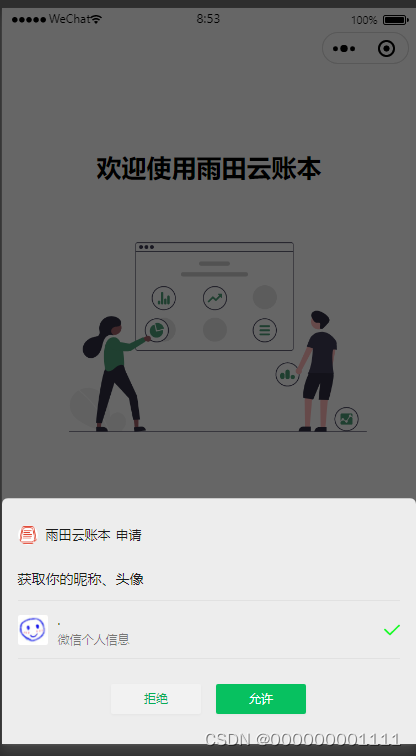
授权手机号: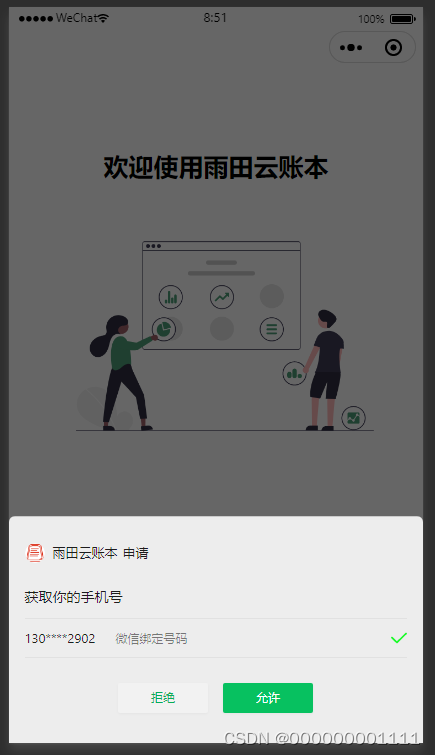
<template>
	<view>
		<view class="tx-w">
			<view class="tx">
				<image class="tx-img" :src="info.avatarUrl"></image>
				<view class="zx"></view>
			</view>
			<view class="name">{{info.nickName}} </view>
			<view class="name-qm">自然的美好的,你的</view>
		</view>

		<button @click="getUserProfile"> 获取用户信息 </button>

		<button open-type="getPhoneNumber" @getphonenumber="getPhoneNumber" class="login-but">获取手机号</button>

	</view>
</template>

<script>
	export default {
		data() {
			return {
				info:[]
			}
		},
		onLoad(){
			let that = this;
			uni.login({
				provider: 'weixin',
				success: function(loginRes) {
					// 获取用户信息-授权code
					 console.log(loginRes.code)
				}
			});
		},
		methods: {
			getUserProfile() {
			    let that =this
			    uni.getUserProfile({
			        desc:"用于完善用户信息",
			        success: (res1) => {
			            that.info = res1.userInfo;
			            console.log(res1)
			            uni.showToast({
			                icon:"none",
			                title:'获取成功'
			            })
			        },
			        fail: (err) => {
			            console.log(err)
			            uni.showToast({
			                icon:"none",
			                title:'用户拒绝获取'
			            })
			        }
			    })
			},
			getPhoneNumber(e){
				console.log(e.detail)
			}

		}
	}
</script>

<style>
	.tx-w{
		margin-top:200upx;
	}

	.tx{
		text-align:center;
	}

	.tx image{
		width:140upx;
		height:140upx;
		border-radius: 50%;
	}

	.name{
		text-align:center;
		margin-top:20upx;
	}

	.name-qm{
		text-align:center;
		margin-top:20upx;
		font-size:30upx;
	}
</style>
看授权返回值-调试接口:
<template>
	<view class="warranty" :style="{backgroundImage: 'url(' + story.src+ ')'}">
		<view class="title color222 font-weight" :style="{'padding-top':menuTop +'px'}">登录</view>
		<image src="../static/enter/logo.png" mode="" class="logoImg"></image>
		<view class="logn height100 font-size30 color222 align-center" @click="logIn()">登录/注册</view>
		<view class="logn1 height100 font-size30 color align-center" v-if="licenseStatus == 0" @click="warrantyClick()">微信授权登录</view>
		<button class="logn1 height100 font-size30 color align-center" hover-class="none" type='primary' open-type="getPhoneNumber" @getphonenumber="PhoneNumber" v-if="licenseStatus == 1">授权手机登录</button>
		<view class="baseBox">
			<image src="../static/enter/btn_wxz.png" mode="" class="btn margin-right20" v-if="agree == 0"
				@click="agreeClick(1)"></image>
			<image src="../static/enter/btn_xuanzhong.png" mode="" class="btn margin-right20" v-if="agree == 1"
				@click="agreeClick(0)"></image>
			<view class="txt">
				我已阅读并同意 <text class="txt1" @click="dealClick('用户服务协议')">《用户服务协议》</text> 和 <text class="txt1" @click="dealClick('隐私协议')">《隐私协议》</text>
			</view>
		</view>

		<!-- 协议开始 -->
		<view class="dealBox width100Percent" v-if="dealShow">
			<view class="dealBoxBg width100Percent"></view>
			<view class="dealMain">
				<image src="../static/img/close.png" mode="aspectFill" class="closeImg" @click="closeClick"></image>
				<view class="title width100Percent height60 align-center font-bold color222 font-size22">{{dealTitle}}</view>
				<view class="cen width100Percent height100Percent">
					111测试测试测试测试测试测试测试测试测试测试测试测试测试测试测试测试测试测试测试测试测试测试测试测试测试测试测试测试测试测试测试测试测试测试测试测试测试测试测试测试测试测试测试测试测试测试测试测试测试测试测试测试
					测试测试测试测试测试测试测试测试测试测试测试测试测试测试测试测试测试测试测试测试测试测试测试测试测试测试测试测试测试测试测试测试测试测试测试测试测试测试测试测试
					测试测试测试测试测试测试测试测试测试测试测试测试测试测试测试测试测试测试测试测试测试测试测试测试测试测试测试测试测试测试测试测试测试测试测试测试测试测试测试测试
					测试测试测试测试测试测试测试测试测试测试测试测试测试测试测试测试测试测试测试测试
					测试测试测试测试测试测试测试测试测试测试测试测试测试测试测试测试测试测试测试测试测试测试测试测试测试测试测试测试测试测试测试测试测试测试测试测试
				</view>
			</view>
		</view>

	</view>
</template>

<script>
	export default {
		components: {

		},
		data() {
			return {
				// 计算头部距离开始
				statusBarHeight: 0, //状态栏的高度
				navigatorHeight: 0, //导航栏高度
				menuHeight: 0, //胶囊高度
				menuTop: 0, //胶囊与顶部的距离
				totalHeight: 0, //总高度
				theMoreTop: 0, //更多那个组件距离屏幕顶部的距离
				system: [],
				menu: [],
				// 计算头部距离结束
				story: {
					src: '../static/enter/bg_logon.png',
				},
				agree: 0,
				pageNum: 1,
				code: '', //获取静默code
				status: 3,	//status 登录结果 0:未注册 1:成功  3-自定义
				loginData:{},
				licenseStatus: 0,	//0 是登录授权用户,1是授权手机号, 2是全部授权完
				dealShow: false,
				dealTitle: '用户服务协议',
			}
		},
		// 页面加载
		onLoad(e) {
			uni.hideTabBar(); //不让底部显示tab选项

			// 计算头部距离开始
			//获取系统信息
			uni.getSystemInfo({
				success: res => {
					this.system = res
				}
			})
			//获取胶囊信息
			this.menu = uni.getMenuButtonBoundingClientRect()

			//计算组件高度
			this.statusBarHeight = this.system.statusBarHeight //状态栏高度
			this.navigatorHeight = (this.menu.top - this.system.statusBarHeight) * 2 + this.menu.height //导航栏高度
			this.totalHeight = this.statusBarHeight + this.navigatorHeight //总高度
			this.menuHeight = this.menu.height //胶囊高度
			this.menuTop = this.menu.top //胶囊与顶部的距离

			//监听【更多】组件距离顶部的距离
			const query = wx.createSelectorQuery()
			query.select('#more').boundingClientRect()
			query.exec((res) => {
				//console.log(res)
				// let top = res[0].bottom //id节点的下边界坐标
				// this.theMoreTop = top + this.totalHeight
			})
			// 计算头部距离结束

			let that = this;
			uni.login({
				provider: 'weixin',
				success: function(loginRes) {
					// 获取用户信息-code
					console.log(loginRes.code,'81');
					that.code = loginRes.code;
				}
			});
		},
		// 页面显示
		onShow() {

		},
		// 方法
		methods: {
			dealClick(name){
				this.$.ti_shi('暂未开通,敬请期待');
				return false;
				this.dealTitle = name;
				this.dealShow = true;
			},
			// 点击关闭协议
			closeClick(){
				this.dealShow = false;
			},
			// 点击同意协议
			agreeClick(index) {
				this.agree = index;
			},
			// 点击登录注册
			logIn() {
				this.$.open('/enter/login');
			},
			// 点击授权-
			warrantyClick() {
				if (this.agree == 0) {
					this.$.ti_shi("请勾选同意用户服务协议及隐私政策后再授权登录");
				} else {
					var data = {
						code: this.code,
						ajax_type: 'form'
					}
					this.$.ajax("POST", "/sso/weChatLoginTry", data, (res) => {
						if (res.code == 200) {
							// status 登录结果 0:未注册 1:成功
							let that = this;
							if(res.data.status == 0){
								uni.getUserProfile({
									desc: "用于完善用户信息",
									success: (res1) => {
										console.log(res1, '183');
										// 没有注册-进行第二次登录授权
										that.licenseStatus = 1;	//0 是登录授权用户,1是授权手机号, 2是全部授权完

										that.loginData.encryptedData = res1.encryptedData;
										that.loginData.iv = res1.iv;
										that.loginData.rawData = res1.rawData;
										that.loginData.signature = res1.signature;

									},
									fail: (err) => {
										console.log(err)
										uni.showToast({
											icon: "none",
											title: '用户拒绝获取'
										})
									}
								})
							}else{
								that.$.set_data("tokenY", res.data.token);
								that.$.set_data("loginStatus", res.data.status);		//status 登录结果 0:未注册 1:成功
								that.$.open('/pages/home/index');
							}

						} else {
							this.$.ti_shi(res.message);
						}
					});
				}
			},
			//授权手机号
			PhoneNumber(e) {
				// console.log(11111111111111111)
				console.log(e,'159')
				let that = this;
				console.log(that.agree,'163')
				if (that.agree == 0) {
					that.$.ti_shi("请勾选同意用户服务协议及隐私政策后再授权登录");
					return false;
				}
				if (e.detail.errMsg == "getPhoneNumber:ok") {
					console.log(e.detail.encryptedData , e.detail.iv, '11111');

					that.loginData.encryptedDataPhone = e.detail.encryptedData;
					that.loginData.ivPhone = e.detail.iv;
					that.loginData.code = that.code;
					that.loginData.ajax_type = 'form';

					this.$.ajax("POST", "/sso/wxLoginCreateUserCode", that.loginData, (res) => {

							if (res.code === code) {
								that.$.set_data("tokenY", res.data.token);
								that.$.set_data("loginStatus", res.data.status);		//status 登录结果 0:未注册 1:成功
								that.$.open('/pages/home/index');
							} else {
								that.$.ti_shi(res.message)
							}

						});

				} else {
					console.log("用户点击了拒绝")
				}
			},

		},
		// 计算属性
		computed: {

		},
		// 侦听器
		watch: {

		},
		// 页面隐藏
		onHide() {

		},
		// 页面卸载
		onUnload() {

		},
		// 触发下拉刷新
		onPullDownRefresh() {
			// this.pageNum = 1
			// this.getListData()
		},
		// 页面上拉触底事件的处理函数
		onReachBottom() {
			// this.pageNum++
			// this.getListData()
		},
	}
</script>

<style lang="scss" scoped>
	.warranty {
		width: 100%;
		height: 100vh;
		overflow: hidden;
		// background-image: url("@/static/enter/bg_logon.png");
		background-size: 100% 100%;
		display: flex;
		flex-direction: column;
		align-items: center;

		.title {
			font-size: 36rpx;
		}

		.logoImg {
			width: 300rpx;
			height: 215rpx;
			margin-bottom: 75rpx;
			margin-top: 249rpx;
		}

		.logn {
			width: 650rpx;
			line-height: 100rpx;
			background: #fff;
			border-radius: 20rpx;
			margin-bottom: 44rpx;
		}

		.logn1 {
			width: 650rpx;
			line-height: 100rpx;
			background: #1AAD19;
			border-radius: 20rpx;
		}

		.baseBox {
			position: fixed;
			bottom: 50rpx;
			display: flex;
			align-items: center;

			.btn {
				width: 38rpx;
				height: 38rpx;
			}

			.txt {
				color: #222;

				.txt1 {
					color: #F21177;
				}
			}
		}

		// 协议开始
		.dealBox{
			height: 100vh;
			// overflow: hidden;
			// overflow-y: scroll;
			// position: fixed;
			// top: 0;
			// z-index: 999999;
			// background: rgba(0, 0, 0, 0.5);
			position: fixed;
			.dealBoxBg{
				height: 100vh;
				// overflow: hidden;
				// overflow-y: scroll;
				position: fixed;
				top: 0;
				z-index: 999999;
				background: rgba(0, 0, 0, 0.5);
			}
			.dealMain{
				width: 650rpx;
				height: 660rpx;
				// position: fixed;
				position: absolute;
				top: 50%;
				left: 50%;
				z-index: 9999991;
				margin-left: -345rpx;
				margin-top: -350rpx;
				background: #fff;
				border-radius: 15rpx;
				padding: 20rpx 20rpx;
				.cen{
					height: 594rpx;
					overflow: hidden;
					overflow-y: scroll;
				}
				.title{
					line-height: 50rpx;
					background-color: #fff;
				}
				.closeImg{
					position: absolute;
					right: -9px;
					width: 45rpx;
					height: 45rpx;
					background-color: #fff;
					top: -16rpx;
					border-radius: 50%;
				}

			}
		}
	}
</style>

华为开发者空间,是为全球开发者打造的专属开发空间,汇聚了华为优质开发资源及工具,致力于让每一位开发者拥有一台云主机,基于华为根生态开发、创新。
更多推荐


 3
3 1
1- 0


 已为社区贡献4条内容

所有评论(0)