harmonyOS应用-DependentLayout布局
DependentLayout布局今天来认识一下DependentLayout布局以及如何进行简单的运用DependentLayout是Java UI系统里的一种常见布局。与DirectionalLayout相比,拥有更多的排布方式,每个组件可以指定相对于其他同级元素的位置,或者指定相对于父组件的位置DependentLayout布局示意图排列方式DependentLayout的排列方式是相对于其
·
DependentLayout布局
今天来认识一下DependentLayout布局以及如何进行简单的运用
DependentLayout是Java UI系统里的一种常见布局。与DirectionalLayout相比,拥有更多的排布方式,每个组件可以指定相对于其他同级元素的位置,或者指定相对于父组件的位置
DependentLayout布局示意图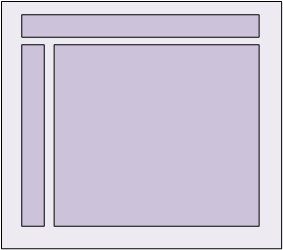
排列方式
DependentLayout的排列方式是相对于其他同级组件或者父组件的位置进行布局
相对于同级组件的位置布局见下表
| 位置布局 | 描述 |
|---|---|
| above | 处于同级组件的上侧。 |
| below | 处于同级组件的下侧。 |
| start_of | 处于同级组件的起始侧。 |
| end_of | 处于同级组件的结束侧。 |
| left_of | 处于同级组件的左侧。 |
right_of参考如下图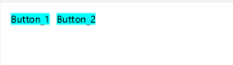
right_of 对应的xml ,above、start_of、left_of、right_of,below等参数可分别实现类似的布局
<?xml version="1.0" encoding="utf-8"?>
<DependentLayout
    xmlns:ohos="http://schemas.huawei.com/res/ohos"
    ohos:height="match_parent"
    ohos:width="match_parent">
    <Button
        ohos:id="$+id:button_1"
        ohos:height="match_content"
        ohos:width="match_content"
        ohos:left_margin="15vp"
        ohos:top_margin="15vp"
        ohos:bottom_margin="15vp"
        ohos:background_element="$graphic:color_cyan_element"
        ohos:text="Button_1"
        ohos:text_size="20fp"
    />
    <Button
        ohos:id="$+id:button_2"
        ohos:height="match_content"
        ohos:width="match_content"
        ohos:right_margin="15vp"
        ohos:left_margin="15vp"
        ohos:top_margin="15vp"
        ohos:bottom_margin="15vp"
        ohos:background_element="$graphic:color_cyan_element"
        ohos:text="Button_2"
        ohos:text_size="20fp"
        ohos:right_of="$id:button_1"
        />
</DependentLayout>
相对于父组件的位置布局见如下表
| 位置布局 | 描述 |
|---|---|
| align_parent_left | 处于父组件的左侧。 |
| align_parent_right | 处于父组件的右侧。 |
| align_parent_start | 处于父组件的起始侧。 |
| align_parent_end | 处于父组件的结束侧。 |
| align_parent_top | 处于父组件的上侧。 |
| align_parent_bottom | 处于父组件的下侧。 |
| center_in_parent | 处于父组件的中间。 |
以上位置布局可以组合,形成处于左上角、左下角、右上角、右下角的布局。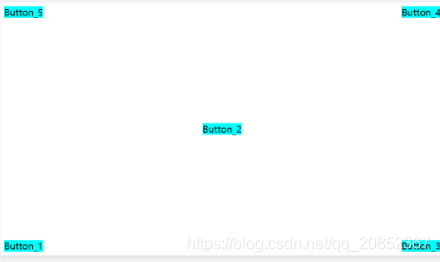
<?xml version="1.0" encoding="utf-8"?>
<DependentLayout
    xmlns:ohos="http://schemas.huawei.com/res/ohos"
    ohos:height="match_parent"
    ohos:width="match_parent">
    <Button
        ohos:id="$+id:button_1"
        ohos:height="match_content"
        ohos:width="match_content"
        ohos:background_element="$graphic:color_cyan_element"
        ohos:text="Button_1"
        ohos:text_size="20fp"
        ohos:align_parent_bottom="true"
    />
    <Button
    ohos:id="$+id:button_2"
    ohos:height="match_content"
    ohos:width="match_content"
    ohos:background_element="$graphic:color_cyan_element"
    ohos:text="Button_2"
    ohos:text_size="20fp"
    ohos:center_in_parent="true"
    />
    <Button
        ohos:id="$+id:button_3"
        ohos:height="match_content"
        ohos:width="match_content"
        ohos:background_element="$graphic:color_cyan_element"
        ohos:text="Button_3"
        ohos:text_size="20fp"
        ohos:align_parent_end="true"
        ohos:align_parent_bottom="true"
        />

    <Button
        ohos:id="$+id:button_4"
        ohos:height="match_content"
        ohos:width="match_content"
        ohos:background_element="$graphic:color_cyan_element"
        ohos:text="Button_4"
        ohos:text_size="20fp"
        ohos:align_parent_end="true"
        />
    <Button
        ohos:id="$+id:button_5"
        ohos:height="match_content"
        ohos:width="match_content"
        ohos:background_element="$graphic:color_cyan_element"
        ohos:text="Button_5"
        ohos:text_size="20fp"
        ohos:align_parent_top="true"
        />
</DependentLayout>
DependentLayout练习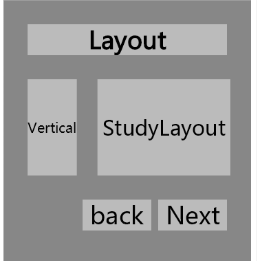
布局文件
<?xml version="1.0" encoding="utf-8"?>
<DependentLayout
    xmlns:ohos="http://schemas.huawei.com/res/ohos"
    ohos:height="match_parent"
    ohos:width="match_parent"
    ohos:background_element="$graphic:color_gray_element">

    <Text
        ohos:id="$+id:text_1"
        ohos:height="match_content"
        ohos:width="match_parent"
        ohos:background_element="$graphic:color_cyan_element"
        ohos:text="Layout "
        ohos:text_size="35fp"
        ohos:top_margin="35vp"
        ohos:left_margin="35vp"
        ohos:right_margin="35vp"
        ohos:text_weight="1000"
        ohos:text_alignment="horizontal_center"
    />
    <Text
        ohos:id="$+id:text_2"
        ohos:width="match_content"
        ohos:height="140vp"
        ohos:text_size="20vp"
        ohos:background_element="$graphic:color_cyan_element"
        ohos:text="Vertical"
        ohos:top_margin="35vp"
        ohos:left_margin="35vp"
        ohos:right_margin="30vp"
        ohos:bottom_margin="35vp"
        ohos:align_parent_left="true"
        ohos:text_alignment="center"
        ohos:multiple_lines="true"
        ohos:below="$id:text_1"
        ohos:text_font="serif"
        />
        <Text
            ohos:id="$+id:text_3"
            ohos:width="match_parent"
            ohos:height="140vp"
            ohos:text_size="30fp"
            ohos:text="StudyLayout"
            ohos:background_element="$graphic:color_cyan_element"
            ohos:top_margin="35vp"
            ohos:right_margin="30vp"
            ohos:bottom_margin="35vp"
            ohos:text_alignment="center"
            ohos:below="$id:text_1"
            ohos:right_of="$id:text_2"
            ohos:text_font="serif"
            />
        <Button
            ohos:id="$+id:button_1"
            ohos:width="100vp"
            ohos:height="match_content"
            ohos:text_size="35fp"
            ohos:background_element="$graphic:color_cyan_element"
            ohos:text="back"
            ohos:right_margin="10vp"
            ohos:bottom_margin="15vp"
            ohos:left_of="$id:button_2"
            ohos:below="$id:text_3"
            ohos:italic="false"
            ohos:text_weight="5"
            ohos:text_font="serif"
            />
        <Button
            ohos:id="$+id:button_2"
            ohos:width="100vp"
            ohos:height="match_content"
            ohos:text_size="35fp"
            ohos:background_element="$graphic:color_cyan_element"
            ohos:text="Next"
            ohos:right_margin="35vp"
            ohos:bottom_margin="15vp"
            ohos:align_parent_end="true"
            ohos:below="$id:text_3"
            ohos:italic="false"
            ohos:text_weight="5"
            ohos:text_font="serif"
            />
</DependentLayout>
color_cyan_element.xml
<?xml version="1.0" encoding="UTF-8" ?>
<shape xmlns:ohos="http://schemas.huawei.com/res/ohos"
       ohos:shape="rectangle">
    <solid
        ohos:color="#ffbbbbbb"/>
</shape>
color_gray_element.xml
<?xml version="1.0" encoding="UTF-8" ?>
<shape xmlns:ohos="http://schemas.huawei.com/res/ohos"
       ohos:shape="rectangle">
<solid
    ohos:color="#878787"/>
</shape>

华为开发者空间,是为全球开发者打造的专属开发空间,汇聚了华为优质开发资源及工具,致力于让每一位开发者拥有一台云主机,基于华为根生态开发、创新。
更多推荐



 0
0 0
0- 0


 已为社区贡献2条内容

所有评论(0)