Spring boot使用https协议
spring boot 启用https协议
概述
项目上要求服务支持https,并且调用其他第三方服务,也需根据第三方需要设置是否在访问接口时使用https。
同时考虑到部署的情况,需要考虑可以灵活配置证书,并且在采用容器化部署时,能够方便绑定证书。
支持https包括服务器端支持和客户端支持
1、创建证书
证书存储类型采用JKS。
制作证书采用jdk自带keytool工具创建。以下为windows 操作系统下命令格式。
keytool -help
密钥和证书管理工具

命令:

 -certreq            生成证书请求
 -changealias        更改条目的别名
 -delete             删除条目
 -exportcert         导出证书
 -genkeypair         生成密钥对
 -genseckey          生成密钥
 -gencert            根据证书请求生成证书
 -importcert         导入证书或证书链
 -importpass         导入口令
 -importkeystore     从其他密钥库导入一个或所有条目
 -keypasswd          更改条目的密钥口令
 -list               列出密钥库中的条目
 -printcert          打印证书内容
 -printcertreq       打印证书请求的内容
 -printcrl           打印 CRL 文件的内容
 -storepasswd        更改密钥库的存储口令


keytool -genkeypair -help
keytool -genkeypair [OPTION]...

生成密钥对

选项:

 -alias <alias>                  要处理的条目的别名
 -keyalg <keyalg>                密钥算法名称
 -keysize <keysize>              密钥位大小
 -sigalg <sigalg>                签名算法名称
 -destalias <destalias>          目标别名
 -dname <dname>                  唯一判别名
 -startdate <startdate>          证书有效期开始日期/时间
 -ext <value>                    X.509 扩展
 -validity <valDays>             有效天数
 -keypass <arg>                  密钥口令
 -keystore <keystore>            密钥库名称
 -storepass <arg>                密钥库口令
 -storetype <storetype>          密钥库类型
 -providername <providername>    提供方名称
 -providerclass <providerclass>  提供方类名
 -providerarg <arg>              提供方参数
 -providerpath <pathlist>        提供方类路径
 -v                              详细输出
 -protected                      通过受保护的机制的口令
制作证书
C:\Users\lihj>keytool -genkeypair -alias demo -keypass 123456@key -keyalg RSA -keysize 1024 -validity 365 -keystore D:/demo.jks -storepass 123456@store
您的名字与姓氏是什么?
  [Unknown]:  lihz
您的组织单位名称是什么?
  [Unknown]:  org
您的组织名称是什么?
  [Unknown]:  org
您所在的城市或区域名称是什么?
  [Unknown]:  wuhan
您所在的省/市/自治区名称是什么?
  [Unknown]:  hubei
该单位的双字母国家/地区代码是什么?
  [Unknown]:  CN
CN=lihz, OU=org, O=org, L=wuhan, ST=hubei, C=CN是否正确?
  [否]:  y


Warning:
JKS 密钥库使用专用格式。建议使用 "keytool -importkeystore -srckeystore D:/demo.jks -destkeystore D:/demo.jks -deststoretype pkcs12" 迁移到行业标准格式 PKCS12。
查看证书:
keytool -list -v -keystore  D:/demo.jks -storepass 123456@store
密钥库类型: jks
密钥库提供方: SUN

您的密钥库包含 1 个条目

别名: demo
创建日期: 2022-5-23
条目类型: PrivateKeyEntry
证书链长度: 1
证书[1]:
所有者: CN=lihz, OU=org, O=org, L=wuhan, ST=hubei, C=CN
发布者: CN=lihz, OU=org, O=org, L=wuhan, ST=hubei, C=CN
序列号: 5e39fbc9
有效期为 Mon May 23 10:43:46 CST 2022 至 Tue May 23 10:43:46 CST 2023
证书指纹:
         MD5:  4E:1F:2D:FE:6F:A7:45:3C:F8:BD:94:67:85:5E:0E:3A
         SHA1: CC:97:DB:29:4E:10:0B:6F:A5:CB:32:69:7B:3A:43:23:B2:C1:AE:68
         SHA256: 04:F3:CD:A7:7B:65:2F:F2:D8:68:30:7C:33:03:CE:04:3D:A9:C4:3F:63:D7:3B:9F:5B:8A:DB:17:72:2E:E8:B2
签名算法名称: SHA256withRSA
主体公共密钥算法: 1024 位 RSA 密钥
版本: 3

扩展:

#1: ObjectId: 2.5.29.14 Criticality=false
SubjectKeyIdentifier [
KeyIdentifier [
0000: B2 28 51 3E A2 9B 93 5A   71 76 A6 7B 19 6B 5A 49  .(Q>...Zqv...kZI
0010: FD AC CB 6A                                        ...j
]
]


*******************************************
*******************************************


Warning:
JKS 密钥库使用专用格式。建议使用 "keytool -importkeystore -srckeystore D:/demo.jks -destkeystore D:/demo.jks -deststoretype pkcs12" 迁移到行业标准格式 PKCS12。
2、配置服务器启用https
server:
  port: 8001
  ssl:
    # 是否启用 ssl 支持 (默认是 true)
    #enabled: true
    # 密钥库的路径
    key-store: file:D:/demo.old.jks
    # 密钥库类型
    key-store-type: JKS
    # 密钥库中密钥的别名
    key-alias: demo
    # 用于访问密钥库中密钥的密码
    key-password: 123456@key
    # 用于访问密钥库的密码
    key-store-password: 123456@store
3、客户端访问https接口
导出证书(公钥)
#导出证书
keytool -export -alias demo -keystore D:/demo.jks -rfc -file D:/demo.cer -storepass 123456@store
存储在文件 <D:/demo.cer> 中的证书

Warning:
JKS 密钥库使用专用格式。建议使用 "keytool -importkeystore -srckeystore D:/demo.jks -destkeystore D:/demo.jks -deststoretype pkcs12" 迁移到行业标准格式 PKCS12。

# .cer 转换成 .crt  (方式1)
keytool -printcert -rfc -file D:/demo.cer > D:/demo.crt

#可以使用openssl 工具转换,一般linux操作系统上都有,windows没有。
openssl  x509 -inform PEM -in D:/demo.cer -out D:/demo.crt
cer,crt 转成keystore
服务方给的证书多为cer类型,比如直接从浏览器中下载下来的,该类证书不能直接使用java调用认证,需转换为java可识别的类型,比如".keystore";
keytool -importcert -keystore client_trust.keystore -file D:/server.cer -alias client_trust_server -storepass 123456@store -noprompt
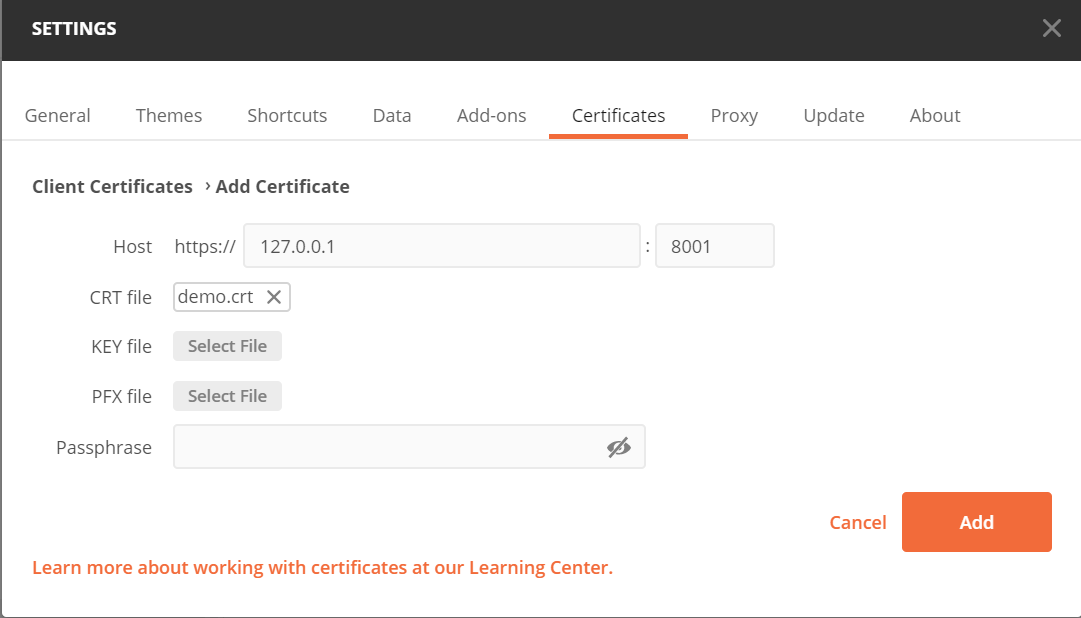
Postman访问
导入证书:
调用API:
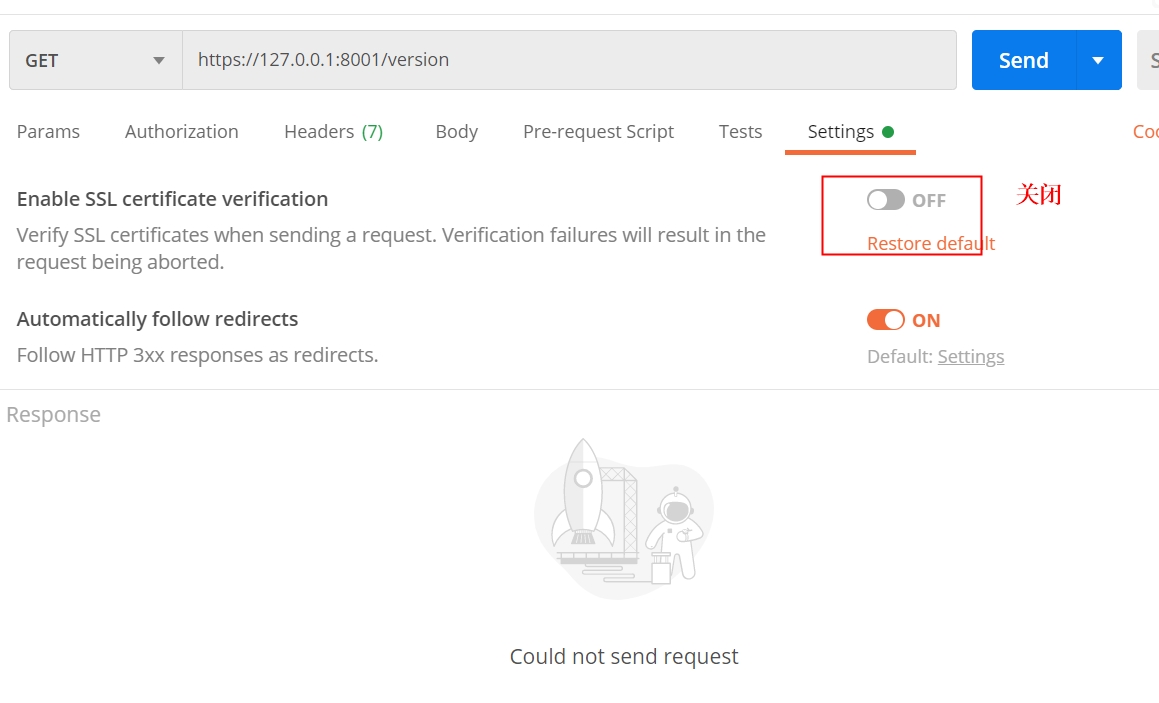
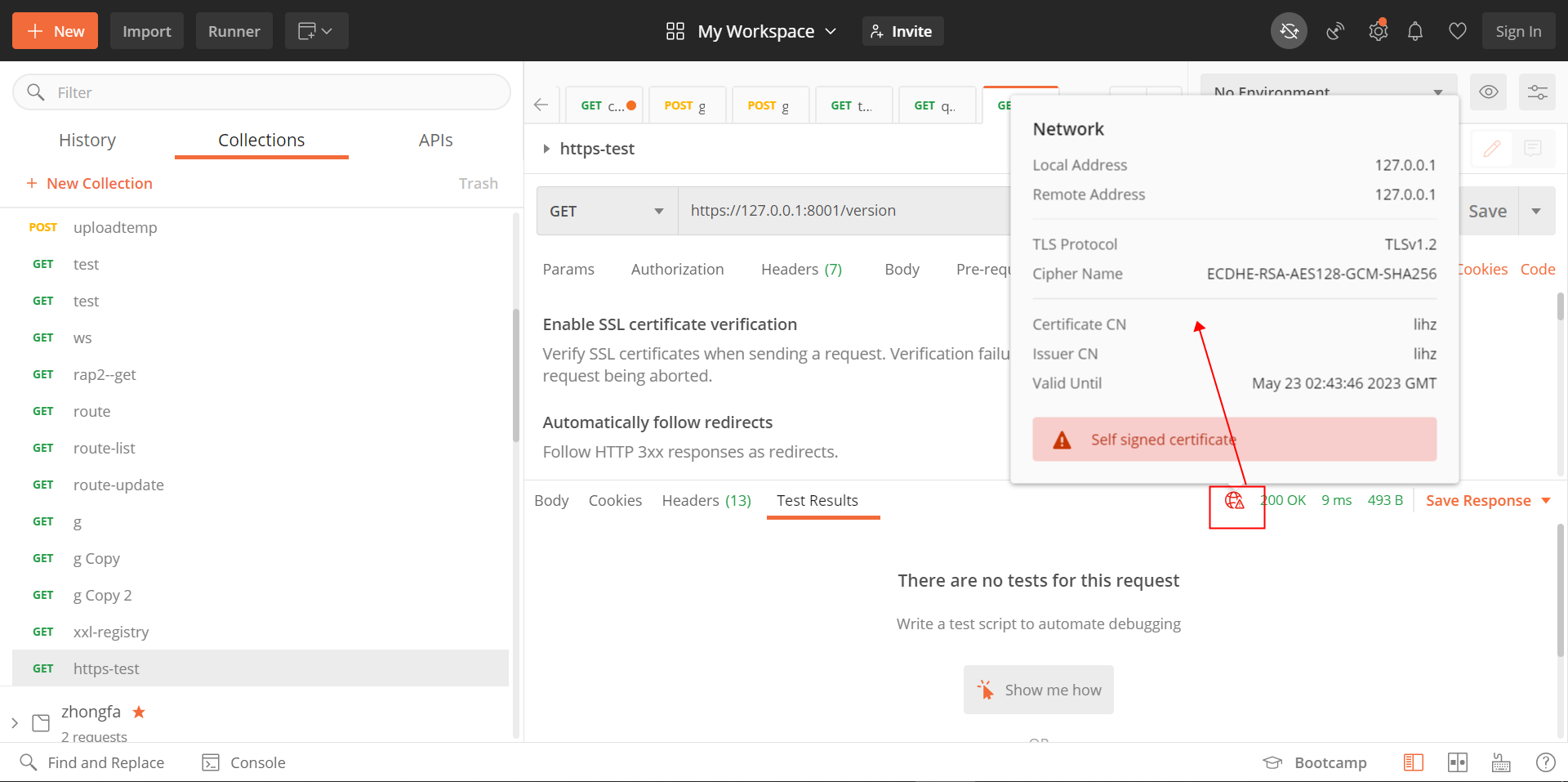
RestTemplate访问
动态设置多证书
public class DefaultTrustManager implements X509TrustManager {
    /**
     检查客户端证书
     */
    @Override
    public void checkClientTrusted(X509Certificate[] chain, String authType) throws CertificateException {
    }

    /**
	 * 检查服务器端证书
     * @param chain
	 * @param authType
	 * @throws CertificateException
     */
    @Override
    public void checkServerTrusted(X509Certificate[] chain, String authType) throws CertificateException {
    }

    /**
	 * 返回受信任的X509证书数组
     * @return
	 */
    @Override
    public X509Certificate[] getAcceptedIssuers() {
        return null;
    }
}
@Configuration
@EnableConfigurationProperties(HttpsCredentialProperties.class)
public class HttpsCredentialConfiguration {

	@Autowired
	HttpsCredentialProperties properties;

	@Bean
	public HttpsCredentialManager httpsCredentialManager() {
		return new HttpsCredentialManager(properties.getCerts());
	}

	@Bean
	public ClientHttpRequestFactory clientHttpRequestFactory(HttpsCredentialManager httpsCredentialManager) {
		return new HttpsClientRequestFactory(httpsCredentialManager);
	}

	@Bean
	@HttpsCompatible
	public RestTemplate restTemplate(ClientHttpRequestFactory clientHttpRequestFactory) {
		if (properties.isEnabled()) {
			return new RestTemplate(clientHttpRequestFactory);
		}
		return new RestTemplate();
	}
}
public class HttpsCredentialManager {

    private Map<String, HttpsCredentialStoreProperties> certs;

    /**
     * 存储keystore,
     */
    private Map<String, HttpsCredentialStore> keyStores = new HashMap<>();

    public HttpsCredentialManager( Map<String, HttpsCredentialStoreProperties> certs) {
        this.certs = certs;

        load();
    }

    public HttpsCredentialStore get(String key) {
        if (!keyStores.containsKey(key)) {
           throw new BizException(StrUtil.format("不存在KeyStore[{}]",key));
        }
        return keyStores.get(key);
    }


    /**
     * 根据配置加载证书
     */
    private void load() {
        this.certs.entrySet().forEach(
                item ->
                {
                    try {
                        keyStores.put(item.getKey(), load(item.getValue()));
                    } catch (Exception ex) {
                        throw new BizException(StrUtil.format("加载keystore[{}]失败", item.getKey()));
                    }
                }
        );
    }

    private HttpsCredentialStore load(HttpsCredentialStoreProperties properties) {

        KeyStore keySotre = null;
        try {
            keySotre = KeyStore.getInstance(properties.getKeyStoreType());
            ResourcePatternResolver resolver = new PathMatchingResourcePatternResolver();
            keySotre.load(resolver.getResource(properties.getKeyStore()).getInputStream(), properties.getKeyStorePassword().toCharArray());
        } catch (Exception e) {
            throw new BizException(StrUtil.format("加载keystore[{}]失败", properties.getKeyStore()));
        }
        return new HttpsCredentialStore(keySotre, properties.getKeyStorePassword(), properties.getKeyPassword());
    }
}
@Getter
@ConfigurationProperties(prefix = "cloud.https")
public class HttpsCredentialProperties {

	@Setter
	private boolean enabled;
    /**
     * 证书列表
     * Key:证书key,一般为[hostname:port]
     * Value:证书的配置信息
     */
    @Setter
    private Map<String, HttpsCredentialStoreProperties> certs = new HashMap<>() ;
}


@AllArgsConstructor
@Getter
public class HttpsCredentialStore {

    /**
	 * KeyStore
     */
    private KeyStore keyStore;

    /**
     * 用于访问密钥库的密码
     */
    private String keyStorePassword;

    /**
     * 用于访问密钥库中密钥的密码
     */
    private String keyPassword;
}
@Getter
@Setter
public class HttpsCredentialStoreProperties {
    /**
	 * 密钥库的路径
     */
    private String keyStore;
    /**
	 * 密钥库类型
     */
    private String keyStoreType;
    /**
	 * 用于访问密钥库中密钥的密码
     */
    private String keyPassword;
    /**
	 * 用于访问密钥库的密码
     */
    private String keyStorePassword;
}

@Target({ElementType.FIELD, ElementType.PARAMETER, ElementType.METHOD})
@Retention(RetentionPolicy.RUNTIME)
@Documented
@Inherited
@Qualifier
public @interface HttpsCompatible {
}
public class HttpsClientRequestFactory extends SimpleClientHttpRequestFactory {

    private HttpsCredentialManager httpsCredentialManager;

    public HttpsClientRequestFactory(HttpsCredentialManager httpsCredentialManager) {
        Assert.notNull(httpsCredentialManager);
        this.httpsCredentialManager = httpsCredentialManager;
    }

    /**
     * Template method for preparing the given {@link HttpURLConnection}.
     * <p>The default implementation prepares the connection for input and output, and sets the HTTP method.
     *
     * @param connection the connection to prepare
     * @param httpMethod the HTTP request method ({@code GET}, {@code POST}, etc.)
     * @throws IOException in case of I/O errors
     */
    @Override
    protected void prepareConnection(HttpURLConnection connection, String httpMethod) throws IOException {
        try {

            //不是HTTPS请求,不做处理
            if (!(connection instanceof HttpsURLConnection)) {
                super.prepareConnection(connection, httpMethod);
                return;
            }

            HttpsURLConnection httpsConnection = (HttpsURLConnection) connection;

            String domain = connection.getURL().getHost();
            int port = connection.getURL().getPort();
            if (port >= 0) {
                domain = StrUtil.format("{}:{}", domain, port);
            }
            HttpsCredentialStore httpsCredentialStore = httpsCredentialManager.get(domain);
            KeyStore keyStore = httpsCredentialStore.getKeyStore();

            KeyManagerFactory keyManagerFactory = KeyManagerFactory.getInstance("SunX509");
            keyManagerFactory.init(keyStore, httpsCredentialStore.getKeyPassword().toCharArray());
            KeyManager[] keyManagers = keyManagerFactory.getKeyManagers();

            TrustManager[] trustAllCerts = new TrustManager[]{
                    new DefaultTrustManager()
            };
            SSLContext sslContext = SSLContext.getInstance("TLSv1.2");
            sslContext.init(keyManagers, trustAllCerts, new java.security.SecureRandom());
            httpsConnection.setSSLSocketFactory(sslContext.getSocketFactory());

            httpsConnection.setHostnameVerifier(new HostnameVerifier() {
                @Override
                public boolean verify(String s, SSLSession sslSession) {
                    return true;
                }
            });

            super.prepareConnection(httpsConnection, httpMethod);
        } catch (IOException ex) {
            log.error("HttpsClientRequestFactory.prepareConnection error", ex);
            throw ex;
        } catch (Exception ex) {
            log.error("HttpsClientRequestFactory.prepareConnection error", ex);
            throw new RuntimeException(ex);
        }
    }
}
    @Autowired
   @HttpsCompatible
    RestTemplate restTemplate;

       HttpHeaders header = new HttpHeaders();
            HttpEntity<?> httpEntity = new HttpEntity<>(header);
            //RestTemplate restTemplate2 = new RestTemplate(new HttpsClientRequestFactory(httpsCredentialManager));
            RestTemplate restTemplate2 = restTemplate;
            Map<String, Object> result = restTemplate2.exchange("http://192.168.1.70:7000/component/comp/chart/get", HttpMethod.GET, httpEntity, Map.class).getBody();
    result = restTemplate2.exchange("https://127.0.0.1:8001/version", HttpMethod.GET, httpEntity, Map.class).getBody();
附录
证书
证书格式
-
.DER扩展名用于二进制
DER编码证书。 -
.PEM扩展名用于不同类型的X.509v3文件,是以“ - BEGIN …”前缀的ASCII(Base64)数据。
-
.CRT扩展名CRT扩展用于证书。 证书可以被编码为二进制DER或ASCII PEM。 CER和CRT扩展几乎是同义词。 最常见的于Unix 或类Unix系统。 -
.CER扩展名.crt的替代形式 -
.KEY扩展名KEY扩展名用于公钥和私钥PKCS#8。 键可以被编码为二进制DER或ASCII PEM。
证书格式转换
查看PEM编码证书
openssl x509 -in cert.pem -text -noout
openssl x509 -in cert.cer -text -noout
openssl x509 -in cert.crt -text -noout
查看DER编码证书
openssl x509 -in certificate.der -inform der -text -noout
转换证书格式
#转换可以将一种类型的编码证书存入另一种。(即PEM到DER转换)
#PEM到DER
openssl x509 -in cert.crt -outform der -out cert.der
#DER到PEM
openssl x509 -in cert.crt -inform der -outform pem -out cert.pem
PEM -> DER -> JKS的转换(无私钥情况下转换pem格式证书为jks格式)
#pem文件 转换为 der文件
openssl x509 -outform der -in cert.pem -out cert.der

#der文件 转换为 jks文件
keytool -import -keystore cert.jks -file cert.der
PKCS12证书
keytool -importkeystore -srckeystore D:/demo.jks -destkeystore D:/demo.jks -deststoretype pkcs12 -srcstorepass 123456@store -deststorepass 123456@store2  -srckeypass 123456@key -destkeypass 123456@key2 -srcalias demo  -destalias demo2
警告: PKCS12 密钥库不支持其他存储和密钥口令。正在忽略用户指定的-destkeypass值。

Warning:
已将 "D:/demo.jks" 迁移到 Non JKS/JCEKS。将 JKS 密钥库作为 "D:/demo.jks.old" 进行了备份。
查看证书信息:
keytool -list -v -keystore  D:/demo.jks -storepass 123456@store2
密钥库类型: jks
密钥库提供方: SUN

您的密钥库包含 1 个条目

别名: demo2
创建日期: 2022-5-23
条目类型: PrivateKeyEntry
证书链长度: 1
证书[1]:
所有者: CN=lihz, OU=org, O=org, L=wuhan, ST=hubei, C=CN
发布者: CN=lihz, OU=org, O=org, L=wuhan, ST=hubei, C=CN
序列号: 5e39fbc9
有效期为 Mon May 23 10:43:46 CST 2022 至 Tue May 23 10:43:46 CST 2023
证书指纹:
         MD5:  4E:1F:2D:FE:6F:A7:45:3C:F8:BD:94:67:85:5E:0E:3A
         SHA1: CC:97:DB:29:4E:10:0B:6F:A5:CB:32:69:7B:3A:43:23:B2:C1:AE:68
         SHA256: 04:F3:CD:A7:7B:65:2F:F2:D8:68:30:7C:33:03:CE:04:3D:A9:C4:3F:63:D7:3B:9F:5B:8A:DB:17:72:2E:E8:B2
签名算法名称: SHA256withRSA
主体公共密钥算法: 1024 位 RSA 密钥
版本: 3

扩展:

#1: ObjectId: 2.5.29.14 Criticality=false
SubjectKeyIdentifier [
KeyIdentifier [
0000: B2 28 51 3E A2 9B 93 5A   71 76 A6 7B 19 6B 5A 49  .(Q>...Zqv...kZI
0010: FD AC CB 6A                                        ...j
]
]


*******************************************
*******************************************
Postman的证书
Postman会对证书进行验证,只有正规机构颁发的证书才能验证通过,如果是自签的证书,则需要关闭验证 SSL certificate verification 。
Postman增加客户端证书涉及3个文件和一个密码:
-
.pfx 同时包含了公钥信息和私钥信息(cer只包含公钥信息)
-
.cer 为客户端密钥库的公钥
-
.key 为客户端密钥库的私钥
-
Passphrase 为密钥库的密码。创建证书时设置的密码,
-keypass参数。

华为开发者空间,是为全球开发者打造的专属开发空间,汇聚了华为优质开发资源及工具,致力于让每一位开发者拥有一台云主机,基于华为根生态开发、创新。
更多推荐


 2
2 0
0- 0


 已为社区贡献4条内容

所有评论(0)