Elasticsearch——Bboss
Elasticsearch——Bboss官网地址mavenes集群整合application.propertiesBBossESStarter操作类功能测试判断索引是否存在官网地址https://esdoc.bbossgroups.com/#/maven<dependency><groupId>com.bbossgroups.plugins</groupId>&
·
Elasticsearch——Bboss
官网地址
https://esdoc.bbossgroups.com/#/
简介
bboss es融合了es官方提供的两种方式(restful和transprortclient)的功能,涵盖两方面能力,提供了(orm和restful,直接使用query dsl),是一个综合型的es客户端。
bboss elasticsearch是一套基于query dsl语法操作和访问分布式搜索引擎elasticsearch的o/r mapping高性能开发库,底层基于es restfulapi。基于bboss elasticsearch,可以快速编写出访问和操作elasticsearch的程序代码,简单、高效、可靠、安全。
maven
<dependency>
  <groupId>com.bbossgroups.plugins</groupId>
  <artifactId>bboss-elasticsearch-rest-jdbc</artifactId>
  <version>6.3.6</version>
</dependency>
<dependency>
  <groupId>com.bbossgroups.plugins</groupId>
  <artifactId>bboss-elasticsearch-spring-boot-starter</artifactId>
  <version>6.3.6</version>
</dependency>
es集群整合
application.properties
##ES集群配置,支持x-pack和searchguard
spring.elasticsearch.bboss.elasticUser=账号
spring.elasticsearch.bboss.elasticPassword=密码


spring.elasticsearch.bboss.elasticsearch.rest.hostNames=ip:9200,ip:9200,ip:9200
#spring.elasticsearch.bboss.elasticsearch.rest.hostNames=10.180.211.27:9280,10.180.211.27:9281,10.180.211.27:9282
##https配置,添加https://协议头
#spring.elasticsearch.bboss.default.elasticsearch.rest.hostNames=https://10.180.211.27:9280,https://10.180.211.27:9281,https://10.180.211.27:9282
spring.elasticsearch.bboss.elasticsearch.dateFormat=yyyy.MM.dd
spring.elasticsearch.bboss.elasticsearch.timeZone=Asia/Shanghai
spring.elasticsearch.bboss.elasticsearch.ttl=2d
#在控制台输出脚本调试开关showTemplate,false关闭,true打开,同时log4j至少是info级别
spring.elasticsearch.bboss.elasticsearch.showTemplate=true
spring.elasticsearch.bboss.elasticsearch.discoverHost=false
# dsl配置文件热加载扫描时间间隔,毫秒为单位,默认5秒扫描一次,<= 0时关闭扫描机制
spring.elasticsearch.bboss.dslfile.refreshInterval=-1

##es client http连接池配置
spring.elasticsearch.bboss.http.timeoutConnection=50000
spring.elasticsearch.bboss.http.timeoutSocket= 50000
spring.elasticsearch.bboss.http.connectionRequestTimeout=50000
spring.elasticsearch.bboss.http.retryTime=1
spring.elasticsearch.bboss.http.maxLineLength=-1
spring.elasticsearch.bboss.http.maxHeaderCount=200
spring.elasticsearch.bboss.http.maxTotal=400
spring.elasticsearch.bboss.http.defaultMaxPerRoute=200
spring.elasticsearch.bboss.http.soReuseAddress=false
spring.elasticsearch.bboss.http.soKeepAlive=false
spring.elasticsearch.bboss.http.timeToLive=3600000
spring.elasticsearch.bboss.http.keepAlive=3600000
spring.elasticsearch.bboss.http.keystore=
spring.elasticsearch.bboss.http.keyPassword=
# ssl 主机名称校验,是否采用default配置,
# 如果指定为default,就采用DefaultHostnameVerifier,否则采用 SSLConnectionSocketFactory.ALLOW_ALL_HOSTNAME_VERIFIER
spring.elasticsearch.bboss.http.hostnameVerifier =

## 数据库数据源配置,使用db-es数据导入功能时需要配置
#spring.elasticsearch.bboss.db.name = test
#spring.elasticsearch.bboss.db.user = root
#spring.elasticsearch.bboss.db.password = 123456
#spring.elasticsearch.bboss.db.driver = com.mysql.jdbc.Driver
#spring.elasticsearch.bboss.db.url = jdbc:mysql://localhost:3306/bboss
#spring.elasticsearch.bboss.db.usePool = false
#spring.elasticsearch.bboss.db.validateSQL = select 1
BBossESStarter操作类
  @Autowired
    private BBossESStarter bbossESStarter;
 //Create a client tool to load dsl xml configuration files(获取加载读取dsl xml配置文件的api接口实例,可以在代码里面直接通过dsl配置名称引用dsl即可), single instance multithreaded security
    ClientInterface configClientUtil = bbossESStarter.getConfigRestClient("esmapper/gateway.xml");
        //Build a create/modify/get/delete document client object(获取不需要读取dsl xml配置文件的api接口实例,可以在代码里面直接编写dsl), single instance multi-thread security
    ClientInterface clientUtil = bbossESStarter.getRestClient();
功能测试
删除-创建-获取索引
dsl的xml
<properties>
    <!--
        For Elasticsearch 7.0.0
        创建demo需要的索引表结构
    -->
    <property name="createDemoIndice">
        <![CDATA[{
            "settings": {
                "number_of_shards": 6,
                "index.refresh_interval": "5s"
            },
            "mappings": {
                "properties": {
                    "demoId":{
                        "type":"long"
                    },
                    "contentbody": {
                        "type": "text"

                    },
                    "agentStarttime": {
                        "type": "date"
                         ## ,"format":"yyyy-MM-dd HH:mm:ss.SSS||yyyy-MM-dd'T'HH:mm:ss.SSS||yyyy-MM-dd HH:mm:ss||epoch_millis"
                    },
                    "applicationName": {
                        "type": "text",
                        "fields": { ##dsl注释 定义精确查找的内部keyword字段
                            "keyword": {
                                "type": "keyword"
                            }
                        }
                    },
                    "name": {
                        "type": "text"
                    },
                    "contrastStatus":{
                        "type":"integer"
                    },
                    "orderId": {
                        "type": "text",
                        "fields": { ##dsl注释 定义精确查找的内部keyword字段
                            "keyword": {
                                "type": "keyword"
                            }
                        }
                    }
                }
            }
        }]]>
    </property>
<properties>
业务代码
@Service
public class DocumentCRUD7 {
	private Logger logger = LoggerFactory.getLogger(DocumentCRUD7.class);
	@Autowired
	private BBossESStarter bbossESStarter;
	//DSL config file path
	private String mappath = "esmapper/demo7.xml";


	public void dropAndCreateAndGetIndice(){
		//Create a client tool to load configuration files, single instance multithreaded security
		ClientInterface clientUtil = bbossESStarter.getConfigRestClient(mappath);
		try {
			//To determine whether the indice demo exists, it returns true if it exists and false if it does not
			boolean exist = clientUtil.existIndice("demo");

			//Delete mapping if the indice demo already exists
			if(exist) {
				String r = clientUtil.dropIndice("demo");
				logger.debug("clientUtil.dropIndice(\"demo\") response:"+r);

			}
			//Create index demo
			clientUtil.createIndiceMapping("demo",//The indice name
					"createDemoIndice");//Index mapping DSL script name, defined createDemoIndice in esmapper/demo.xml

			String demoIndice = clientUtil.getIndice("demo");//Gets the newly created indice structure
			logger.info("after createIndiceMapping clientUtil.getIndice(\"demo\") response:"+demoIndice);
		} catch (ElasticSearchException e) {
			// TODO Auto-generated catch block
			e.printStackTrace();
		}

	}
}
添加-修改文档
entity
/*
 *  Copyright 2008-2019 bboss
 *
 *  Licensed under the Apache License, Version 2.0 (the "License");
 *  you may not use this file except in compliance with the License.
 *  You may obtain a copy of the License at
 *
 *      http://www.apache.org/licenses/LICENSE-2.0
 *
 *  Unless required by applicable law or agreed to in writing, software
 *  distributed under the License is distributed on an "AS IS" BASIS,
 *  WITHOUT WARRANTIES OR CONDITIONS OF ANY KIND, either express or implied.
 *  See the License for the specific language governing permissions and
 *  limitations under the License.
 */
package com.wh.entity;

import com.fasterxml.jackson.annotation.JsonFormat;
import com.frameworkset.orm.annotation.Column;
import com.frameworkset.orm.annotation.ESId;
import org.frameworkset.elasticsearch.entity.ESBaseData;

import java.util.Date;

/**
 *测试实体,它可以从ESBaseData对象继承元属性。
 *文档的元属性将在检索期间设置为对象实例
 */
public class Demo extends ESBaseData {
	private Object dynamicPriceTemplate;
	//设置文档标识字段
	//@ESId 用于标识实体对象中作为_id的属性,该注解只有一个persistent 布尔值属性,用于控制被本注解标注的字段属性是否作为普通文档属性保存,默认为true-保存,false不保存,字段名称为属性名称。ESId可用于添加和修改文档
	@ESId(readSet = true,persistent = false)
	private Long demoId;
	private String contentbody;
	/** 在映射定义中指定日期格式时,
	 *例如,需要指定以下两个注释:
	 *
	 "agentStarttime": {
	 "type": "date",
	 ###Specify multiple date formats
	 "format":"yyyy-MM-dd HH:mm:ss.SSS||yyyy-MM-dd'T'HH:mm:ss.SSS||yyyy-MM-dd HH:mm:ss||epoch_millis"
	 }
	 @JsonFormat(pattern = "yyyy-MM-dd HH:mm:ss.SSS")
	 @Column(dataformat = "yyyy-MM-dd HH:mm:ss.SSS")
	 */

	protected Date agentStarttime;


	public Date getAgentStarttimezh() {
		return agentStarttimezh;
	}

	public void setAgentStarttimezh(Date agentStarttimezh) {
		this.agentStarttimezh = agentStarttimezh;
	}

	@JsonFormat(pattern = "yyyy-MM-dd HH:mm:ss")
	@Column(dataformat = "yyyy-MM-dd HH:mm:ss")
	private Date agentStarttimezh;
	private String applicationName;
	private String orderId;
//	@JsonProperty(value="contrast_status",access= JsonProperty.Access.WRITE_ONLY)
	private int contrastStatus;

	public String getName() {
		return name;
	}

	public void setName(String name) {
		this.name = name;
	}

	private String name;

	public String getContentbody() {
		return contentbody;
	}

	public void setContentbody(String contentbody) {
		this.contentbody = contentbody;
	}

	public Date getAgentStarttime() {
		return agentStarttime;
	}

	public void setAgentStarttime(Date agentStarttime) {
		this.agentStarttime = agentStarttime;
	}

	public String getApplicationName() {
		return applicationName;
	}

	public void setApplicationName(String applicationName) {
		this.applicationName = applicationName;
	}

	public Long getDemoId() {
		return demoId;
	}

	public void setDemoId(Long demoId) {
		this.demoId = demoId;
	}

	public Object getDynamicPriceTemplate() {
		return dynamicPriceTemplate;
	}

	public void setDynamicPriceTemplate(Object dynamicPriceTemplate) {
		this.dynamicPriceTemplate = dynamicPriceTemplate;
	}

	public String getOrderId() {
		return orderId;
	}

	public void setOrderId(String orderId) {
		this.orderId = orderId;
	}

	public int getContrastStatus() {
		return contrastStatus;
	}

	public void setContrastStatus(int contrastStatus) {
		this.contrastStatus = contrastStatus;
	}

	@Override
	public String toString() {
		return "Demo{" +
				"dynamicPriceTemplate=" + dynamicPriceTemplate +
				", demoId=" + demoId +
				", contentbody='" + contentbody + '\'' +
				", agentStarttime=" + agentStarttime +
				", agentStarttimezh=" + agentStarttimezh +
				", applicationName='" + applicationName + '\'' +
				", orderId='" + orderId + '\'' +
				", contrastStatus=" + contrastStatus +
				", name='" + name + '\'' +
				'}';
	}
}
业务代码
	/**
	 * 添加-修改文档
	 */
	public void addAndUpdateDocument()  {
		//构建创建/修改/获取/删除文档客户端对象,单实例多线程安全
		ClientInterface clientUtil = bbossESStarter.getRestClient();
		//将对象构建为索引文档
		Demo demo = new Demo();
		//指定文档id、唯一标识和@ESId注释标记。如果demoId已经存在,修改单据;否则,请添加文档
		demo.setDemoId(2l);
		demo.setAgentStarttime(new Date());
		demo.setAgentStarttimezh(new Date());
		demo.setApplicationName("blackcatdemo2");
		demo.setContentbody("this is content body2");
		demo.setName("liudehua");
		demo.setOrderId("NFZF15045871807281445364228");
		demo.setContrastStatus(2);


		//添加文档并强制刷新
		String response = clientUtil.addDocument("demo",//索引名称
				demo,"refresh=true");


		logger.info("Demo id=2:addDocument-------------------------");
		logger.info(response);

		demo = new Demo();
		//指定文档id、唯一标识和@ESId注释标记。如果demoId已经存在,修改单据;否则,请添加文档
		demo.setDemoId(3l);
		demo.setAgentStarttime(new Date());
		demo.setApplicationName("blackcatdemo3");
		demo.setContentbody("this is content body3");
		demo.setName("zhangxueyou");
		demo.setOrderId("NFZF15045871807281445364228");
		demo.setContrastStatus(3);
		demo.setAgentStarttime(new Date());
		demo.setAgentStarttimezh(new Date());

		///添加文档并强制刷新
		response = clientUtil.addDocument("demo",//索引名
				demo,"refresh=true");

		//根据文档id获取文档对象,并返回演示对象
		demo = clientUtil.getDocument("demo",//索引名
				"2",//document id
				Demo.class);

		logger.info("Demo id=2:getDocument-------------------------");
		logger.info(demo.toString());
		//update document
		demo = new Demo();
		demo.setDemoId(2l);//Specify the document id, the unique identity, and mark with the @ESId annotation. If the demoId already exists, modify the document; otherwise, add the document
		demo.setAgentStarttime(new Date());
		demo.setApplicationName("blackcatdemo2");
		demo.setContentbody("this is modify content body2");
		demo.setName("刘德华modify\t");
		demo.setOrderId("NFZF15045871807281445364228");
		demo.setContrastStatus(2);
		demo.setAgentStarttimezh(new Date());
		//Execute update and force refresh
		response = clientUtil.addDocument("demo",//index name
				demo,"refresh=true");

		logger.info("Demo id=2:updateDocument-------------------------");
		logger.info(response);

		//Get the modified document object according to the document id and return the json message string
		response = clientUtil.getDocument("demo",//indice name
				"2");//document id
		logger.info("document id:getDocument-------------------------");
		logger.info(response);


		logger.info("Print the modified result:getDocument-------------------------");
		logger.info(response);


	}
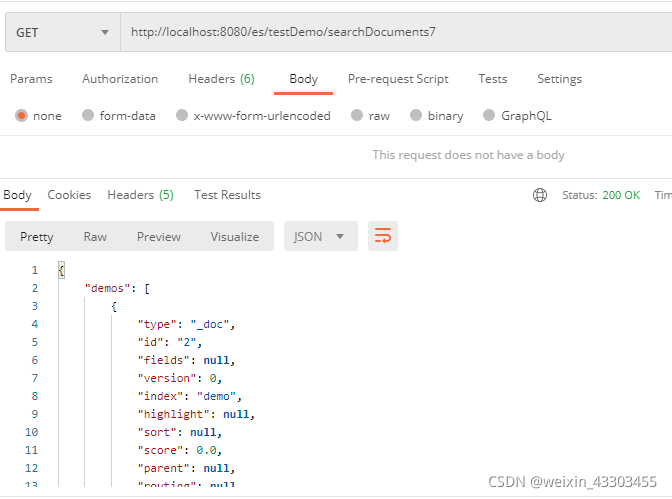
搜索文档
dsl的xml
searchDatas和wh-searchDatas均可以
<property name="searchDatas">
        <![CDATA[{
            "query": {
                "bool": {
                    "filter": [
                        {  ## 多值检索,查找多个应用名称对应的文档记录
                            "terms": {
                                "applicationName.keyword": [#[applicationName1],#[applicationName2]]
                            }
                        },
                        {   ## 时间范围检索,返回对应时间范围内的记录,接受long型的值
                            "range": {
                                "agentStarttime": {
                                    "gte": #[startTime],##统计开始时间
                                    "lt": #[endTime]  ##统计截止时间
                                }
                            }
                        }
                    ]
                }
            },
            ## 最多返回1000条记录
            "size":1000,
            "explain":true
        }]]>
    </property>
    <property name="wh-searchDatas">
        <![CDATA[{
    "query": {
        "bool": {
            "must": [
                {
                    "terms": {
                        "applicationName.keyword": [#[applicationName1],#[applicationName2]]
                    }
                }
            ],
              "filter": {
            "range": {
                "agentStarttime": {
                    "gte": #[startTime],
                    "lt": #[endTime]
                }
            }
        }
        }
    },
     ## 最多返回1000条记录
            "size":1000,
            "explain":true
           }]]>
    </property>
业务代码
 /**
     * 搜索文档
     */
    public DemoSearchResult search() {
        //创建加载DSL文件客户端实例以检索文档,单实例多线程安全
        ClientInterface clientUtil = bbossESStarter.getConfigRestClient(mappath);
        //设置查询条件,通过map传递变量参数值,在DSL中输入变量名称
        //DSL中有四个变量:
        //applicationName1
        //applicationName2
        //startTime
        //endTime
        Map<String, Object> params = new HashMap<String, Object>();
		//设置applicationName1和applicationName2变量的值
        params.put("applicationName1", "blackcatdemo2");
        params.put("applicationName2", "blackcatdemo3");
        DateFormat dateFormat = new SimpleDateFormat("yyyy-MM-dd HH:mm:ss");
        //设置时间范围,并接受long值作为时间参数
        try {
            params.put("startTime", dateFormat.parse("2017-09-02 00:00:00").getTime());
        } catch (ParseException e) {
            e.printStackTrace();
        }
        params.put("endTime", new Date().getTime());


        //执行查询
        //ESDatas包含由DSL中的size属性指定的当前检索记录的集合,最多1000条记录
        ESDatas<Demo> esDatas = clientUtil.searchList("demo/_search",//demo 作为索引, search作为搜索操作
                "searchDatas",//在esmapper/demo.xml中定义的DSL语句名称
                params,//查询参数
                Demo.class); //返回的数据对象类型Demo
//        ESDatas<Demo> esDatas = clientUtil.searchList("demo/_search",//demo 作为索引, search作为搜索操作
//                "wh-searchDatas",//自己写的一个dsl语句
//                params,//查询参数
//                Demo.class); //返回的数据对象类型Demo


		//获取结果对象的列表,并返回最多1000条记录(在DSL中指定)
        List<Demo> demos = esDatas.getDatas();

//		String json = clientUtil.executeRequest("demo/_search",//demo as the index table, _search as the search action
//				"searchDatas",//DSL statement name defined in esmapper/demo.xml
//				params);//Query parameters

//		String json = com.frameworkset.util.SimpleStringUtil.object2json(demos);
		//获取记录的总数
        long totalSize = esDatas.getTotalSize();
        DemoSearchResult demoSearchResult = new DemoSearchResult();
        demoSearchResult.setDemos(demos);
        demoSearchResult.setTotalSize(totalSize);
        return demoSearchResult;
    }

华为开发者空间,是为全球开发者打造的专属开发空间,汇聚了华为优质开发资源及工具,致力于让每一位开发者拥有一台云主机,基于华为根生态开发、创新。
更多推荐



 4
4 0
0- 0


 已为社区贡献2条内容

所有评论(0)